Quick Facts
- Weight: 377g (requires FAA/CAA registration in most regions).
- Ease of Use: Features the DJI RC Motion 3 for intuitive, gesture-based control and Easy ACRO for one-button stunts.
- Flight Time: Up to a maximum of 23 minutes per battery.
- Internal Storage: 46GB built-in storage, enough for roughly 90 minutes of 1080p footage.
- Imaging: Equipped with a 1/1.3-inch CMOS sensor capturing 4K/60fps HDR video.
- Safety: Integrated propeller guards, downward/backward sensors, and the life-saving Turtle Mode.
Buying your first FPV drone is a major step that often feels like learning a new language. The DJI Avata 2 is highly accessible for DJI Avata 2 beginners due to the intuitive RC Motion 3 controller, which uses natural hand movements instead of complex joystick inputs. Features like Easy ACRO allow novices to perform flips and rolls with a single button press, while the emergency brake and hover function provide a vital safety net for those navigating the initial FPV drone learning curve.
Understanding the Persona: Is the Avata 2 Right for You?
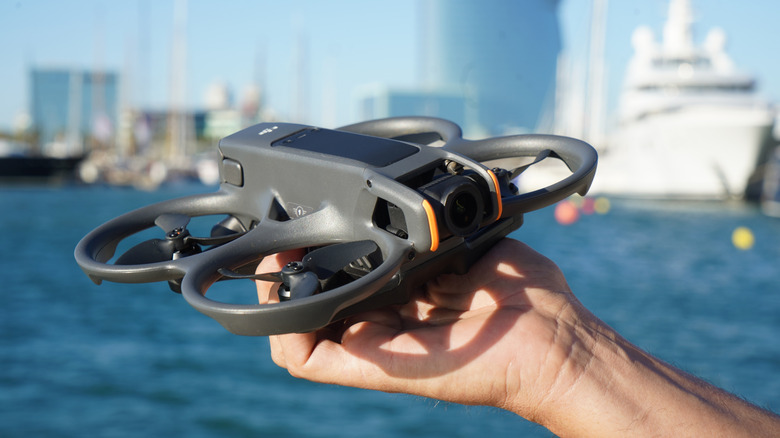
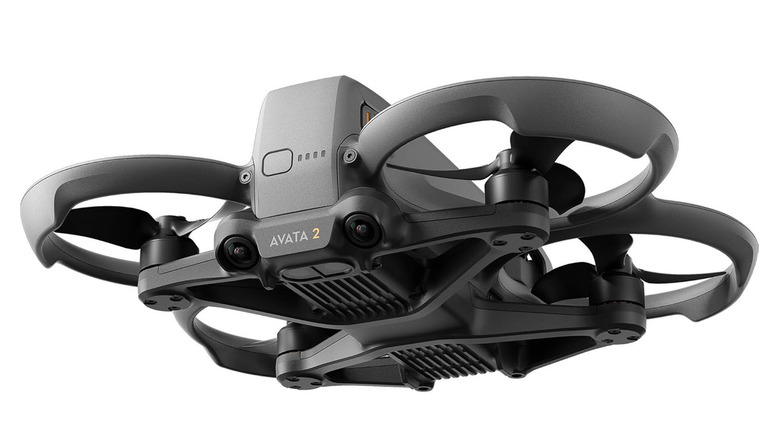
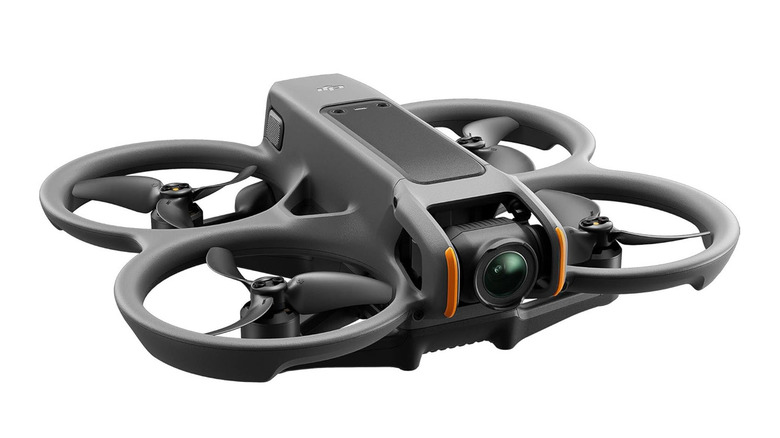
When you step into the world of FPV (First-Person View), you are choosing immersion over convenience. For many first-time pilots, the decision often comes down to a choice: DJI Avata 2 vs DJI Neo for first-time pilots. The Neo is a fantastic, pocket-sized entry point for casual social media creators who want a "flying camera" for selfies and basic tracking. However, the Avata 2 is a different beast entirely. It is a cinewhoop architecture drone, meaning it is designed with protected propellers to fly in close proximity to objects, people, or indoors.
If your goal is to feel like you are a bird—diving down mountain sides or weaving through gaps in a forest—the Avata 2 is your starting line. It uses a high-performance 1/1.3-inch CMOS sensor that delivers much better dynamic range and low-light performance than smaller drones. This drone is for the enthusiast who wants to learn the art of flight rather than just pushing a button to take a photo.
Mastering the FPV Drone Learning Curve with RC Motion 3
The traditional FPV experience usually involves a twin-stick remote controller that takes weeks of practice to master. One of the biggest advantages for DJI Avata 2 beginners is the DJI RC Motion 3 for beginners. Instead of managing pitch, roll, yaw, and throttle across two sticks, you simply point the controller where you want to go. When you tilt your wrist, the drone tilts; when you pull the trigger, the drone accelerates.
This motion-based system significantly flattens the FPV drone learning curve. You can focus on the composition of your shot while the drone handles the complex stabilization. If you ever feel disoriented or lose control, the controller features a prominent orange button for emergency brake and hover. Pressing this instantly stops the drone in mid-air, allowing you to catch your breath and regroup.
To make the transition even smoother, I always recommend that my readers spend a few hours in the DJI Virtual Flight simulator. You can connect your Goggles 3 and Motion 3 controller to a smartphone or computer to practice in a risk-free digital environment. Understanding how to use DJI RC Motion 3 as a beginner in a simulation before heading to a real park will save you a lot of stress and potential repair costs.
The Fear of Crashing: Turtle Mode and Safety Features
The most common question I get from new pilots is: "What happens when I crash?" With the Avata 2, crashing is part of the process, and the hardware is built to survive it. The drone features integrated propeller guards that bounce off walls or branches during minor collisions.
However, the real magic is in how DJI Avata 2 Turtle Mode works for beginners. If the drone clips an object and lands upside down on the grass, you don’t have to go on a "walk of shame" to pick it up. By activating Turtle Mode, the drone uses its motors to flip itself upright, allowing for a quick takeoff so you can keep flying. This feature, combined with DJI Avata 2 Turtle Mode, ensures that a small mistake doesn't end your flight session.
For those interested in flying DJI Avata 2 indoors tips for beginner safety, you should know that the drone uses downward and backward binocular vision sensors to maintain stability even when GPS signals are weak. These sensors help the drone "see" the ground and obstacles behind it, which is essential for navigating tight hallways or under furniture. While it’s incredibly stable, I still suggest getting DJI Care Refresh protection to cover the cost of more significant accidents.
Essential Setup: Goggles 3 and Technical Specs
The visual experience of the Avata 2 is powered by the DJI Goggles 3. These goggles feature the latest O4 digital video transmission system, which provides a crystal-clear, high-definition feed. According to the technical specifications, the Avata 2 supports a maximum transmission distance of up to 13 kilometers with a low latency of 24 milliseconds, though as a beginner, you should always keep the drone within your line of sight.
One of the most thoughtful features for photographers is the diopter adjustment on the Goggles 3. It ranges from -6.0 D to +2.0 D, meaning most people who wear glasses can fly without them. This creates a much more comfortable and immersive experience. In terms of imaging, the upgraded 1/1.3-inch CMOS image sensor is capable of recording 4K/60fps HDR video with a 155-degree ultra-wide field of view. This wide angle is what gives FPV footage that signature "speed" look, while RockSteady 3.0+ stabilization keeps the horizon level even during aggressive maneuvers.
Costs, Legals, and The Best Beginner Combo
Before you head to the checkout, there are some practical logistics to consider. The Avata 2 weighs 377g, which means it exceeds the 249g threshold for many "mini" drones. You will need to comply with Remote ID compliance regulations and register your drone with the FAA in the US or your local aviation authority.
When choosing which package to buy, the best DJI Avata 2 Fly More Combo for new FPV pilots is almost always the three-battery version. Why? Because FPV flying is addictive, and a single battery only gives you a maximum flight time of approximately 23 minutes. In reality, after landing with a safe margin, you usually get about 18 minutes of actual flight.
The Fly More Combo includes a Two-Way Charging Hub that has a clever power-accumulation feature. It can transfer the remaining power from multiple low batteries into the one with the highest charge, giving you one last full flight at the end of the day. Additionally, you should budget for essential ND filters for DJI Avata 2 cinematic beginner footage. These filters act like sunglasses for your camera, allowing you to use a slower shutter speed for that smooth, professional motion blur in bright daylight.
| Feature | DJI Avata 2 | DJI Neo (FPV Mode) |
|---|---|---|
| Weight | 377g | 135g |
| Sensor | 1/1.3-inch CMOS | 1/2-inch CMOS |
| Max Flight Time | 23 Mins | 18 Mins |
| Storage | 46GB Internal | 22GB Internal |
| Best For | Immersive Cinewhoop Action | Casual Vlogging & Selfies |
FAQ
Is the DJI Avata 2 good for beginners?
Yes, it is arguably the best entry point into FPV today. The combination of the RC Motion 3 controller, which simplifies flight to basic hand gestures, and the integrated safety guards makes it far less intimidating than traditional FPV drones that require manual flight skills.
Do I need a license to fly the DJI Avata 2?
In the United States, because the drone weighs more than 250g (it is 377g), you must register it with the FAA for a small fee ($5). You also need to pass the TRUST (The Recreational UAS Safety Test), which is a free online safety quiz for hobbyists.
How hard is it to fly the DJI Avata 2?
With the Motion 3 controller, most people can learn the basics within ten minutes. However, mastering manual mode—where you have full control over the drone's orientation without auto-leveling—takes significantly more time and should be practiced in a simulator first.
Is the DJI Avata 2 easy to crash?
Because you often fly FPV close to obstacles, minor bumps are common. Fortunately, the cinewhoop architecture and propeller guards make it very durable. Most small collisions result in the drone simply bouncing off the object rather than breaking.
What accessories do beginners need for the Avata 2?
Beyond the drone itself, the Fly More Combo is essential for the extra batteries and charging hub. I also highly recommend a set of ND filters for better video quality and DJI Care Refresh to provide peace of mind during your first few months of learning.
The DJI Avata 2 is a remarkable piece of engineering that brings the thrill of FPV to everyone. By starting slow, using the simulator, and respecting local regulations, you’ll find that the view from the goggles is unlike anything else in photography. Happy flying!