Quick Facts
- Setup Time: Less than 5 minutes for basic installation.
- Cost: Totally free if you use your existing old hardware and free versions of apps.
- Device Compatibility: Works on legacy devices including iPhone 4s (iOS 8) and Android 2.3 or higher.
- Core Functionality: Includes live video feed, motion detection, and two-way audio communication.
- Global Market Trend: The global DIY home security market reached a valuation of USD 5.1 billion in 2024, reflecting a major shift toward self-managed systems.
- Primary Recommendation: Use a dedicated surveillance app to link your old phone to your current one for instant monitoring.
To turn an old smartphone into a phone security camera, download a surveillance app like AlfredCamera or Visory on both your current phone and the old device. Sign in to the same account on both, designating the old phone as the camera and your current one as the viewer, then position the old device near a power source with a stable Wi-Fi connection for instant home surveillance.
Why Repurpose Your Old Smartphone?
We all have that drawer. You know the one—the graveyard of retired tech where an iPhone 6 or a dusty Galaxy S8 sits forgotten. As a mobile editor, I often see people rush to trade these in for pennies, but there is a much more valuable way to handle device upcycling. By choosing to reuse old phone for security purposes, you are essentially getting a hundred-dollar piece of hardware for free.
Beyond the immediate savings, there is a significant environmental factor at play. E-waste recycling is a mounting global challenge, and extending the lifecycle of a device by another two or three years significantly reduces your personal carbon footprint. Instead of that phone ending up in a landfill, it becomes a vigilant sentry for your home.
The psychological impact of DIY smartphone surveillance cannot be overstated. Statistics show that nearly 60% of burglars are deterred by the mere presence of visible cameras. While a professional system like Ring or Nest can set you back $150 or more plus monthly subscriptions, a DIY phone security camera offers similar peace of mind without the financial barrier. Whether you want to check on a package delivery or ensure your kitchen is safe while you are at work, your old phone is more than capable of the task.
Step-by-Step Guide: Your 5-Minute Setup
If you have five minutes and a steady Wi-Fi connection, you have a security system. Follow these steps to get your first camera online.
- Prepare the Device: Start by performing a factory reset on your old phone. This clears out unnecessary background apps that might drain the battery or cause the camera to lag. Ensure the device is updated to its latest possible OS version.
- Install the Software: Open the App Store or Google Play Store. If you are wondering how to turn old iphone into security camera units, look for AlfredCamera or Visory. Download the app on both your "new" daily driver and the "old" camera phone.
- Pair the Devices: Open the app on both phones. On your old phone, select the Camera mode. On your current phone, select the Viewer mode. Most apps will use a QR code or a simple Google login to pair them instantly.
- Configure Your Settings: Once paired, you should see a live video feed from the old phone on your current screen. This is the time to setup motion alerts on diy phone security system settings to ensure you get a notification only when something actually moves.
- Test the Audio: Try the two-way audio feature. This is incredibly useful if you are using the device for baby monitoring or as a way to tell your dog to get off the sofa.
Choosing the Right App: AlfredCamera vs. Visory
When it comes to software, not all apps are created equal. Depending on whether you are looking for the best free home security apps for old android phones or a polished iOS experience, your choice might change.
| Feature | AlfredCamera | Visory |
|---|---|---|
| Best For | General all-around home security | High-quality video and multi-user access |
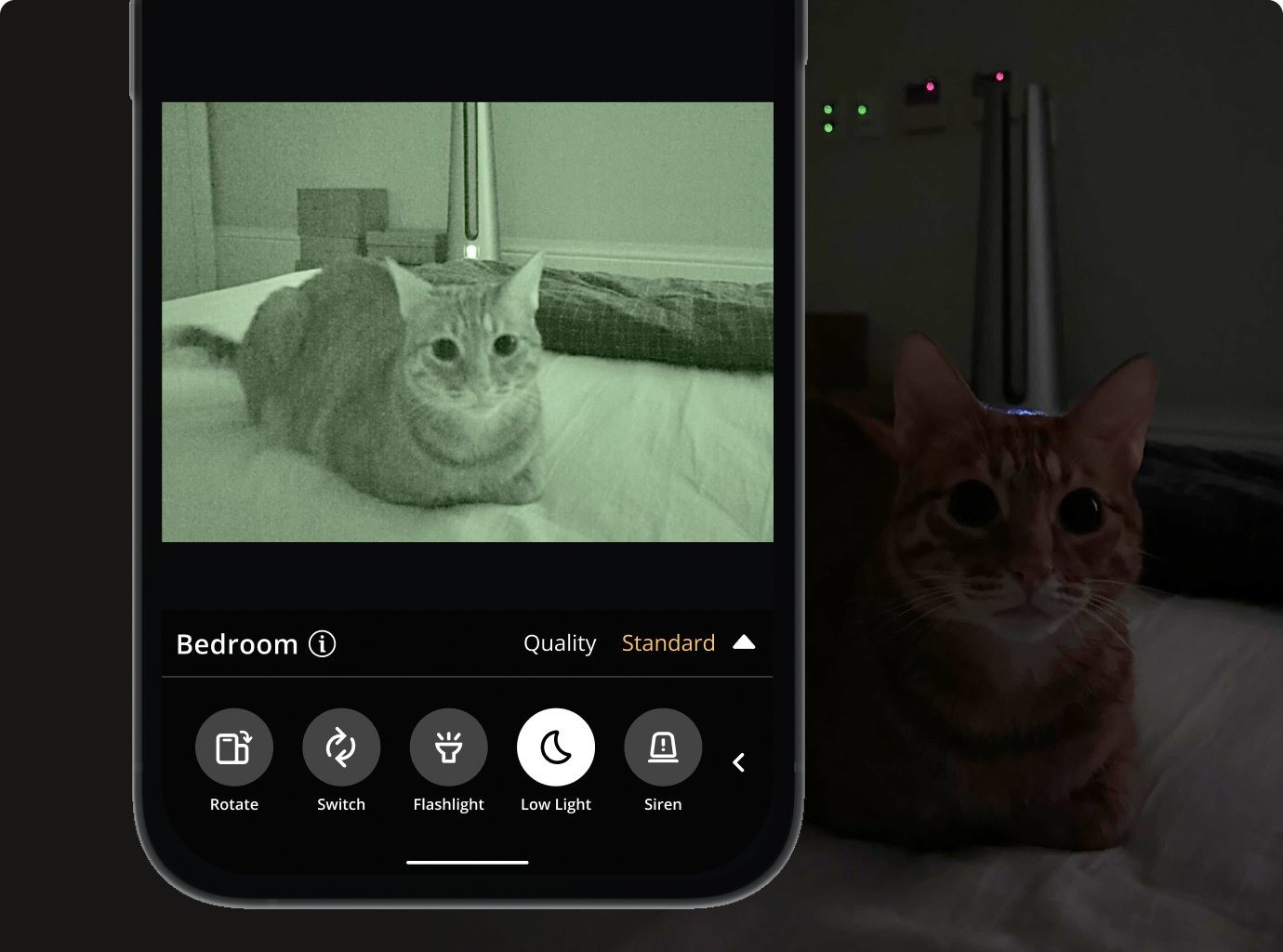
| Low-Light Mode | Software-based "Moonlight" filter | Standard exposure adjustment |
| Platform | iOS, Android, and Web Browser | iOS and Android |
| Storage | Cloud recording for motion events | Cloud and local options |
In a direct alfredcamera vs visory home security comparison, AlfredCamera usually wins on versatility. It includes a web-based viewer, meaning you can check your cameras from a work laptop without needing your phone. However, Visory often feels a bit more modern and offers a very smooth setup process for those using old smartphone as pet camera for free. If you are strictly on Android, you might also look at Security Camera CZ, which is highly optimized for older hardware and offers advanced motion detection with old phone sensors.
Hardware & Placement: Ensuring 24/7 Reliability
The software is the brain, but the physical setup is the body of your system. To ensure your camera doesn't go dark right when you need it, you need to think about power and positioning.
The biggest hurdle is the diy home security camera power supply solutions. Running a continuous live video feed is incredibly taxing on a battery, especially an older one. You must keep the phone plugged into a wall outlet at all times. I recommend using a high-quality, long charging cable (10 feet or more) to give you flexibility in where you place the device.
For mounting, the best way to mount phone security camera in window areas is to use a small tripod or a suction-cup car mount. If you want a more discreet look, a simple gooseneck phone holder can be clipped to a bookshelf or curtain rod. Avoid placing the lens directly against a glass pane if you plan to use night vision, as the infrared lights or screen glare will reflect off the glass and blind the camera. Instead, keep it an inch or two back or use a black piece of cardboard to mask the reflection.
Security & Privacy: Is Your Feed Safe?
When you utilize DIY smartphone surveillance, you are sending video data over the internet. Naturally, privacy is a top concern. Reputable apps use high-level data encryption to ensure that your stream is only accessible by you.
To keep your system secure:
- Use Strong Passwords: Your security is only as good as your account password. Use a unique password for the surveillance app.
- Enable Two-Factor Authentication: If the app supports it, always turn on 2FA.
- Check Access Circles: Apps like AlfredCamera allow you to share your feed with family members. Periodically check these "Trust Circles" to ensure only authorized people have access.
- Keep Software Updated: App developers frequently release patches for security vulnerabilities. Set your old phone to auto-update the surveillance app.
By following these protocols, you can enjoy the benefits of remote surveillance without worrying about unauthorized eyes on your private life.
FAQ
How can I use my old phone as a security camera?
You can use your old device by installing a surveillance app that links its camera to your current smartphone. By setting the old phone to Camera mode and your current one to Viewer mode, you can stream live video over Wi-Fi or cellular data.
What are the best apps for turning a phone into a security camera?
The most popular and reliable options are AlfredCamera, Visory, and Presence. For Android users looking for specific features, Security Camera CZ is also a highly-rated choice that specializes in older hardware optimization.
Is it safe to use a smartphone as a home security camera?
Yes, it is generally safe as long as you use reputable apps that employ end-to-end data encryption. To maximize safety, use a strong, unique password for the app and ensure your home Wi-Fi network is secured.
Can I watch my phone camera feed from another device?
Most modern surveillance apps allow you to view the live video feed from multiple devices. This includes other smartphones, tablets, and even desktop web browsers, allowing you to monitor your home while at work.
Will a phone security camera work in low light or at night?
While most old phones do not have true infrared night vision, apps often include a low-light filter or moonlight mode that boosts the sensor's sensitivity. For total darkness, you may need to leave a small lamp on or use a phone with a built-in flash that can be triggered remotely.
How long can a phone run as a continuous security camera?
A smartphone can run indefinitely as a camera as long as it is connected to a stable power supply and has adequate ventilation to prevent overheating. It is not recommended to run it on battery alone, as the camera and Wi-Fi will drain it in just a few hours.