Quick Facts
- Core Benefit: Todoist for ADHD minimizes the friction between thinking of a task and recording it, which directly compensates for executive function gaps.
- Top Feature: Natural Language Processing (NLP) allows for instant, hands-free task capture.
- Best AI Tool: Task Assist helps users by breaking down overwhelming projects with todoist for adhd into small, actionable steps.
- Pricing Structure: A robust Free version is available (up to 5 projects), with Pro plans ranging from $4 to $7 per month.
- Essential Shortcuts: Use Shift+Command+A on Mac or Shift+Alt+A on Windows to add tasks instantly without leaving your current window.
- Neurodivergent Edge: The app provides a shame-free environment with customizable views that reduce visual clutter and prevent sensory overwhelm.
ADHD is not a matter of laziness or a lack of willpower; it is fundamentally an executive function challenge that affects how the brain prioritizes and remembers tasks. Todoist for ADHD succeeds by reducing the cognitive load required to capture and organize life, providing a reliable system for externalizing memory and bypassing the gaps left by working memory struggles. Through natural language processing and frictionless entry, the app allows users to bridge the gap between intention and action, providing the dopamine rewards necessary to overcome task paralysis and maintain long-term focus.
Solving Executive Dysfunction: Why Todoist Works for ADHD
For those living with neurodivergence, the simple act of "getting started" can feel like climbing a mountain. This is often referred to as the Wall of Awful—a psychological barrier built from past failures, anxiety, and the sheer weight of a task. When we talk about why a specific tool works, we have to look at how it manages the limited cognitive energy we have each day, often described through spoon theory. Every time you have to decide where to put a task or how to categorize it, you use a "spoon." Todoist is designed to preserve those spoons by making the system as invisible as possible.
One of the greatest hurdles for the ADHD brain is time blindness, the inability to accurately sense the passage of time or plan for future events. By externalizing memory into a digital system, you take the pressure off your internal hard drive. You no longer need to use your precious cognitive load to remember that you need to buy milk or finish a report; the app becomes a second brain that holds that information for you. This allows you to stay present in the moment rather than being constantly interrupted by the "pop-up ads" of your own thoughts.
Learning how to set up todoist for adhd productivity involves creating a structure that mirrors how your brain actually functions. Traditional productivity systems often rely on rigid hierarchies and complex folders, which can lead to context-switching and eventual abandonment. Instead, this app focuses on flexibility. It allows you to dump information quickly and sort it later, ensuring that your ideas are captured before they vanish into the ether of a distracted mind.
Frictionless Entry: Capturing Thoughts Before They Vanish
The moment a thought enters an ADHD mind, it is on a timer. If it isn't recorded within seconds, it is often gone forever. This is where the natural language processing of the app becomes a lifesaver. You don't have to click through three menus to set a deadline. You simply type "Call the dentist Friday at 2pm" and the app automatically recognizes the date and time, setting the reminder for you. This frictionless entry is the difference between a system you use and a system you ignore.
Beyond typing, the mobile experience is crucial for managing tasks on the go. For many, typing on a small screen is just enough resistance to cause task avoidance. Learning how to use todoist voice memos for adhd working memory can be a game-changer. By using the Ramble feature or simple voice-to-text integrations, you can dictate your tasks while driving, walking, or doing the dishes. This ensures that your working memory isn't taxed by trying to hold onto a thought until you find a pen or open a laptop.
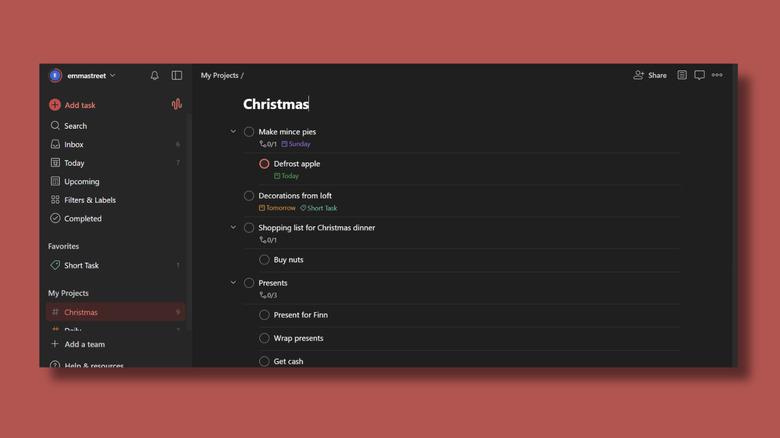
Shortcuts are the secret language of the power user. If you are working on a document and suddenly remember a bill you need to pay, using Shift+Command+A allows you to add that task without ever closing your browser or switching apps. This prevents the "rabbit hole" effect, where you go to add a task and end up checking your email for forty minutes. By keeping the capture process under three seconds, you maintain your current flow while securing your future responsibilities.
Breaking the 'Wall of Awful': Todoist AI and Task Breakdown
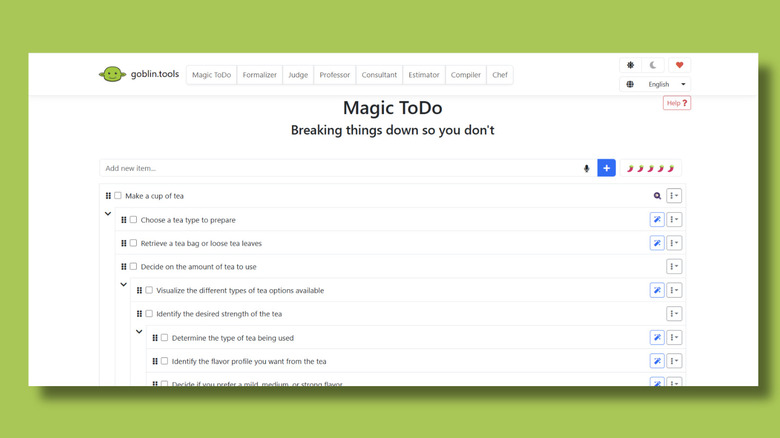
Task paralysis often stems from a goal being too vague. When an ADHD brain sees a task like "Clean the Garage," it doesn't see a single action; it sees a thousand tiny, disorganized steps. This leads to a total system freeze. Breaking down tasks with Todoist AI helps dissolve this paralysis by doing the heavy lifting of planning for you. The Task Assist feature can take a broad, intimidating project and suggest a list of micro-tasks that are actually manageable.
Using todoist ai task assist for adhd procrastination allows you to transform a daunting project into a series of "quick wins." Instead of "Clean the Garage," the AI might suggest:
- Toss out old cardboard boxes
- Sweep the left corner
- Put the gardening tools on the rack
- Take the recycling to the bin
Each of these micro-tasks provides a small dopamine reward when checked off. For a neurotypical person, checking off a task is a nice-to-have; for someone with ADHD, that dopamine hit is the fuel required to move to the next step. By leveraging Todoist AI features for productivity, you essentially outsource the executive function of "planning" so you can focus entirely on "doing." This is especially effective for breaking down overwhelming projects with todoist for adhd, where the initial "how do I even start?" is the biggest hurdle.
Energy-Based Management vs. Traditional Priority
Standard productivity advice tells you to "do the hardest thing first." For someone dealing with ADHD, this is often the worst possible strategy. If your energy is low, forcing yourself to do a high-focus task will only lead to burnout and frustration. A more effective approach is setting up todoist energy filters for neurodivergent task management. Instead of just marking tasks as "High Priority," you can use labels to categorize tasks by the mental effort they require.
Consider using labels like @low_energy, @high_focus, or @brain_fog. On days when your executive function feels depleted, you can filter your list to show only the @low_energy tasks. This ensures you still make progress without triggering a meltdown. It also helps with emotional regulation by removing the guilt of not being able to tackle the big projects. You aren't being lazy; you are simply matching your output to your current cognitive capacity.
To keep the interface from becoming a source of visual clutter, the "Today" view can be customized to show only what is absolutely necessary. You can set realistic todoist reminders for adhd routine building that nudge you toward habits without screaming at you. By using recurring sub-tasks for daily routines—like "Take Meds" or "Water Plants"—you create a rhythmic structure that helps mitigate the chaos of a wandering mind.
Todoist vs. Notion for ADHD Focus
When choosing a tool, many people fall into the "tweaking trap." This is particularly common when comparing todoist vs notion for adhd organization. Notion is an incredible tool for building custom databases and aesthetic workspaces, but for an ADHD brain, that infinite customization can be a double-edged sword. You might spend six hours choosing the perfect icon and background image for your "To-Do" page, but never actually get around to doing the tasks themselves.
Todoist is a "low-friction" tool, whereas Notion is a "high-friction" tool. While Notion excels at macro-planning and long-term knowledge storage, it often fails at the "micro-daily" execution that neurodivergent users need. To find the right balance, many successful users utilize todoist vs reclaim.ai for adhd calendar automation. Reclaim.ai can sync with your tasks to block out time on your calendar, ensuring that you don't overschedule yourself—a common symptom of time blindness.
| Feature | Todoist | Notion |
|---|---|---|
| Capture Speed | Near-instant (NLP) | Requires navigation |
| Cognitive Load | Low | High |
| Visual Clutter | Minimalist/Controlled | Can become overwhelming |
| Primary Use | Daily execution & habits | Long-term documentation |
| Setup Barrier | Minutes | Hours or days |
The goal of todoist vs notion for adhd focus isn't to pick the most powerful app, but the one that is hardest to "break" when you're having a bad day. The simplicity of a list-based view is often more grounding than a complex dashboard when your thoughts are already racing.
Managing Burnout: The 'Burnout Bankruptcy' Protocol
Even with the best system, there will be weeks where things fall apart. You might open your app to find 50+ overdue tasks, all staring at you with red text. For many, this sight triggers such intense shame and task paralysis that they simply stop using the app altogether. This is the moment to implement a managing adhd burnout bankruptcy in todoist strategy.
Burnout bankruptcy is a shame-free way to reset your system. Instead of trying to "catch up" on three weeks of missed tasks, you follow these steps:
- The Selection: Go through your overdue tasks and identify only the 3 most critical items that must happen today.
- The Mass Reschedule: Select all other overdue tasks.
- The Reset: Change their date to "Unscheduled" or move them to a "Someday/Maybe" project.
- The Clean Slate: Start your Today view with a manageable list.
This protocol prevents the "system collapse" that happens when a productivity tool starts feeling like a list of your failures. By allowing yourself to start over without the weight of the past, you maintain the habit of using the tool. A best todoist project structure for adhd brain fog includes a specific folder for these "backlog" items, so they aren't lost, but they aren't cluttering your immediate field of vision either.

Implementing a weekly review ritual—even if it's just 15 minutes on a Sunday—can help you catch these build-ups before they become overwhelming. During this time, you can clear out the "Inbox," adjust your recurring sub-tasks, and ensure your energy filters are still serving your current needs.
FAQ
Is Todoist good for people with ADHD?
Yes, it is widely considered one of the best tools because it addresses the core symptoms of executive dysfunction. Its natural language processing allows for immediate capture, reducing the chance that a thought will be forgotten, while its minimalist design prevents sensory overwhelm.
How do I set up Todoist to manage ADHD symptoms?
Start by creating energy-based labels like @low_energy and @high_focus. Focus on the "Inbox" for quick capture throughout the day, and use the "Today" view as your primary workspace to limit visual distractions. Avoid over-complicating your project structure in the beginning.
Is Todoist or TickTick better for neurodivergent users?
Both are excellent, but they offer different strengths. Todoist is generally preferred for its superior natural language processing and cleaner interface. TickTick includes a built-in Pomodoro timer and habit tracker, which some find helpful, though others find it adds unnecessary visual clutter.
How can Todoist help with executive dysfunction?
It acts as an external hard drive for your brain. By using features like AI Task Assist, the app takes over the "planning" phase of a project, breaking down complex goals into micro-tasks. This lowers the barrier to entry and helps overcome task paralysis.
How do I prevent Todoist from becoming overwhelming?
Practice burnout bankruptcy regularly. If your overdue list becomes a source of stress, reschedule everything to a later date or remove the dates entirely. Keep your "Today" list short—no more than 3-5 major items—to avoid the feeling of being "behind" before the day even starts.
Can Todoist help with time blindness and deadlines?
Yes, by using recurring reminders and integrating with a calendar tool like Reclaim.ai. The app can send push notifications to your phone or watch, providing the external "pokes" needed to transition between tasks and stay aware of upcoming deadlines.
Conclusion & Getting Started
Transforming your relationship with productivity doesn't happen overnight, but the right tool makes the transition significantly easier. By focusing on a system that prioritizes frictionless entry and energy-based management, you can stop fighting against your brain and start working with it.
To begin, download the app and practice the "brain dump" method. For the next 24 hours, every time a thought, task, or "I should do that" enters your mind, use the quick-add shortcut to get it into your Inbox. Don't worry about dates or projects yet. Just focus on the habit of externalizing your memory. Once you feel the relief of not having to carry those thoughts around, you can start exploring the more advanced features like todoist energy filters for neurodivergent task management or AI task breakdowns. Remember, the goal is not perfection—it is a sustainable system that supports you even on your hardest days.