Quick Facts
- Cost Savings: Professional designers can save over $600/year by transitioning from traditional suites to subscription-free creative platforms.
- Top Raster Tool: Photopea remains the industry leader for browser-based raster graphics editing with full .PSD support.
- Top UI/UX Tool: Figma continues to dominate multi-user real-time collaboration for interface prototyping and reusable design systems.
- Key 2026 Trend: Widespread machine learning integration is shifting workflows from manual asset creation to layout automation and generative assistance.
- Commercial Safety: High-performance WebGL platforms like Adobe Firefly are setting the standard for commercial licensing compliance in AI-generated content.
- Market Adoption: Over 64% of professional designers now utilize multiple design platforms to handle diverse client requirements.
Professional designers can utilize several browser-based alternatives that match the functionality of expensive suites. Photopea offers advanced raster editing and PSD support, while Kodo provides AI-assisted vector controls. For UI/UX and collaborative projects, Figma remains a standard for multi-user workflows without high upfront costs. Modern browser-based creative suites utilize high-performance WebGL and cloud-native workflows to rival traditional desktop performance. These platforms allow for real-time collaboration and seamless file management without the need for complex installations. Many now integrate machine learning to assist with layout, typography, and image generation.
The Shift to Browser-Based Creative Suites
As a hardware editor, I have spent years benchmarking high-end workstations designed to crush creative workloads. But as we move into 2026, the bottleneck is no longer the local CPU or GPU; it is the efficiency of the workflow. The landscape of professional design software alternatives has shifted dramatically toward the cloud. We are seeing a massive evolution where browser-based graphic software is no longer a "lite" version of desktop apps. Thanks to modern browser engines and hardware acceleration, tasks like complex vector manipulation and high-resolution rendering are happening entirely within a tab.
This transition is fueled by the changing nature of the workforce. With the digital design industry seeing significant growth, the traditional SaaS subscription models that charge hundreds of dollars annually are becoming harder to justify for independent professionals and boutique agencies. As of the end of 2025, the web-based design platform Canva reached over 265 million monthly active users globally, representing a 20% increase from its 220 million users in late 2024. This isn't just a win for hobbyists; it signals a fundamental shift in how professionals approach browser-based creative suites for remote design workflows.
The technical secret behind this shift is high-performance WebGL. By leveraging the local GPU directly through the browser, these tools can handle thousands of layers and complex paths without the lag that plagued early web apps. For a pro builder or a designer, this means you can get top-tier results on a mid-range laptop, focusing your budget on a color-accurate monitor rather than an over-specced processor.
Professional Alternatives for Raster and Vector Design
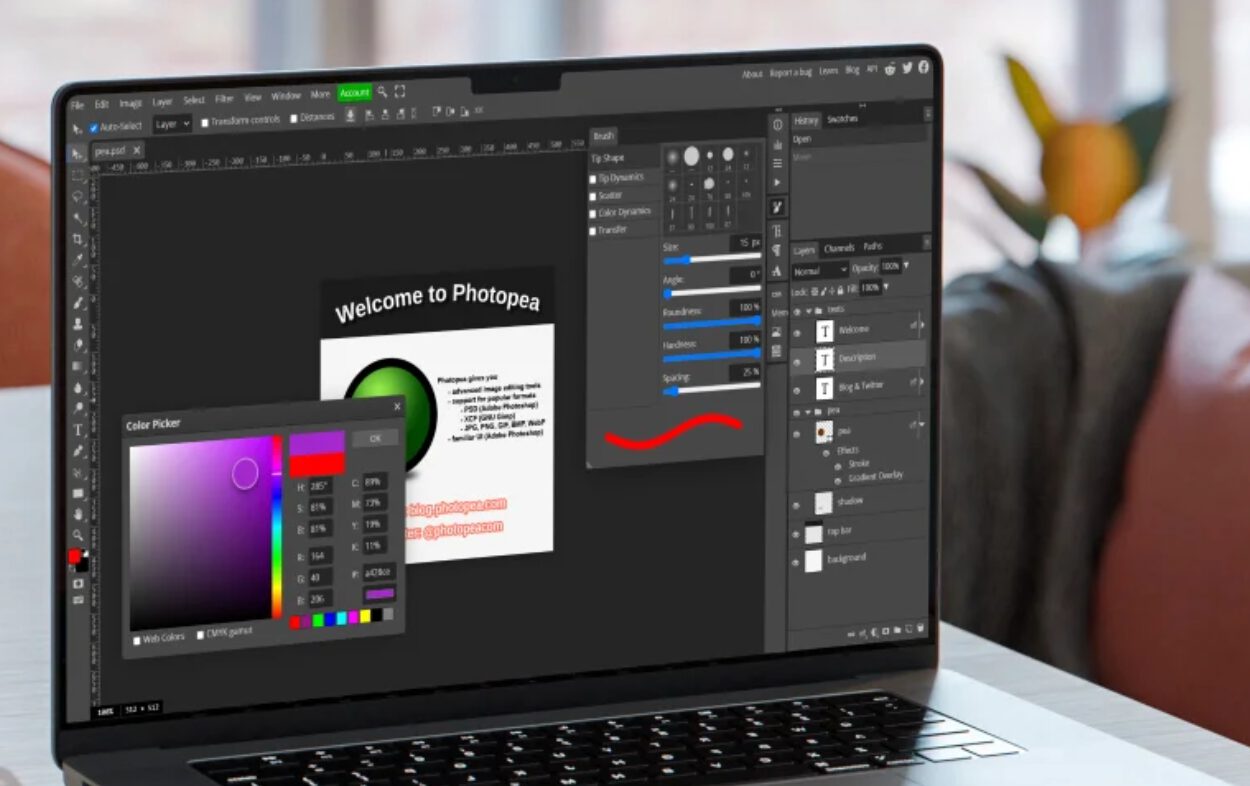
When a client sends you a legacy file, the biggest hurdle is usually compatibility. For years, the industry was locked into specific file formats, but 2026's free design tools have broken those walls. If you are looking for the best browser-based alternatives to photoshop for psd files, Photopea is the undisputed champion. It is a masterclass in what a single developer can achieve, offering a UI that is nearly identical to industry standards, meaning zero learning curve for veterans.
For those focused on scalable graphics, finding professional vector design software without subscription fees used to mean sacrificing features. Not anymore. Tools like Kodo and the web-enabled versions of Inkscape have matured. They now offer robust multi-user real-time collaboration, allowing a team to tweak a brand identity simultaneously from three different continents.
Here is a technical comparison of how these browser-based giants stack up:
| Feature | Raster Editing (Photopea) | Vector Design (Kodo/Inkscape Web) |
|---|---|---|
| Primary File Support | .PSD, .XCF, .RAW, .Sketch | .SVG, .AI, .EPS, .PDF |
| Core Technology | HTML5 / Canvas | WebGL / WebAssembly |
| Workflow Focus | Raster graphics editing & Photo Retouching | Vector manipulation & Iconography |
| Collaboration | File sharing / Versioning | Multi-user real-time collaboration |
| Offline Mode | Limited | Progressive Web App (PWA) support |
Photopea | Best For: Advanced photo retouching and PSD management | Key Feature: Native support for Smart Objects and Layer Styles | Limitations: Ad-supported interface in the free tier can be distracting.
Kodo | Best For: AI-enhanced vector illustration | Key Feature: Predictive pathing and automated color harmony | Limitations: Requires a consistent high-speed internet connection for AI features.
UI/UX and Asset Management Tools
Interface design has moved almost entirely to the web. Figma is no longer just an alternative; it is the benchmark for interface prototyping. By offering a robust free tier that includes unlimited cloud storage for personal drafts and a limited number of collaborative projects, it has become one of the most essential subscription-free creative platforms available today.
However, the "hidden" part of the professional toolkit often lies in asset management. A design is only as good as its typography and imagery. Industry research indicates that 64% of graphic designers now utilize multiple design platforms for their workflows, and that includes sourcing from hidden web tools for professional graphic designers like Fontshare or Uncut. These platforms provide designer-quality typefaces that are free for commercial use, bypassing the need for expensive font licenses that can eat into a project’s margin.
Furthermore, managing royalty-free visual assets has become easier with cloud-integrated libraries. Modern designers are moving away from local folders and toward integrated browser plugins that pull high-resolution, commercially safe images directly into their workspace. This cloud-native workflow ensures that the transition from a prototype in Figma to a final marketing asset is seamless.
AI-Assisted Design and Commercial Safety
The biggest buzzword for 2026 is machine learning integration, but for a professional, the conversation isn't about "cool filters"—it's about commercial licensing compliance. When using free ai assisted design platforms for marketing graphics, you have to ask where the data came from. Using a tool trained on scraped, copyrighted material is a legal landmine for your clients.
Commercial safety depends on the platform's licensing model and training data. Tools like Adobe Firefly (which offers a generous free tier of credits) are specifically designed for professional environments by using licensed content and public domain materials. When using AI-assisted platforms, designers should verify that the outputs are cleared for commercial IP protection to avoid legal ambiguity.
The real value of AI in 2026 is workflow enhancement. We are seeing tools that can take a rough wireframe and suggest three different layout variations based on conversion data. This isn't replacing the designer; it’s removing the grunt work of moving pixels, allowing you to focus on the creative strategy.
FAQ
Can I use free design software for commercial projects?
Yes, most free design tools like Photopea and Figma allow commercial use, but you must always verify the specific licensing agreement. For AI-based tools, ensure the training data is ethically sourced to avoid potential IP conflicts with your clients.
Are there free alternatives to professional paid software?
Absolutely. Photopea is a direct alternative to Photoshop, Kodo or Inkscape replaces Illustrator, and Figma is the industry standard for UI/UX, often replacing Adobe XD or Sketch. These tools offer high-performance WebGL capabilities that rival traditional desktop applications.
What are the limitations of using free design tools?
Common limitations include ad-supported interfaces, limits on the number of active collaborative projects, and the requirement for a constant internet connection. Some tools may also lack advanced CMYK color management for high-end print production compared to their paid counterparts.
Which free design tools work best for web design?
Figma is the premier choice for web and mobile interface prototyping. For creating the actual graphic assets, a combination of Photopea for raster elements and Kodo for vector icons provides a complete, professional-grade workflow.
Can I create professional-looking logos with free tools?
Yes, using professional vector design software without subscription fees like Inkscape or Kodo allows you to create scalable, high-resolution logos. Since these tools export to industry-standard formats like .SVG and .EPS, the final files are indistinguishable from those created in paid software.
Professional Growth Without the Price Tag
The democratization of high-end creative tools is a win for the entire computing industry. It proves that the web browser has become a powerful operating system in its own right, capable of handling the most demanding professional tasks. By integrating these free design tools into your daily routine, you aren't just saving money; you are adopting a more agile, collaborative, and future-proof way of working.
Whether you are building a new PC to handle these web-heavy workloads or looking to streamline your existing studio, the message for 2026 is clear: the best tools in the world are now just a URL away. Explore these subscription-free creative platforms and take control of your creative output without the burden of recurring fees.