Quick Facts
- The Prerequisite: Xbox Game Pass Ultimate subscription ($29.99/mo).
- Hardware: LG webOS 24+ or compatible in-vehicle infotainment system.
- Controller: Bluetooth 4.0+ (Xbox Wireless Controller or DualShock 4).
- Connectivity: 35-50 Mbps recommended for 1440p streaming.
- Safety: Feature is locked via driver safety interlocks; stationary/parked mode only.
- Direct Answer: To enable Xbox Cloud Gaming in your vehicle, you need a car with a compatible infotainment platform like LG’s webOS. You must have an active Xbox Game Pass Ultimate subscription, a Bluetooth controller, and a stable 20-50 Mbps internet connection via the car’s 5G or a mobile hotspot.
Gaming isn't just for the living room anymore. As vehicles evolve into software-defined machines, in-car gaming is becoming the primary way to kill time during EV charging sessions. Whether you're in a Kia EV3 or a car with LG webOS, here is your complete guide to Xbox Cloud Gaming vehicle setup. To enable Xbox Cloud Gaming in your vehicle, you need a car equipped with a compatible infotainment platform, such as LG’s webOS found in select Kia models. Requirements include an active Xbox Game Pass Ultimate subscription, a compatible Bluetooth controller, and a stable internet connection via the car’s built-in data plan or a mobile hotspot. For safety, the feature is restricted to use only when the vehicle is parked.
The Charging Gap: Why In-Car Gaming is the New Standard
For years, the biggest hurdle for electric vehicle adoption wasn't just range anxiety; it was the charging gap. When you pull into a fast-charger, you are often looking at 20 to 40 minutes of downtime. While scrolling through your phone is the default, the automotive industry is pivoting toward a more immersive solution. The global in-car gaming market was valued at $2.2 billion in 2023 and is projected to grow at a compound annual growth rate of 10.1% to reach $5.2 billion by 2032.
This growth is driven by the rise of the digital cockpit. Your car is no longer just a mode of transport; it is a high-powered computer on wheels. Manufacturers are increasingly looking at EV charging entertainment options as a way to differentiate their brand experience. When you are sitting in a stationary car, the environment is perfect for gaming: you have a high-quality sound system, climate control, and a screen positioned right in your line of sight. This shift turns charging station downtime from a chore into a session where you can knock out a few side quests in Starfield or complete a race in Forza.
The industry is moving toward a model where passenger-centric entertainment is a core pillar of the driving experience. By integrating these services directly into the automotive software platforms, car makers ensure that the vehicle remains a relevant "third space" between work and home.
Hardware and Connection: The Spec Checklist
If you want a console-quality experience on your dashboard, you cannot compromise on the technical requirements. Cloud gaming is sensitive to network conditions, and the metallic shell of a car can sometimes act as a Faraday cage, complicating your 5G cellular connectivity.
Reliable in-car cloud gaming typically requires a minimum internet speed of 20 Mbps, though I strongly recommend 35 to 50 Mbps for stable 1440p streaming. It is not just about the download speed; network jitter and latency are the real performance killers. For a responsive feel, you want to see a ping of 37-40ms or lower. If your car has integrated 5G, use it, but ensure your data plan is robust.
Editor's Tip: If your vehicle's built-in Wi-Fi is limited to 2.4GHz, try using a high-end mobile hotspot that supports 5GHz. The 5GHz band has less interference and provides the lower latency required for high-speed gaming.
You also need to consider how much data does car cloud gaming use before you start a marathon session. High-definition game streaming bitrates can consume between 7GB and 15GB per hour. If you are relying on a mobile hotspot, ensure your plan doesn't have a hidden "throttle" after a few gigabytes.
When it comes to hardware, the Xbox Cloud Gaming vehicle setup guide usually starts with the controller. Modern in-vehicle infotainment systems use standard Bluetooth protocols. To sync your controller, navigate to the car's Bluetooth settings menu while the vehicle is in park. Hold the pairing button on your Xbox Wireless Controller until the logo flashes, then select it on your car's screen.
Compatibility: Kia, LG, and the webOS Ecosystem
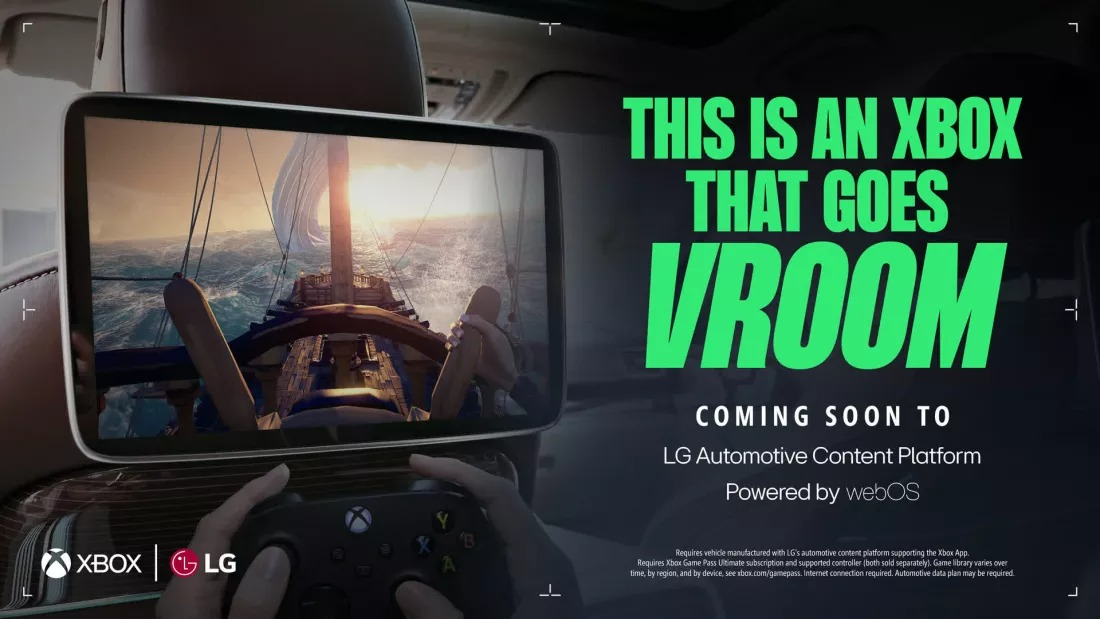
The landscape of in-car gaming changed significantly when Microsoft and LG partnered in 2025 to integrate Xbox Cloud Gaming into vehicles via the webOS Automotive Content Platform. This isn't a niche experiment; LG expects this system to reach 20 million vehicles by 2030.
The rollout is most visible in the newest fleet from Korea. For example, the Kia EV3 Xbox Cloud Gaming features are built directly into the dashboard software. In these models, the Xbox app is a native part of the LG webOS automotive Xbox app requirements, meaning you don't need to mess with a clunky web browser. You simply sign in to your Game Pass account and play.
Specific models supporting or slated to support this ecosystem include:
- Kia EV3: The flagship for the webOS gaming rollout.
- Kia EV4 and EV5: Upcoming models expected to carry the same IVI architecture.
- Select LG-partnered EVs: High-end trims using the latest Automotive Content Platform (ACP).
These systems are designed with telematics integration that communicates directly with the car's power management. The software knows when the car is charging and adjusts power delivery to the screen and processors to ensure you aren't draining the 12V battery while trying to play.

Game Suitability: What to Play While Parked
Not every game in the Xbox library is suitable for a car environment. Even with a great 5G connection, cloud gaming introduces a slight delay compared to a local console. This makes some genres better than others for your connected car gaming requirements.
| Game Genre | Latency Tolerance | Recommendation | Why? |
|---|---|---|---|
| Turn-Based RPG | High | Persona 5 Royal / Sea of Stars | Input lag doesn't affect gameplay. Perfect for relaxing while charging. |
| Racing | Medium | Forza Horizon 5 | Built-in "dead zones" in steering help mask minor network jitter. |
| Action/Adventure | Medium | Halo Infinite (Campaign) | Fun, but avoid the "Legendary" difficulty where millisecond reactions matter. |
| Competitive FPS | Low | Valorant / Overwatch 2 | Not recommended. Network spikes will lead to frustration and missed shots. |
When choosing the best Xbox games to play while charging EV, I suggest focusing on titles that offer multimedia content delivery that matches the car's vibe. Open-world games like Starfield look stunning on the high-contrast displays found in modern digital cockpits.
However, be mindful of the Xbox Game Pass Ultimate car streaming limitations. Some titles might require a mouse and keyboard, which is a nightmare to set up in a driver's seat. Stick to games with full controller support. Furthermore, utilize the car’s sound system—many EVs have premium Harman Kardon or Bose setups that provide better immersion than any gaming headset.
FAQ
What is in-car gaming and how does it work?
In-car gaming refers to the ability to play video games directly on a vehicle's infotainment system. It typically works via cloud streaming, where the game is processed on a remote server (like Microsoft's) and the video feed is sent to your car's screen over a 5G or Wi-Fi connection. Your controller inputs are sent back to the server, allowing you to play high-end games without a console in the car.
Can you play video games while a car is in motion?
No. For safety reasons, manufacturers implement driver safety interlocks that disable gaming applications the moment the vehicle is taken out of "Park." This ensures the driver is not distracted. However, some vehicles allow passengers in the rear seats to play on secondary screens while the car is moving.
How do I set up a gaming console in my vehicle?
While cloud gaming is the modern standard, you can set up a physical console like an Xbox Series S if your car has an HDMI input and a 110V AC power outlet. You would plug the console into the power outlet and the HDMI cable into the car's media port. However, most users find the Xbox Cloud Gaming vehicle setup much cleaner as it requires no extra wires or hardware.
Does gaming in a car drain the battery?
In a traditional gas car, gaming can drain the 12V starter battery quickly. In an EV, the power used for the screen and 5G modem is negligible compared to the massive capacity of the traction battery. Most EVs are designed to handle hours of infotainment use while parked, especially if the car is plugged into a charger at the time.
Do you need a Wi-Fi connection for in-car gaming?
You need an internet connection, but it doesn't have to be Wi-Fi. You can use the vehicle's built-in 5G data plan, a mobile hotspot from your phone, or a public Wi-Fi signal from a charging station. The key requirement is a stable speed of at least 20 Mbps to maintain a clear video stream.