Quick Facts
- Primary Benefit: Achieves 100% data sovereignty through local inference where your conversations never leave the device.
- Recommended Hardware: Requires modern flagship processors like Snapdragon 8 Gen 2/3 or Apple A16 Bionic and above with 8GB+ of available RAM.
- Default Model: Meta Llama 3.2 1B, which is highly optimized for mobile speed and efficiency.
- Storage Usage: Each model typically occupies between 1GB and 4GB of your phone's internal storage.
- Market Growth: The on-premise LLM serving market is booming, with a projected compound annual growth rate (CAGR) of 27.1% from 2025 to 2033.
- AI Versatility: Supports a range of open-source models including the Qwen series and Google Gemma for diverse linguistic tasks.
A local AI browser like Puma executes large language models directly on mobile hardware instead of routing data to cloud servers. By utilizing a device's CPU, GPU, or Neural Processing Unit (NPU), these browsers enable private and offline AI interactions such as text summarization and content restyling. This on-device inference ensures that conversational data remains local, providing significantly higher data sovereignty than traditional cloud-based AI apps.
Why Local AI Matters: Privacy and Data Sovereignty
As an editor who spends most of my day testing the latest mobile gear, I have watched the AI revolution with a mix of awe and caution. We have reached a point where digital assistants can draft our emails and summarize our long-read articles, but there is a hidden cost: your data. Every time you send a prompt to a cloud-based AI, that information lives on a server owned by a tech giant. For professionals handling sensitive documents or anyone who values their digital footprint, this creates a privacy specter that is hard to ignore.
This is where a local AI browser changes the game. Instead of relying on a massive server farm, your phone becomes the brain. The global on-premise large language model (LLM) serving platforms market reached a value of USD 2.18 billion in 2024, signaling a massive shift in how users want to interact with technology. People are no longer willing to trade their privacy for convenience.
When you use a platform like Puma, you are engaging in privacy-centric browsing. In my testing, I found that the risks associated with cloud AI—such as data breaches or the 15% risk of malicious instructions often discussed in cybersecurity circles regarding open-source skills—are mitigated when the model is sandboxed directly on your device. You are not just a user of someone else’s service; you are the sovereign of your own data. The move toward local inference ensures a low-latency response that works even when you are miles away from the nearest cell tower.
Hardware Readiness: Can Your Phone Run Local LLMs?
Before you jump into the world of on-device LLM for mobile, we need to talk about the silicon under your phone's hood. Running a large language model is a resource-intensive task that requires more than just a decent internet connection. In fact, for a local AI browser, your internet speed matters much less than your RAM allocation and your chip’s Neural Processing Unit (NPU).
To get a smooth experience with Puma, your hardware needs to meet some specific benchmarks. While older mid-range phones might struggle, modern flagships are more than ready.
- RAM Requirements: You should have at least 8GB of RAM. Models like Meta Llama 3.2 1B need several gigabytes of "breathing room" to process text without crashing the browser.
- Processor (SoC): Ideally, you are looking for a Snapdragon 8 Gen 2 or Gen 3, or an Apple A16 Bionic or newer. These chips feature dedicated NPUs designed to handle millions of operations per second.
- NPU Performance: High-end chips like the Snapdragon X2 can reach 80 TOPS (Tera Operations Per Second). This raw power is what allows for near-instant text generation.
- Storage Space: Ensure you have at least 5GB of free space. Quantized models are compressed to save space, but they still require a significant footprint.
Edge and device-based LLM deployments are projected to expand at a compound annual growth rate (CAGR) of 27.25% through 2031 as demand increases for privacy-centric and low-latency AI solutions. This means if your current phone isn't up to the task, your next one almost certainly will be.
Step-by-Step: Puma Browser AI Setup Guide
Setting up a local AI browser is surprisingly straightforward, even if you aren't a developer. The Puma AI browser local model installation guide is built into the app's intuitive interface, making it accessible for any tech enthusiast. Here is how you can transform your mobile device into a private AI powerhouse.
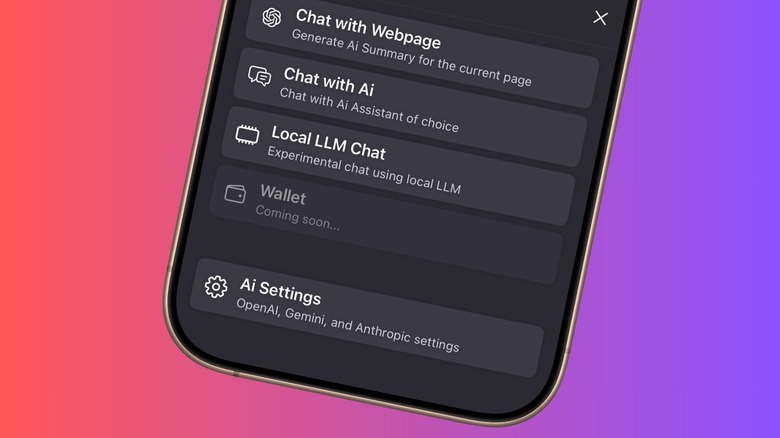
First, download the Puma AI Browser from your respective app store. Once installed, open the application and tap on the AI icon usually found in the bottom navigation bar or the main menu. From here, you will want to look for the Local LLM Chat option. Unlike the cloud version, this section requires a one-time setup where you choose your brain.
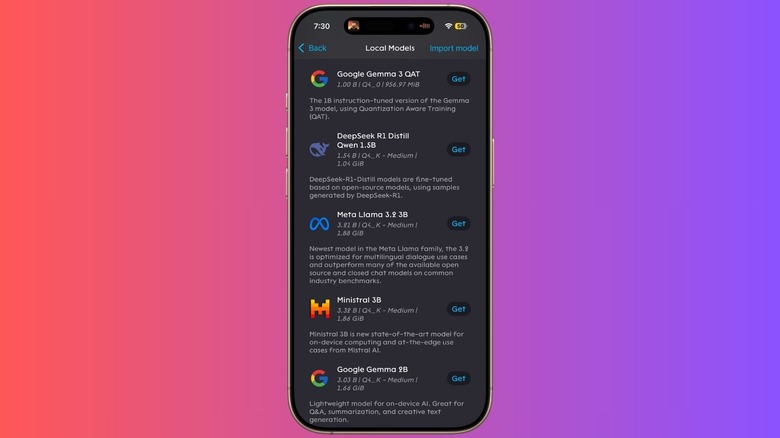
Within the Model Library, you will see several options. I recommend starting with Meta Llama 3.2 1B. Tap Download and wait for the process to complete. It is important to stay on a Wi-Fi connection during this part, as these models are over 1GB in size. Once the model is indexed, you will see a Composer Field at the bottom of the screen. This is where you type your prompts.
Puma uses a sophisticated inference engine to load the model into your phone's memory. When you start typing, the browser utilizes the NPU to generate a response. You can manage multiple models within the settings, allowing you to swap between different open-source projects depending on your needs.
Choosing Your Model: Llama 3.2 vs. Qwen vs. Gemma
Not all models are created equal. When selecting the right mobile llm for puma browser, you need to balance intelligence with your phone's thermal constraints. Most mobile models use Q4 quantization, which is a technical way of saying the model has been compressed to run efficiently on mobile chips without losing too much "reasoning" ability.
| Model Name | Parameters | Best Use Case | Memory Impact |
|---|---|---|---|
| Meta Llama 3.2 1B | 1 Billion | Fast summarization and general chat | Low (Approx 1.2GB) |
| Qwen 3 1.5B | 1.5 Billion | Creative writing and coding tasks | Medium (Approx 1.8GB) |
| Google Gemma | 2 Billion | Complex reasoning and logic | High (Approx 2.2GB+) |
In my real-world usage, running llama 3.2 locally on android and ios provided the best balance of speed and utility. It is incredibly snappy for drafting text or summarizing a long article you’ve just found while browsing. If you are doing more logic-heavy work, Google Gemma is powerful, but you might notice your phone getting a bit warmer as the NPU works overtime.
The benefit of having several quantized models to choose from is that you can tailor the browser's performance to your specific task. If you are just doing a quick offline summarization of a web page, the smaller 1B parameter models are more than sufficient and will preserve your battery life.
The Offline Trust Exercise: Verifying Local Inference
One of the most satisfying aspects of using a local AI browser is the realization that you no longer need the cloud. This is why I always suggest the Offline Trust Exercise to new users. It is a simple way to verify that your private AI chat offline is actually working as advertised and that your data is staying on-device.
Pro Tip: The Airplane Mode Test To verify that your AI is truly local, enable Airplane Mode on your phone. Ensure both Wi-Fi and Cellular data are completely turned off. Now, open Puma and send a prompt to the local LLM. If the AI responds, you have definitive proof that the entire inference engine is running on your hardware.
During my tests with the Pixel 9 Pro and devices equipped with the Snapdragon 8 Gen 3, the response time while offline was nearly immediate. This exercise demonstrates the benefits of local ai browsers for data privacy in a way that technical specs never could. You are essentially carrying a supercomputer in your pocket that doesn't need to "call home" to think. This is ideal for sensitive work in restricted environments or simply for maintaining productivity when you are on a flight or in a dead zone.
FAQ
What is a local AI browser?
A local AI browser is a web browser that integrates large language models directly into its software, allowing the AI to run on the user's device hardware rather than on a remote cloud server. This allows for increased privacy, as data does not need to be transmitted over the internet for processing.
How does a local AI browser work?
It works by using an inference engine within the browser app to execute a quantized version of an AI model. The browser taps into the device's CPU, GPU, or Neural Processing Unit (NPU) to handle the mathematical calculations required to generate text or analyze data locally.
Are local AI browsers safer for privacy than cloud-based tools?
Yes, local AI browsers are generally safer because they eliminate the risk of data being intercepted during transmission or stored on a third-party server. Your prompts and the AI's responses remain on your device's internal storage, giving you full data sovereignty.
Can a local AI browser run offline?
Yes, one of the primary advantages of a local AI browser like Puma is that it can function entirely without an internet connection once the AI model has been downloaded to the device. This makes it a reliable tool for private AI chat offline.
What hardware is needed to run AI locally in a browser?
To run local models smoothly, you typically need a modern smartphone with a dedicated NPU, such as those found in the Snapdragon 8 series or Apple’s A-series chips. A minimum of 8GB of RAM is highly recommended to ensure the system has enough memory to load the model.
How does local AI impact browser performance?
Running a local AI can be resource-intensive, potentially leading to increased battery consumption and device heat during long sessions. However, because the processing is local, it often results in a lower-latency response for text tasks compared to waiting for a round-trip to a cloud server.