Quick Facts
- Best for Storage: WizTree (Visual Disk Analysis)
- Best for System Management: UniGetUI (Bulk Updates)
- Best for Workflow: Ditto Clipboard (History Tracking)
- Best for Audio: EarTrumpet (Per-App Volume Control)
- Best for Media: MusicBee (Library Organization)
- Best All-in-One: Microsoft PowerToys (25+ Power User Tools)
EarTrumpet and WizTree are top-tier free Windows utilities for managing audio and storage, offering seamless per-app volume control and rapid disk usage analysis that exceeds native Windows 11 capabilities. These programs address the inherent micro-frictions of the default operating system, allowing users to reclaim drive space and manage system performance tuning with professional-grade precision.
Modern productivity requires more than what stock Windows offers. Finding the best free Windows utilities can transform your workflow by solving micro-frictions that slow down your daily tasks. Whether you are building a new rig or optimizing a workstation, the goal is always the same: reduce the number of clicks between you and your work. As someone who spends all day testing laptops and desktop components, I’ve found that the default Windows experience often leaves a lot of performance on the table—not necessarily in terms of raw CPU cycles, but in user efficiency.
The following guide highlights five tools that solve specific, annoying problems that Microsoft has yet to address adequately. These are not bloated "optimization" suites; they are targeted, lightweight, and mostly open-source solutions that respect your resource utilization while significantly improving your desktop experience.
1. Reclaiming Storage with WizTree
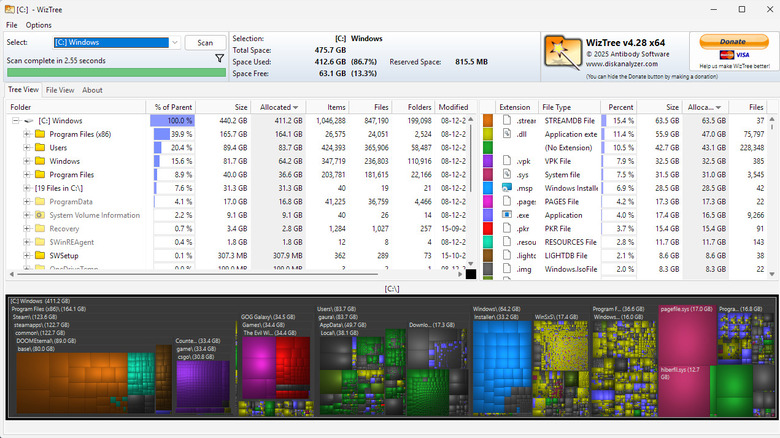
If you have ever tried to find out why your 2TB NVMe drive is suddenly full, you know that the native Windows Storage settings are abysmal. They give you vague categories like Other or System, which tells you nothing. WizTree is the definitive answer to this frustration. It is a free open source Windows programs alternative that scans your entire drive in seconds by reading the Master File Table (MFT) directly. This method is significantly faster than traditional tools like WinDirStat, which can take several minutes to crawl through directories.
What makes WizTree essential is its visual tree map. It represents every file on your drive as a block; the larger the block, the larger the file. This allows you to instantly spot massive log files, forgotten ISO images, or hidden caches that are eating up your disk footprint analysis. For anyone managing a PC in 2026, where modern games and professional media files regularly exceed 100GB, having a tool that provides instant disk management is a necessity.
Tech Specs:
- RAM Usage: ~50MB during scan
- Storage Requirement: <10MB
- Compatibility: Windows 7, 10, 11 (x86/x64/ARM)
- Onboarding Reality: 5/5 (Install and run; no setup required)
Not ideal if: You are uncomfortable with the idea of a tool accessing your MFT (though it is perfectly safe) or if you prefer a list-only view without the visual heat map.
2. Granular Audio Control with EarTrumpet
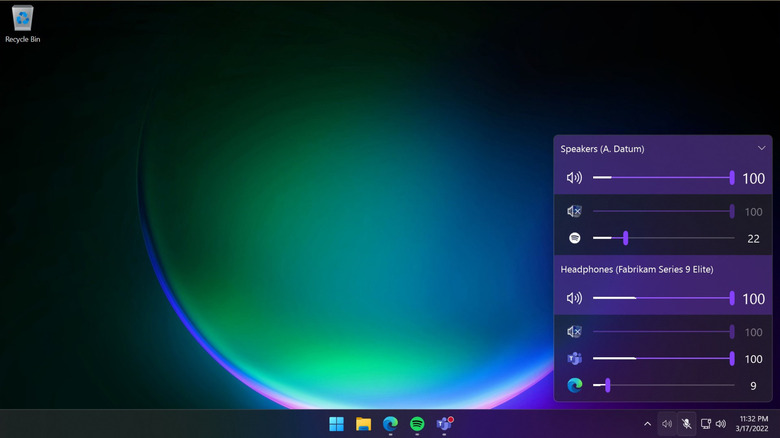
Windows 11 has made some strides in audio management, but the system tray mixer is still buried behind too many clicks. EarTrumpet solves this by providing a multi-channel volume mixer that feels like it should have been built into the OS. It allows for seamless per-app volume control and sound output switching directly from the system tray. If you are a professional who constantly toggles between headphones for Zoom calls and speakers for background music, EarTrumpet is one of the best productivity apps for Windows you can install.
The app supports advanced hotkey configuration, allowing you to cycle through playback devices without ever touching your mouse. It sits quietly in the background processes, consuming negligible resources while providing a much more responsive UI than the native Windows Settings app.
Tech Specs:
- RAM Usage: ~15MB
- Integration: Seamlessly replaces or sits alongside the default volume icon
- Onboarding Reality: 5/5 (Install and it immediately populates your apps)
Not ideal if: You already use a hardware-based mixer (like a GoXLR or Elgato Stream Deck+) that handles your routing at the hardware level.
3. Supercharging Your Clipboard with Ditto
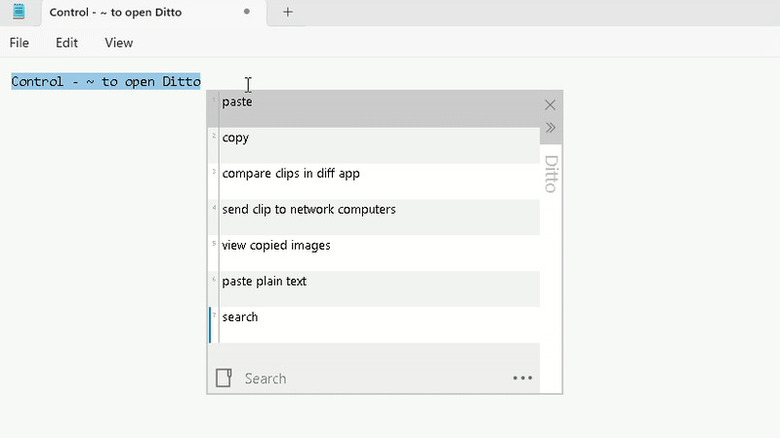
The native Windows clipboard (accessed via Win+V) is a decent start, but it is limited to only 24 items and lacks serious organization. For power users, Ditto is the essential Windows 11 software for managing snippets of data. It expands your clipboard to store thousands of items, including text, images, and HTML.
The real power of Ditto lies in its searchable history. If you copied a snippet of code or a specific URL three days ago, you can simply bring up Ditto with a hotkey, type a few letters, and find it instantly. It also supports cross-device syncing and can be configured to keep your clipboard persistent even after a reboot. Improving windows 11 clipboard history for power users is often the single biggest "quick win" for boosting daily output.
Tech Specs:
- RAM Usage: ~20MB (scales with database size)
- Database: SQLite
- Onboarding Reality: 4/5 (Requires a few minutes to set up your preferred hotkeys)
Not ideal if: You handle extremely sensitive, unencrypted data and are wary of maintaining a long-term local database of your clipboard history.
4. Centralized Software Management with UniGetUI
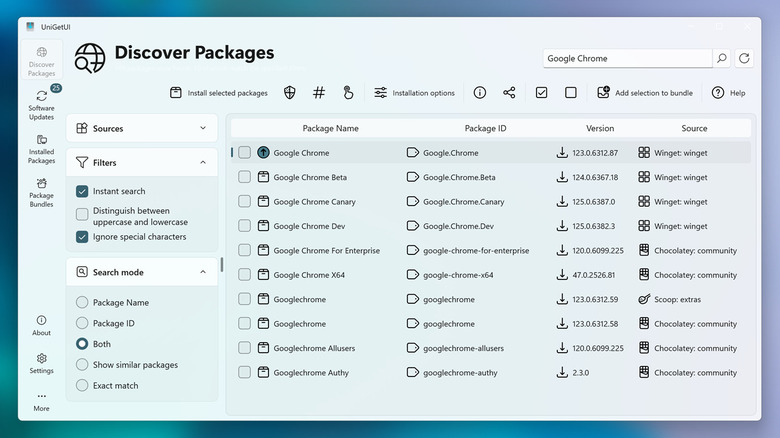
Keeping your software up to date is a security necessity, but opening every app to check for updates is a waste of time. UniGetUI (formerly WingetUI) is a graphical interface for package managers like Winget, Scoop, and Chocolatey. It offers a centralized dashboard where you can bulk install, update, and manage almost every program on your PC.
Instead of hunting for .exe installers on various websites, you simply search for the app in UniGetUI and click install. When updates are available, they appear in a single list, allowing you to update everything with one click. This free windows software for bulk app updates is a game-changer for system performance tuning and security, ensuring you are never running outdated, vulnerable versions of your favorite tools. It provides a level of software versioning control usually reserved for Linux users, but with a clean, Windows-native UI.
Tech Specs:
- Package Repository Support: Winget, Scoop, Chocolatey, Pip, NPM
- Resource Impact: High only during active updates; low background idle
- Onboarding Reality: 3/5 (Requires choosing which package managers to enable)
Not ideal if: You prefer the command line or only use a handful of apps that already have reliable auto-update mechanisms (like Chrome or Steam).
5. Professional Media Archiving with MusicBee
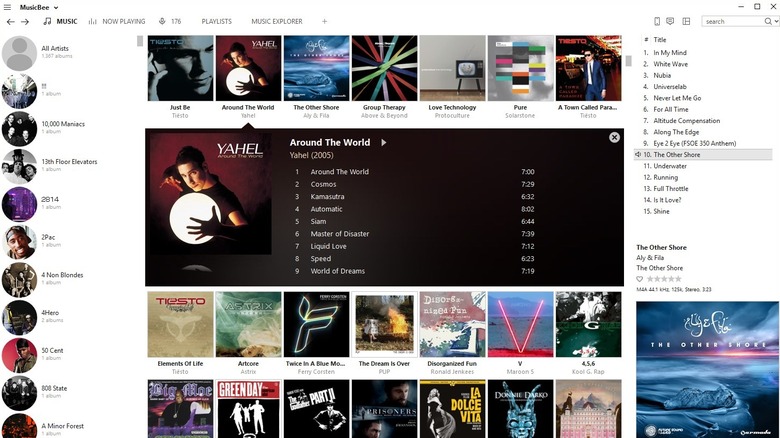
While streaming services dominate the market, many enthusiasts still maintain local high-fidelity music collections. Stock media players like Groove or the new Media Player are woefully inadequate for managing large libraries. MusicBee is a comprehensive free utility for organizing and playing local music libraries on Windows. It treats your music collection as a multimedia database, offering automatic tagging, artwork retrieval, and file metadata tagging.
For audiophiles, MusicBee supports high-end audio interfaces like WASAPI and ASIO, ensuring bit-perfect playback. It is widely considered one of the best free local music library organizers for windows because it manages to be incredibly powerful without feeling cluttered. You can customize the entire interface with skins to match your desktop aesthetic, and it handles libraries of over 100,000 tracks without breaking a sweat.
Tech Specs:
- Audio Engine: BASS
- Plugin Support: Extensive (Winamp plugins, web sync)
- Onboarding Reality: 3/5 (Deep feature set takes time to master)
Not ideal if: You exclusively use Spotify or Apple Music and do not own any local FLAC or MP3 files.
The Power User’s Toolkit: Beyond the Core Five
While the five tools above address specific gaps, no discussion of free Windows utilities is complete without mentioning Microsoft PowerToys, a toolkit that provides over 25 standalone utilities. Tools like FancyZones and PowerToys Run are essential for anyone using high-resolution ultrawide monitors.
Similarly, if your productivity involves heavy note-taking, more than one million people have moved to Obsidian, a markdown-based knowledge management app that keeps your data local and private. For those who frequently share screenshots or screen recordings, ShareX remains the gold standard, offering built-in OCR and automated workflows that the Snipping Tool can’t touch.
Integrating these hidden free windows utilities for productivity 2026 into your daily routine doesn't just save time; it reduces the mental load of fighting with your operating system. Start with WizTree to clear out some space, then grab EarTrumpet to fix your audio—you’ll wonder how you ever used Windows without them.
FAQ
What are the best free utility tools for Windows?
The best free utility tools are those that solve specific OS limitations without adding bloat. EarTrumpet for audio, WizTree for storage analysis, and UniGetUI for software management are top-tier recommendations. For a broader set of features, Microsoft PowerToys is an essential download for any power user.
Are free Windows utilities safe to download?
Most reputable free Windows utilities are safe, especially if they are open-source and hosted on platforms like GitHub. However, always download from official sites or trusted repositories. Tools mentioned in this guide, such as WizTree and Ditto, have long-standing reputations within the PC community. Avoid any utility that promises to "speed up your internet" or "clean your registry," as these are often unnecessary or malicious.
What are the must-have free utilities for a new PC?
For a fresh installation, start with UniGetUI to quickly install your favorite apps in bulk. Follow this with WizTree to monitor your initial setup's drive impact and EarTrumpet to take control of your audio. If you do a lot of copy-pasting, Ditto should be your next install to ensure you don't lose important data.
Where can I find open-source utilities for Windows?
The best place to find high-quality best open source alternative windows apps for daily tasks is GitHub. You can also use package managers like Winget or search directories like FossHub. Many of the most popular Windows power tools started as small open-source projects before gaining mainstream popularity.
Can free utilities help clean up disk space on Windows?
Yes, utilities like WizTree are far more effective than the built-in Windows Disk Cleanup. While Windows might find a few hundred megabytes of temporary files, WizTree allows you to see exactly where gigabytes of data are being hidden in folder structures, making it much easier to manually delete large, unnecessary files.