Quick Facts
- The Challenge: The average American spent approximately 7 hours and 4 minutes per day looking at screens in 2024, a record high that highlights our growing digital dependency.
- The Problem: Approximately 31 percent of American adults engage in doomscrolling regularly, with those numbers spiking to 53 percent among Gen Z users.
- The Solution: The best screen time apps for stopping doomscrolling in 2026 include One Sec for adding friction, Minimalist Phone for UI simplification, and Opal for strict blocking, helping users reclaim 40-60% of their lost time.
- Effectiveness: Scientific research indicates that app limit intervention strategies can decrease social media usage by more than 33 percent in the short term.
- Primary Methods: Tools generally fall into three categories: conscious friction (delays), UI modification (stripping color), and deep blocking (unbreakable sessions).
- Top Recommendation: For most users, combining a friction-based app like One Sec with a UI-changer like Minimalist Phone provides the most sustainable path to a better screen-life balance.
The best screen time apps for stopping doomscrolling include Minimalist Phone, which replaces colorful icons with text, and One Sec, which introduces a mandatory delay before opening distracting apps. Opal and Roots offer powerful blocking features like Deep Focus and Monk Mode, while Repscroll requires physical activity to earn screen time, helping users swap passive scrolling for productive physical habits.
Why Willpower Fails: The Science of the Infinite Scroll
If you feel like you are losing the battle against your smartphone, it is because you are. We are currently living in a hyper-aggressive attention economy where thousands of engineers are paid six-figure salaries to keep your eyes glued to a glass rectangle. They use sophisticated dopamine loops—variable rewards that mimic slot machines—to ensure that every refresh of your feed offers a potential hit of neurochemical pleasure.
The reason your willpower fails 92% of the time is that you are fighting a biological war with a psychological toothpick. Digital dependency is not a character flaw; it is a design outcome. To fight back, you need more than just good intentions. You need digital detox apps that act as a prosthetic for your prefrontal cortex, providing the impulse control that the modern internet has stripped away.
By introducing intentionality back into the device experience, you can begin to recognize the triggers of social media fatigue. Instead of a mindless thumb-swipe, the best screen time apps force you to ask: "Do I actually want to open this, or am I just bored?"
1. One Sec: Breaking Muscle Memory with Conscious Friction
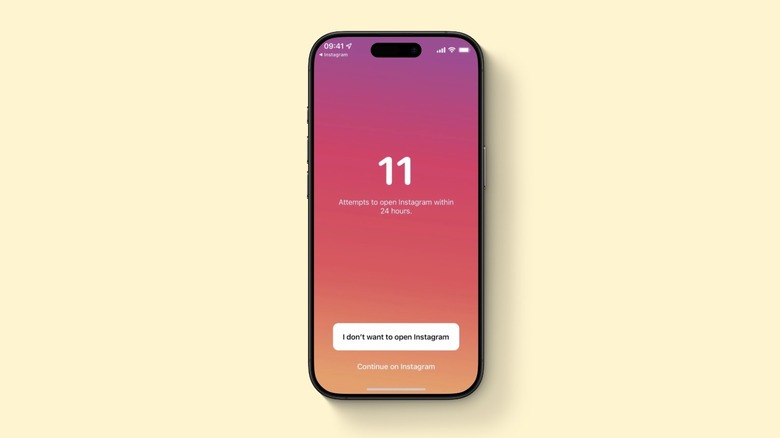
The most effective way to break a habit is not to ban it, but to make it slightly more annoying. This is the core philosophy of One Sec. Most of our doomscrolling begins with muscle memory—you finish a task, and before you realize it, your thumb has navigated to Instagram. One Sec interrupts this automation by forcing a breathing exercise or a specific delay before the app opens.
When you tap a blacklisted app, One Sec takes over the screen and instructs you to take a deep breath. A timer counts down for several seconds. In that brief window, your brain has the chance to catch up with your fingers. You are then asked if you still want to open the app or if you’d rather do something else.
Why It Works
One Sec excels at building intentionality. By adding just enough friction-based intervention, it helps you realize how often you reach for your phone out of pure reflex. It leverages behavioral psychology to stretch the gap between the stimulus (boredom) and the response (scrolling). Over time, your brain begins to associate the "breathing prompt" with the app, often leading you to close the phone before the timer even finishes.
2. Minimalist Phone: Reclaiming Your Home Screen
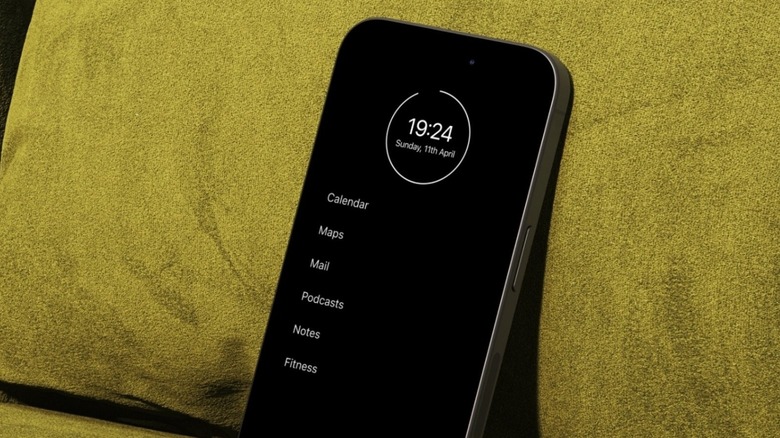
Your phone’s home screen is designed to be a digital candy store. Bright, saturated icons for YouTube, TikTok, and Instagram are visual triggers that keep you coming back. Minimalist Phone takes a radical approach to mobile design by stripping away all graphics and replacing them with a simple, text-based list on a monochrome background.
For Android users, this is a total launcher replacement. For iPhone users, similar minimalist home screen apps for iphone utilize widgets and custom icons to achieve the same effect. By removing the visual dopamine triggers, the app makes your phone feel like a tool rather than a toy.
Why It Works
This UI design change targets the very first step of the addiction cycle: the visual cue. Without the bright red notification badges and the familiar brand logos, the urge to tap is significantly reduced. It also features a built-in notification filter, ensuring that only the most critical pings reach you, which is essential for managing notification management and reducing social media fatigue.
3. Opal & Roots: Deep Focus and Monk Mode
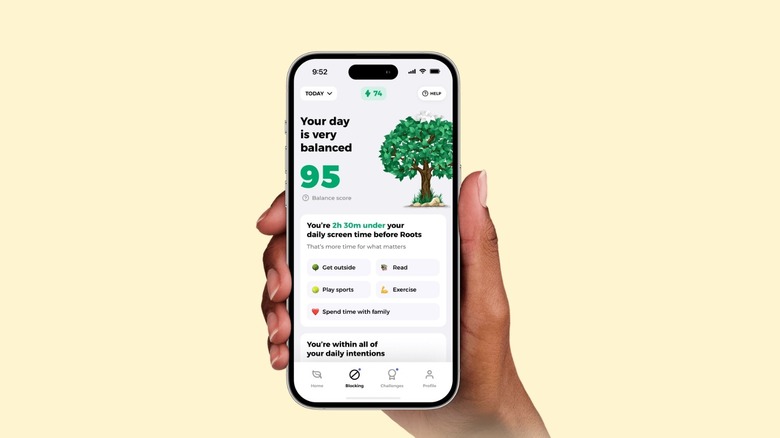
If you find that you simply cannot resist the urge to bypass your own limits, you need a more heavy-duty solution. Opal and Roots are the heavyweights in the world of strict blocking features. These apps use a local VPN (on iOS) or accessibility services (on Android) to create a barrier that is difficult to deactivate once a session has started.
Opal’s "Deep Focus" mode is particularly famous because, once it is active, you cannot simply delete the app or turn off the timer to get back into your social media. It creates an unbreakable wall. Roots offers a similar "Monk Mode" which is designed for those who need to go completely dark for several hours to maintain work productivity.
Why It Works
These are the best focus apps for work productivity and phone addiction because they remove the option of choice. When you are in a state of digital dependency, your "future self" knows you need to work, but your "present self" wants dopamine. Opal and Roots allow your future self to lock the doors and throw away the key for a set period. They are also excellent for those who need to block social media on a schedule, such as during the 9-to-5 workday or before bed.
4. Repscroll: Gamifying Physical Habits
Repscroll represents a new frontier in gamified digital detox apps to build habits. Instead of just blocking your access, Repscroll requires you to "pay" for your scrolling time with physical activity. Want 10 minutes of TikTok? You might need to do 20 squats or 10 pushups.
The app uses your phone’s camera and AI motion tracking to verify that you are actually doing the exercises. It turns the passive, sedentary nature of doomscrolling into an active habit replacement strategy. This is often called the Swap Strategy: you don't just stop a bad habit; you replace it with a good one.
Why It Works
Repscroll addresses the physical toll of phone addiction. By linking movement to screen time, it forces a conscious trade-off. It’s much harder to justify an hour of mindless scrolling if you have to do 200 burpees to get it. This creates a powerful incentive for impulse control and helps restore a healthier screen-life balance by ensuring that your body moves as much as your thumbs do.
5. ScreenZen & Freedom: Technical Bypass Prevention
One of the biggest issues with standard screen time settings is how easy they are to ignore. "Ignore limit for today" is the most clicked button on many iPhones. ScreenZen and Freedom are designed with technical reliability in mind, specifically targeting these loopholes.
For Android users, ScreenZen can integrate with Samsung Knox or other enterprise-level management tools to ensure that its "Locked Mode" is truly uninstallation-proof. Freedom is the go-to choice for cross-platform users, as it can sync your blocks across your phone, tablet, and computer simultaneously.
Why It Works
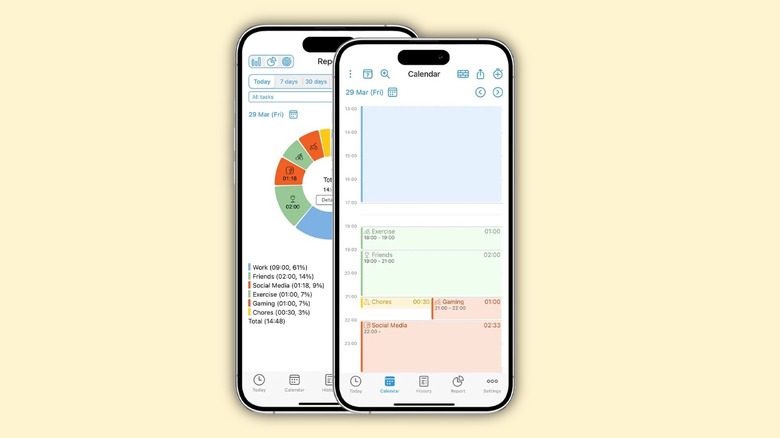
These tools provide screen time trackers with detailed app usage analytics that go far beyond what Apple or Google offer natively. By seeing exactly how many times you pick up your phone and which apps are your biggest "time leaks," you can set more surgical blocks. Freedom’s ability to block the entire internet or specific domains across multiple devices is a game-changer for those who find themselves switching from their phone to their laptop just to keep scrolling.
FAQ
Which app is most effective for reducing phone addiction?
The most effective app depends on your specific behavior. If your scrolling is impulsive muscle memory, One Sec is highly effective because it adds friction at the exact moment of the urge. If you are a power user who constantly bypasses limits, Opal or ScreenZen are better choices due to their strict blocking and bypass prevention features.
What are the best free screen time apps?
While many of the premium features require a subscription, ScreenZen offers a very robust free version that includes many of its core blocking and friction features. Additionally, the native "Screen Time" (iOS) and "Digital Wellbeing" (Android) tools are free, though they are much easier to bypass than third-party digital detox apps.
Can you set screen time limits that are difficult to bypass?
Yes, apps like Opal, Roots, and Freedom offer "Deep Focus" or "Locked" modes. These use administrative permissions or local VPN configurations to prevent you from disabling the block or deleting the app until the timer expires. For Android users, look for apps that utilize Samsung Knox for an extra layer of bypass prevention.
How do screen time apps help manage device usage?
These apps work by interrupting the dopamine-driven feedback loops of modern apps. They provide intentionality through delays, remove visual triggers by changing the UI, and enforce boundaries through scheduled blocks. They also provide usage reporting that helps you identify which specific apps are causing your digital dependency.
Is there a screen time app that works on both iPhone and Android?
One Sec and Freedom are among the best screen time apps that offer versions for both iOS and Android. Freedom is particularly strong for multi-device households because it can sync your blocking sessions across your phone, tablet, and Mac or Windows PC simultaneously.
Final Thoughts: Start Small
Breaking a doomscrolling habit is a marathon, not a sprint. You don’t need to install all five of these apps today. In fact, doing so might lead to "friction fatigue," where you find the restrictions so annoying that you delete everything and go back to your old ways.
Instead, I recommend starting with one app this week. If you find yourself opening apps without thinking, start with One Sec. If your home screen feels like a distracting mess, try a minimalist phone interface apps approach. The goal isn't to become a digital hermit; it's to regain intentionality so that when you do use your phone, you are the one in control, not the algorithm.