Our Top Picks
- Best Task Management: Todoist offers the most seamless blend of calendar views and sub-tasks for a streamlined mobile workflow.
- Best Focus Tool: Focus Friend provides a gamified approach to the pomodoro technique that effectively battles digital distractions.
- Best Document Utility: Adobe Scan utilizes advanced OCR technology to turn your phone into a high-fidelity portable scanner.
- Best File Manager: Files by Google is the gold standard for digital decluttering and cloud storage integration on any device.
- Best Smart Notes: Notein prioritizes privacy and local-first information architecture while offering powerful Google Gemini integration.
Modern mobile workflows demand more than just basic tools; they require integrated systems to combat the 1,200 daily app-toggles that drain our time. The best Android productivity apps for 2026 focus on streamlining mobile workflows through specialized tools. Top recommendations include Todoist for integrated task and calendar management, Focus Friend for gamified deep work sessions, and Notein for organized note-taking. Additionally, Files by Google provides essential file organization while Adobe Scan offers high-quality document digitization to help users maintain an efficient digital workspace.
| App Name | Best For | 2026 Pricing | Minimum Specs |
|---|---|---|---|
| Todoist | Time Blocking & Planning | Free / $48/year Pro | 2.0 GHz CPU / 2GB RAM |
| Focus Friend | Deep Work Sessions | Free / $3.99/mo | 1.8 GHz CPU / 2GB RAM |
| Adobe Scan | Paperless Office Solutions | Free / Subscription | 2.2 GHz CPU / 3GB RAM |
| Files by Google | Digital Decluttering | Free | Any modern Android OS |
| Notein | Information Architecture | Free / One-time Purchase | 2.0 GHz CPU / 2GB RAM |
The way we use our phones changed significantly between 2024 and 2026. We are no longer just "checking emails" on the go; we are managing entire departments, editing complex documents, and orchestrating massive projects from the palm of our hands. However, this increased capability has come with a cost. Research from the Harvard Business Review highlights that the average professional switches between apps and windows more than 1,200 times a day, leading to a collective loss of four hours of productive time every week.
To combat this "toggle tax," the global productivity app market is projected to reach 14.46 billion dollars in 2026, driven by the increasing adoption of mobile-first and cloud-based solutions. As your editor, I’ve spent the last six months testing dozens of tools to find the ones that actually help you regain those four hours. Whether you are a student or a remote professional, these five tools are essential for mobile workflow optimization in today's AI-driven landscape.
1. Todoist: Mastering Integrated Task Management
One of the biggest hurdles in daily planning is the disconnect between your to-do list and your calendar. You might have ten tasks written down, but without seeing them against your available time slots, you are set up for failure. This is where Todoist excels in 2026. It has evolved from a simple list maker into a powerhouse for managing tasks and calendar in one Android app.
The app uses an intuitive interface that allows for advanced time blocking. You can drag a task directly into a time slot, ensuring that your goals are realistic. For those of us who live on our home screens, Todoist offers some of the most functional home screen widgets in the ecosystem. You can view your "Upcoming" view or specific project lists without ever opening the app, which reduces the temptation to get distracted by social media notifications.
Furthermore, its cross-platform synchronization is flawless. Whether you add a task via your WearOS watch while on a run or through the web browser on your laptop, the Android app updates instantly. For power users, the Pro version at $48 per year unlocks reminders and advanced filters that are necessary for complex project management.
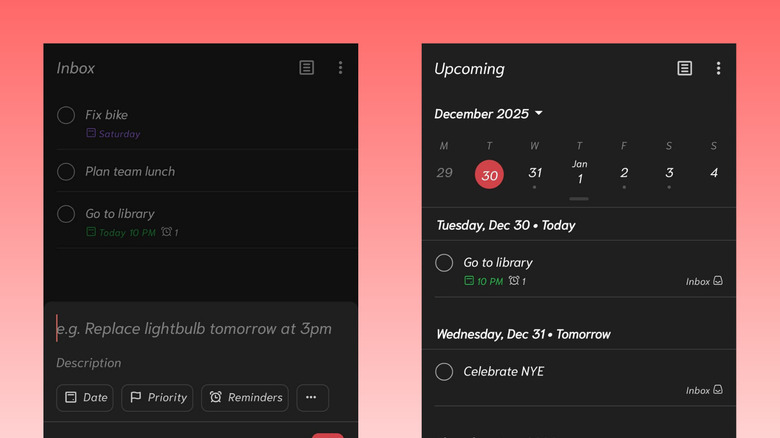
Pro Tip: Use the natural language processing feature. Instead of clicking through menus, just type "Email Sarah about the budget every Friday at 10am" and Todoist will automatically set the recurring task and reminder.
2. Focus Friend: Gamified Concentration for Students
Digital distractions have become more sophisticated, making deep work sessions harder to maintain. For students and lifelong learners, Focus Friend has become a top rated Android apps for focus and deep work by turning concentration into a game. Instead of just a boring timer, you are tasked with looking after a digital "friend" that only thrives when you stay off your phone.
The app is built around the pomodoro technique, allowing you to set sessions ranging from five minutes to two hours. If you leave the app to check a notification, your progress is reset, and your digital companion loses "health." This psychological layer of accountability is incredibly effective. It’s easily among the best Android productivity apps for students 2026 who struggle with the constant pull of short-form video apps.
Beyond the gamification, Focus Friend provides detailed analytics on your focus trends. You can see which times of day you are most productive and which apps are your biggest "distraction triggers." This data-driven approach to deep work sessions helps you build better long-term habits. As the best Android apps for focus, it succeeds because it makes the act of ignoring your phone rewarding rather than restrictive.

3. Adobe Scan: The Core of Your Paperless Office
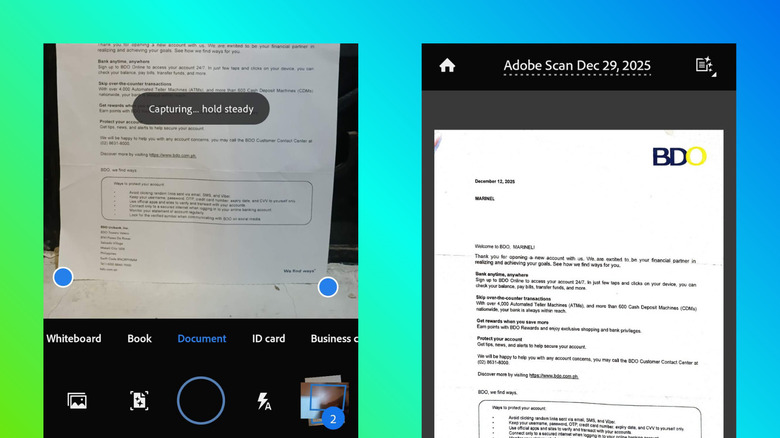
In 2026, there is no excuse for a desk cluttered with paper receipts, contracts, or handwritten notes. Moving toward paperless office solutions is a requirement for modern efficiency. While there are many Android document scanning tools available, Adobe Scan remains the most professional and secure option, especially after the security concerns that plagued older apps in this category.
Powered by Adobe Sensei AI, the app automatically detects borders, sharpens text, and removes shadows or glares. The standout feature is its OCR technology, which stands for Optical Character Recognition. This turns a static image of a document into a searchable, selectable PDF. If you scan a ten-page contract, you can use the "Find" function to locate specific clauses in seconds.
The app handles multiple formats, from standard A4 to US Letter, and even business cards. Once a document is digitized, it is stored in the Document Cloud, allowing for easy sharing and collaboration. For anyone serious about streamlining mobile workflow with Android productivity tools, having a high-quality scanner in your pocket is non-negotiable.
4. Files by Google: Essential File Organization
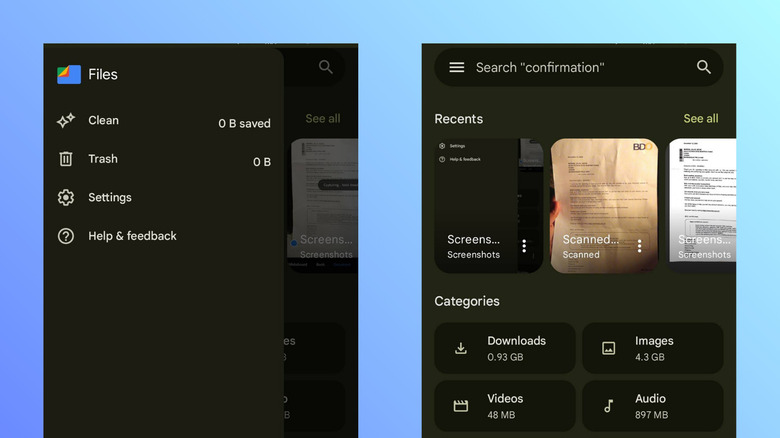
As our mobile devices become our primary computers, our internal storage can quickly become a chaotic mess of downloads, screenshots, and duplicate files. Files by Google is one of the top Android file managers because it prioritizes digital decluttering. It doesn't just show you your files; it actively suggests which ones you should delete to save space.
The app’s cloud storage integration is a major highlight. You can move large files to Google Drive or other services with a single tap, keeping your local storage lean. This is vital for maintaining the speed and responsiveness of your device. Security is also a core focus; the "Safe Folder" feature allows you to hide sensitive documents behind a biometric lock or PIN, ensuring that your private information architecture remains private.
In a world where we handle hundreds of files weekly, the search functionality in Files by Google is a lifesaver. It uses the same powerful search technology found in Google’s search engine, allowing you to find a specific PDF or image even if you can't remember which folder it's in.
Pro Tip: Use the "Nearby Share" feature within the app to send large videos or folders to other Android or ChromeOS devices without using any data or cloud bandwidth.
5. Notein: Smart Note-Taking and AI Integration
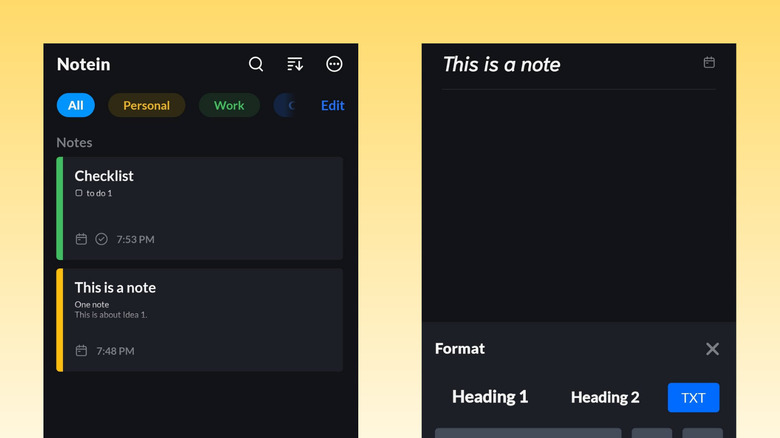
The era of simple note taking apps for Android users is evolving into something much more powerful. Notein represents the new wave of AI-native applications. By 2026, the AI-powered assistant Google Gemini reached over 450 million monthly users, and Notein leverages this to automate the more tedious parts of note-taking.
Notein allows for a voice-first approach, which is often four times faster than typing on a mobile keyboard. The AI can summarize long meetings, extract action items from voice memos, and even suggest relevant tags for better information architecture. While AI is a massive trend—noting that five of the top ten most-downloaded productivity apps in 2025 were AI-powered—Notein stands out by offering local-first data privacy.
This means your most sensitive thoughts and business strategies are stored on your device and encrypted with end-to-end protocols, rather than sitting unencrypted on a corporate server. Its cross-platform synchronization ensures that your notes are available on your tablet or desktop whenever you need them, maintaining a seamless flow of information.
FAQ
What are the best free productivity apps for Android?
Google offers a comprehensive suite of free tools including Google Calendar, Keep, and Files by Google. Additionally, the free versions of Todoist and Adobe Scan provide enough functionality for most casual users without requiring a subscription.
How can I improve my productivity using an Android phone?
Start by auditing your notification settings and using Focus Friend to block distracting apps. Implement time-blocking with a dedicated task manager and move toward a paperless workflow by digitizing physical documents as soon as you receive them.
Which Android apps are best for time management?
Todoist is the premier choice for combining task lists with calendar views. For those who prefer a more rigid structure, apps that support the pomodoro technique or time-tracking, like Focus Friend, are highly effective.
Are there built-in productivity tools on Android devices?
Yes, most Android devices come with "Digital Wellbeing" settings that allow you to set app timers and "Bedtime Mode." Many manufacturers also include basic note-taking and file management apps, though third-party options like Notein often offer more advanced features.
How do I sync my Android productivity apps with a computer?
Most modern Android productivity tools offer cloud-based synchronization. By signing into the same account on your phone and a web browser or desktop app (like with Todoist or Notein), your data will stay updated across all devices automatically.
The shift in 2026 is moving away from having a dozen separate apps toward having a cohesive system. By choosing tools that prioritize integration, AI-assisted automation, and security, you can reclaim your time and focus on the work that actually matters. It's time to audit your current app-toggling habits and build a mobile workflow that works for you, not against you.