Quick Facts
- Launch Date: July 7, 2026
- Default Status: Opt-out required for adult public accounts
- The @-Mention Risk: Any user can trigger an AI remix of your photos without notification
- Regional Edge: EU users have stronger GDPR rights than US users
- Non-Retroactive: Settings changes do not delete previously generated AI content
- Core Risk: Potential for identity fraud and creation of deepfakes from personal imagery
Meta muse spark is a generative AI model that automatically uses public Instagram photos from adult profiles to create remixed synthetic media. By default, any user can mention a public account in an AI prompt to generate new images based on that profile's content without notifying the owner. To protect your digital likeness, you must navigate to your instagram meta ai opt out settings to disable automated image harvesting.
Understanding the Remix: Meta Muse Spark Feature Explained
As a mobile editor monitoring the intersection of hardware and neural processing, I have observed that Meta Muse Spark represents one of the most aggressive deployments of consumer-facing AI to date. Developed under the umbrella of Meta Superintelligence Labs, this model is built on a specific "Three Modes" architecture overseen by Alexandr Wang. These modes—Instant, Thinking, and Contemplating—determine how much computational power is dedicated to the creative process. While Instant mode provides rapid results, the Contemplating mode utilizes a deeper recursive processing path to ensure high-fidelity outputs.
The primary mechanism that has privacy advocates concerned is the @-mention trigger. When a user enters a prompt, they can tag any public Instagram handle. The AI then applies a mechanism known as Thought Compression to index the visual data associated with that handle. This allowed meta muse spark to pull public imagery into a newly generated scene almost instantaneously. For example, a user could prompt the AI to "create a 1920s noir version of @username," and the system would pull that user’s facial features and style into a synthetic image.
Understanding how to use meta muse spark reveals that the tool was designed for friction-less creativity, but this lack of friction is precisely where the permissions issues arise. There is no notification sent to the account owner when their image is being remixed. During its initial launch window from July 7 to July 10, 2026, the meta muse spark remix feature explained how easily public data could be transformed into synthetic media creation. Although the tagging tool was briefly removed following immediate backlash, the underlying algorithmic training data remains heavily reliant on the content users upload every day.
The permissions for public accounts are broad by default. If your account is set to public, you are essentially providing a standing "yes" to these automated systems. Meta argues this is part of the "legitimate interest" of evolving its AI ecosystem, but for the average user, the discovery of their meta muse spark permissions for public accounts often comes as a shock.
Deepfake Risks and Digital Likeness: Why Privacy Matters
The scale of this operation is unprecedented. Meta has committed a staggering $135B in AI Capex to fuel these models, and that investment requires a massive amount of data. It is a known fact that Meta has admitted it uses public text and photos from adult Facebook and Instagram accounts dating back as far as 2007 to train its generative artificial intelligence models. This means nearly two decades of your digital life are currently serving as the foundation for synthetic media creation.
The meta muse spark deepfake risks instagram presents are not merely theoretical. When an AI can perfectly replicate your digital likeness from a single @-mention, the door opens for online impersonation risks and sophisticated identity verification fraud. A malicious actor could generate a series of convincing "candid" photos of you in compromising situations or use your likeness to bypass biometric security measures.
"The shift from 'data as information' to 'data as a generative seed' marks a dangerous era for mobile users. Once your biometric markers are ingested by a model like Muse Spark, you lose the ability to 'delete' that data because it has been compressed into the model's neural weights." — Security Specialist, ESET Research.
There is a significant difference when considering meta muse spark vs instagram private account. Moving to a private account is the only 100% effective way to stop the real-time @-mention harvesting, as it locks the AI out of your current and future posts. However, even then, users often wonder how to see if meta muse spark used my images in the past. Unfortunately, Meta provides no gallery or log of AI generations that utilized your likeness, making it nearly impossible to track the spread of your synthetic twin once it's created.
Furthermore, public sentiment is clearly at odds with these corporate policies. A survey of 1,000 Meta users in Germany found that while 75% were aware of these AI training plans, only 7% actually wanted their personal data used for these purposes. This gap between user consent and corporate practice is why understanding your data privacy rights and generative AI security is no longer optional for smartphone owners.
Step-by-Step: Instagram Meta AI Opt Out Settings
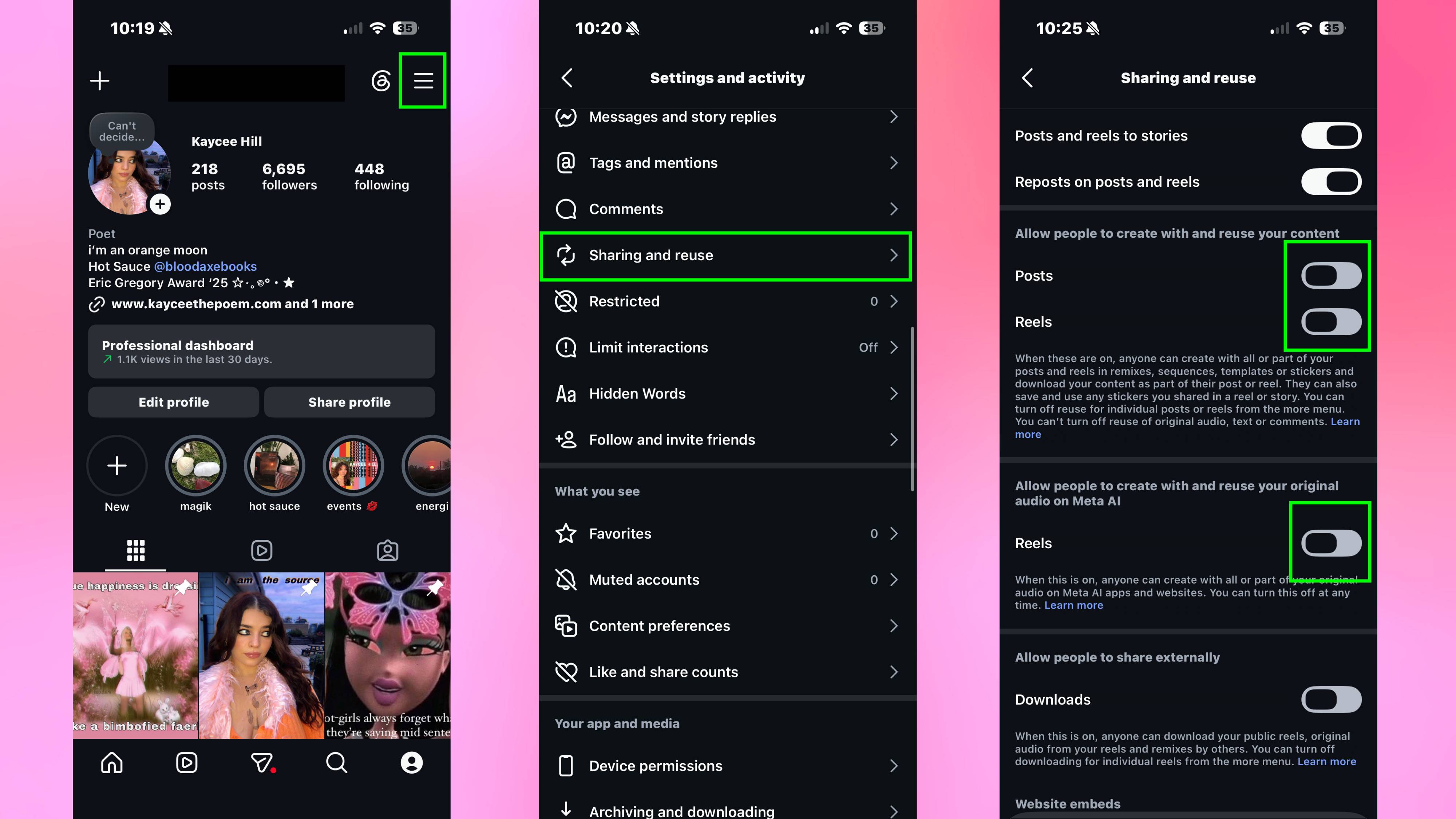
To protect your digital identity, you must actively manage your settings. Meta does not make these controls front-and-center; you have to dig into the sub-menus of your mobile app. Here is the direct path for how to stop meta muse spark from using my photos.
- Open Instagram and navigate to your Profile.
- Tap the Three Horizontal Lines (Menu) in the top right corner.
- Select Settings and activity.
- Scroll down to the Sharing and reuse section.
- Locate the toggles for Allow people to reuse your posts and Allow people to reuse your reels.
- Switch both to Off.
It is important to distinguish between "Muting" the AI features and actually opting out of the training. Muting simply hides the Meta AI button from your chat interface; it does not stop the backend system from harvesting your data. For a complete "Right to Object," users in certain regions must follow different protocols.
| Jurisdictional Feature | U.S. Objection Rights | E.U. GDPR Rights |
|---|---|---|
| Legal Basis | Terms of Service Agreement | Legitimate Interests / GDPR Art. 21 |
| Opt-Out Method | Manual toggle in settings | "Right to Object" Form + Settings |
| Notification | No notification required | Mandatory disclosure of data use |
| Compliance Status | Platform discretion | Heavily regulated via DPA |
For U.S.-based users, I highly recommend finding the "Privacy Center" within your Meta account and looking for the "AI at Meta" section. There, you may find an "Objection Form." Filling this out is a formal step that tells Meta you do not want your data used for future model training beyond Muse Spark.
FAQ
What is Meta AI muse spark?
Meta Muse Spark is a generative AI feature within the Meta ecosystem that allows users to create and remix images using text prompts. It is capable of pulling visual data from public Instagram profiles to generate synthetic "deepfake" versions of real people combined with artificial backgrounds or styles.
Is Muse Spark free?
Technically, Muse Spark is free to use for anyone with an active Instagram or Facebook account. However, as the saying goes in the tech world, if you aren't paying for the product, you are the product. The tool is subsidized by the vast amount of user-generated data Meta harvests from its platforms to train the underlying models.
Is Meta Muse Spark good?
From a technical standpoint, the model is highly capable, utilizing advanced Thought Compression and the Three Modes architecture to produce high-resolution synthetic media. However, its "goodness" is subjective; while creative and fast, it has been widely criticized by privacy advocates for its lack of user consent and potential for misuse in creating deepfakes.
Where can I get Muse Spark?
Muse Spark is integrated directly into the Meta AI interface on Instagram, Facebook, and WhatsApp. You do not need a separate app download. On Instagram, it is typically accessed through the DM search bar or the Meta AI icon, though the specific @-mention feature is subject to regional availability and ongoing policy changes.
Professional Privacy Checklist
As we navigate this era of automated image harvesting and platform safety guardrails, I recommend all mobile users perform a "Privacy Audit" every few months. The landscape of what platforms can do with your photos changes faster than the hardware in your pocket. Use this checklist to stay ahead of the curve:
- Audit Your Account Visibility: If you do not have a professional reason to be public, switch your account to Private. This is the strongest defense against meta muse spark.
- Disable All Sharing Toggles: Go through the Sharing and reuse menu and ensure no one is permitted to "remix" your content without your knowledge.
- Review Cloud Syncing: Check your smartphone’s native photo app (like Google Photos or iCloud). Ensure you are not inadvertently syncing your entire camera roll to a public-facing cloud service that Meta components might have access to via API.
- Submit the Objection Form: If you are in the U.S. or E.U., find the specific "Right to Object" form in Meta’s Privacy Center to formally withdraw your data from AI training.
- Watermark High-Value Photos: If you are a creator who must stay public, consider subtle watermarking or using "Glaze" software that adds a layer of digital noise to prevent AI models from accurately scraping your facial features.
- Monitor Your Digital Footprint: Periodically search for your own username or name within the Meta AI prompt tool to see if the system allows you to be "remixed."
By taking these proactive steps, you can enjoy the connectivity of social media while ensuring that your digital likeness remains yours alone. The rise of meta muse spark is a reminder that in the world of smart devices, the most important feature isn't the camera—it's the privacy shield you put over it.