Quick Facts
- Codename: Apple is internally referring to this update as Project Rave.
- Release Timeline: Expect the official reveal during WWDC 2026, likely between June 8 and June 12.
- Primary Objective: A major under-the-hood cleanup designed to extend ios 27 battery life by removing outdated code.
- Core Philosophy: Prioritizing system maturity and software refactoring over flashy visual redesigns.
- Device Impact: Significant ios 27 battery life improvements for old iphones are expected due to reduced processing overhead.
- Key Strategy: Improving energy efficiency through the elimination of technical debt and optimized system resource management.
Apple aims to extend ios 27 battery life through a comprehensive system cleanup focused on removing legacy code and rewriting core features. By reducing technical debt and optimizing background task management, the operating system can run more efficiently, consuming less power during daily tasks and improving overall system responsiveness.
The Rave Strategy: Why Code Cleanup Equals Longer Life
For years, smartphone users have been caught in a cycle of trading endurance for features. Every time a new update drops with shiny widgets or complex animations, the hardware has to work harder, often leading to a noticeable dip in daily runtime. With the upcoming release of iOS 27, Apple is reportedly shifting its focus. The internal project, known by the codename Rave, represents a pivot toward what engineers call software refactoring. This isn't about adding more to the plate; it's about cleaning the kitchen.
In the world of software development, technical debt refers to the accumulated mess of old, inefficient code that remains in a system because it is easier to patch than to rewrite. Over time, this debt creates a heavy load on the processor. According to industry reports, Apple is developing iOS 27 with a focus on a major under-the-hood cleanup designed to extend iPhone battery life by removing outdated code and rewriting core features. When the OS does not have to navigate through layers of legacy instructions to perform a simple task, it uses less energy.
This strategy is not entirely unprecedented. Back in 2009, Apple released OS X Snow Leopard for the Mac. It was an update that famously added almost no new features, focusing entirely on performance and stability. By taking this same approach with ios 27 code cleanup, Apple is ensuring that the hardware-software integration is tighter than ever. For the average user, this means the phone stays cooler during use and stays powered on longer throughout the evening. This shift toward operating system maturity is a sign that Apple is prioritizing the long-term health of its device ecosystem over short-term marketing hype.
The concept of energy efficiency in this context goes beyond just turning off background apps. It involves how ios 27 performance optimization handles system calls. Every time your phone checks for a signal, pings a GPS satellite, or refreshes a social media feed, it uses a burst of power. By streamlining the way the OS manages these requests, Apple can reduce the frequency and intensity of these power spikes. This is how ios 27 code cleanup boosts battery without requiring a physically larger cell inside the phone.
iOS 27 vs iOS 26: A Battery Life Comparison
When we look back at the previous year, iOS 26 was a feature-dense release. It brought massive changes to how we interact with our lock screens and introduced more complex AI-driven suggestions. While these features were impressive, they came at a cost. Many users reported that their devices felt warmer and that they were reaching for their chargers earlier in the day. This led to a focus on ios 27 stability improvements for battery drain as a primary goal for the next cycle.
The following table highlights the fundamental shift in philosophy between the two versions:
| Feature/Focus | iOS 26 | iOS 27 |
|---|---|---|
| Primary Goal | Feature Expansion | System Efficiency |
| User Interface | Major Visual Redesigns | Subtle Refinements |
| Processing Load | High (Feature Bloat) | Low (Refactored Code) |
| Background Tasks | Aggressive Fetching | Optimized Management |
| Hardware Focus | Latest Pro Models | Universal Compatibility |
| Endurance Strategy | Adaptive Power Mode | Core Code Optimization |
The ios 27 vs ios 26 battery life comparison reveals that while iOS 26 focused on what the phone could do, iOS 27 focuses on how the phone feels. Reports indicate that the iOS 27 update aims to increase device endurance across all compatible iPhone models by reducing unnecessary background processes. This is particularly important for users who don't upgrade their phones every year.
One of the most significant ios 27 stability improvements involves how the system handles what we call the "idle state." Even when your phone is sitting on a desk with the screen off, it is busy. It is indexing photos, updating weather data, and maintaining a connection to your Apple Watch. In iOS 26, these tasks were often handled in a way that prevented the processor from entering its lowest power-saving state. In the new version, better system resource management allows the device to "sleep" more deeply, preserving juice for when you actually need to use it.
Breathing New Life into Old Devices: Legacy iPhone Support
One of the biggest concerns for any iPhone user is how a new software update will affect an older device. We have all heard the stories of updates "slowing down" older phones. However, because this specific update focuses on efficiency, ios 27 battery life improvements for old iphones are actually a core pillar of the release.
When software is bloated, older processors have to run at maximum clock speeds just to keep the interface smooth. This generates heat, and heat is the number one enemy of battery health. By stripping away legacy code, Apple reduces the workload on aging chips. This means an iPhone 14 or iPhone 15 running iOS 27 might actually run cooler and last longer than it did on previous versions. This commitment to legacy device support is essential as consumers hold onto their devices for four or five years instead of two.
Furthermore, the rumored introduction of a thinner "iPhone Air" model has likely pushed Apple toward this efficiency-first mindset. Thinner phones have less physical space for batteries. To make a slim device viable, the software must be incredibly lean. The ios 27 performance optimization techniques developed for these new, slim designs will trickle down to benefit every device in the lineup. It’s a win-win for everyone from the early adopter with the latest flagship to the student using a hand-me-down model.
New Features, Less Power: Siri and UI Refinements
Even though the focus is on stability, Apple isn't ignoring new features entirely. The difference here is how those features are implemented. For instance, Siri is expected to undergo a significant UI change, moving its visual presence into the Dynamic Island. While this looks better, the real magic is happening in the background.
Apple is refactoring how AI models interact with the local hardware. Instead of Siri constantly keeping high-power neural engines on standby, iOS 27 uses a more modular approach to hardware-software integration. It only wakes up the necessary components of the chip for the specific task at hand. This ios 27 performance optimization tips for battery usage suggest that even with advanced AI capabilities, the impact on your daily percentage drop will be minimal.
Other UI refinements, like the rumored Home Screen Undo/Redo function, are being built using modern coding frameworks that are natively more efficient than the legacy code they replace. By focusing on operating system maturity, Apple is ensuring that the interface is snappy and responsive without being a resource hog.
How to Prepare: Best iOS 27 Settings for Long Battery Life
While the OS does much of the heavy lifting, there are still ways you can maximize your results once you install the update. To get the most out of the ios 27 battery life improvements, you should review your settings to ensure they align with the new system resource management protocols.
Here are the best ios 27 settings for long battery life:
- Optimize Auto-Brightness: The path has remained consistent but is more critical than ever. Go to Settings > Accessibility > Display & Text Size and scroll to the bottom to ensure Auto-Brightness is toggled on. This allows the OS to use its new, more granular light-sensing algorithms.
- Refine Background App Refresh: Rather than turning it off entirely, iOS 27 allows for more specific control. Go to Settings > General > Background App Refresh and select only the apps that truly need real-time data.
- Leverage Adaptive Power Mode: Building on the foundation of previous versions, the new low power mode integration is more seamless. It can now be scheduled to trigger at specific battery percentages or during certain times of the day through the Shortcuts app.
- Monitor Battery Health: Check Settings > Battery > Battery Health & Charging. iOS 27 provides more detailed insights into which specific system processes are consuming the most power.
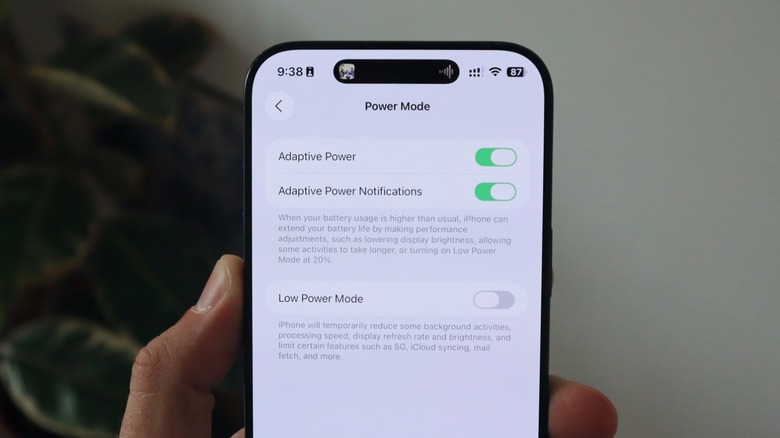
These ios 27 performance optimization tips for battery are designed to complement the internal work Apple has done. By combining a cleaner OS with smart user habits, you can significantly push the boundaries of what your iPhone’s hardware can achieve.
FAQ
Does iOS 27 drain battery faster?
No, the primary focus of iOS 27 is actually the opposite. According to industry reports, iOS 27 will prioritize system stability and performance over major visual redesigns, following a strategy similar to the 2009 Snow Leopard update to maximize battery longevity. While early developer betas might show some instability, the final public release is designed to be the most energy-efficient version of iOS in years.
How can I improve my battery life on iOS 27?
You can improve your results by taking advantage of the new system resource management tools. Ensure that you have Auto-Brightness enabled via Settings > Accessibility > Display & Text Size. Additionally, use the enhanced battery health settings to identify and limit background processes for apps that you do not use frequently.
Is iOS 27 battery life better than previous versions?
Yes, early indications and reports on Project Rave suggest that ios 27 battery life will be superior to iOS 26. This is because Apple is focusing on removing technical debt and legacy code, which reduces the overall processing load on the device. This "Snow Leopard" style update is specifically intended to fix the battery drain issues reported in more feature-heavy previous versions.
Does the iOS 27 beta cause battery issues?
Beta software is, by definition, unfinished. Developer and public betas often contain debug code that runs in the background, which can lead to temporary battery drain. However, these issues are typically resolved as the software nears its final release. If you are concerned about daily endurance, it is best to wait for the stable public release in the fall.
What are the best tips for extending battery life in iOS 27?
The best tips for extending battery life in iOS 27 include using the new low power mode integration settings and auditing your location services. By navigating to Settings > Privacy & Security > Location Services, you can ensure that apps only access your GPS when absolutely necessary, which preserves significant amounts of energy throughout the day.