Quick Facts
- Best for Detail: InfiRay P2 Pro (256x192 resolution).
- Best for Clarity: FLIR One Pro (MSX Technology).
- Pro Benchmark: NETD ≤50mK.
- Weight Leader: InfiRay P2 Pro (9g).
- Temperature Range: Entry models typically cover -20°C to 400°C.
- Connectivity: Available in USB-C, Lightning, and wireless options.
- Core Technology: Relies on microbolometer arrays, not standard CMOS sensors.
A smartphone thermal camera is a specialized hardware attachment that transforms your mobile device into a powerful heat-sensing tool. Unlike standard cameras, these devices use microbolometer arrays to detect long-wave infrared radiation, allowing users to perform non-contact temperature measurement through hardware attachments rather than software alone.
Hardware vs. Software: Why Apps Aren't Enough
If you search your phone’s app store for a thermal camera, you will find dozens of results promising to give your device heat vision for free. As an editor who has tested hundreds of mobile accessories, I have to be blunt: these apps are entirely decorative. The standard CMOS sensors used in modern smartphone cameras are designed to capture visible light. They are equipped with infrared filters specifically to block out the very radiation needed for thermal imaging. To see heat, you need a different kind of eye altogether.
A genuine infrared camera for smartphone use requires a microbolometer array. This is a specific type of thermal sensor that does not look for reflected light but rather for long-wave infrared (LWIR) energy emitted by objects. When you plug a smartphone thermal camera into your USB-C or Lightning port, you aren't just adding a lens; you are adding a completely different category of sensor hardware. These tiny gadgets use heat signature visualization to map temperature data onto a color palette that we can understand, typically ranging from "white hot" to "ironbow" or "rainbow" filters.
For budget-friendly infrared camera for smartphone hobbyists, understanding this distinction is the first step toward a smart purchase. You are paying for the physical sensor material, often Vanadium Oxide or Amorphous Silicon, which reacts to heat at a molecular level. No software update or clever app filter can replicate the physical reality of a microbolometer detecting a temperature gradient analysis across a room.
The Technical Pillars: Resolution, NETD, and MSX
When you start shopping for a smartphone thermal camera, the spec sheets can feel overwhelming. However, there are three primary pillars that determine how much detail you will actually see on your screen: resolution, NETD, and proprietary image fusion like MSX technology.
Thermal resolution is far lower than the megapixels we are used to in standard photography. Entry-level sensors might offer 80 x 60 pixels, while high-end consumer models reach 256 x 192 or even 320 x 240. When choosing smartphone thermal camera resolution for HVAC or professional inspections, more pixels mean you can spot smaller problems from further away. For example, the Seek Thermal CompactPRO for smartphones utilizes a 320 x 240 thermal sensor and is capable of detecting heat signatures at distances up to 550 meters.
Then there is NETD (Noise Equivalent Temperature Difference). This represents the sensitivity of the sensor. In 2026, the gold standard for smartphone thermal camera sensitivity NETD requirements is ≤50mK. A lower number means the camera can distinguish between smaller differences in temperature, which is critical for finding a slow water leak behind a thick wall or a slight temperature gradient analysis in an electrical panel.
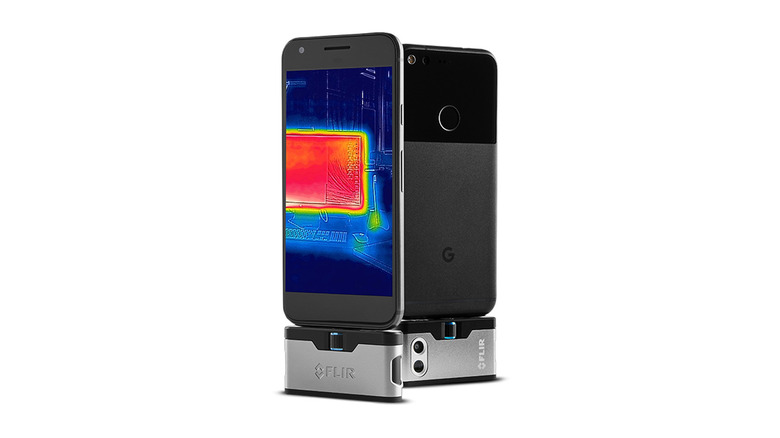
Finally, we have image fusion. Since thermal images often look "blobby" and lack context, brands like FLIR use thermal imaging attachments with MSX technology. This takes the high-contrast edges from your phone’s standard visible camera and overlays them onto the thermal data. It allows you to actually read the labels on a circuit breaker or see the outline of a window frame while looking at the heat data, providing much-needed visual context.
The Showdown: FLIR One vs InfiRay P2 Pro
In the current market, the two biggest names are FLIR and InfiRay. Choosing between the FLIR One vs InfiRay P2 Pro usually comes down to whether you prioritize clever software and ruggedness or pure sensor performance and portability.
The FLIR One Pro is a well-rounded tool that features an internal battery, meaning it won't drain your phone's power as quickly. However, it is significantly bulkier at 36.5g. On the other hand, the InfiRay P2 Pro is a marvel of miniaturization. At only 9g, it is roughly the size of a fingernail, making it one of the most compact thermal camera sensors for iPhone USB-C or Android users.
| Feature | FLIR One Pro | InfiRay P2 Pro |
|---|---|---|
| Thermal Resolution | 160 x 120 | 256 x 192 |
| Weight | 36.5g | 9g |
| Refresh Rate | 8.7 Hz | 25 Hz |
| Thermal Sensitivity | < 70mK | ≤ 40mK |
| Power Source | Internal Battery | Phone Battery |
| Special Feature | MSX Edge Detail | Macro Lens Attachment |
While FLIR has the edge in image clarity thanks to MSX, the InfiRay P2 Pro offers a much higher refresh rate (Hz), resulting in a smoother video feed as you scan a room. For those looking for FLIR One vs InfiRay P2 Pro for Android specifically, the P2 Pro often wins on raw sensor specs, while FLIR wins on the user-friendly interface and the ability to adjust surface emissivity adjustment within the app to get more accurate readings on shiny surfaces like copper or glass.
The FLIR ONE Edge Pro wireless thermal camera features a thermal resolution of 160 x 120 pixels and can measure temperatures ranging from -20°C up to 400°C. This makes it a versatile choice for those who don't want a physical plug-in connection.
Real-World Use Cases: From HVAC to DIY
While these devices look like toys, they are powerful diagnostic tools. In my time reviewing mobile accessories, I have found that a smartphone thermal camera is often the most used tool in a homeowner's tech kit after a screwdriver.
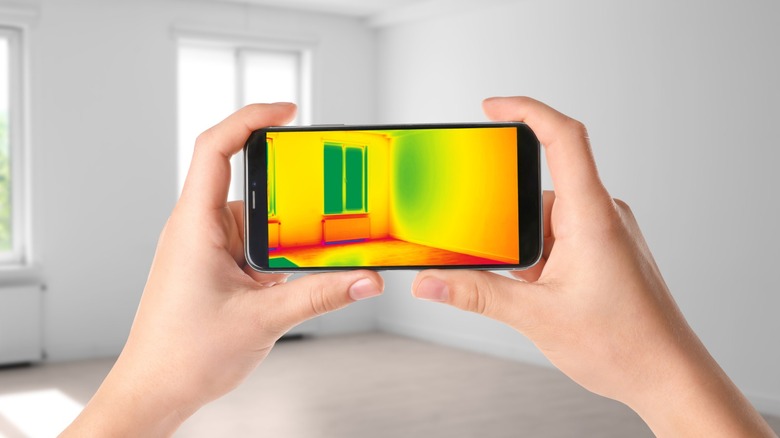
One of the most popular uses is finding building envelope insulation gaps. By scanning your walls on a cold day, you can see exactly where heat is escaping. This is the best thermal camera attachment for home energy audit tasks because it allows you to visualize where weather stripping has failed or where insulation was missed during construction.
Similarly, these gadgets are essential for electrical component inspection. You can point your phone at a breaker box and immediately see if a circuit is overloaded because it will glow significantly brighter than the others. This non-contact temperature measurement is a safety game-changer for DIYers.
If you are dealing with a mysterious damp spot on the ceiling, knowing how to detect water leaks with phone thermal camera attachments can save you from tearing down the wrong section of drywall. Evaporating water is typically cooler than the surrounding area, creating a "cold spot" on the thermal map. By following that gradient, you can trace the leak back to its source at the pipe or roof.
FAQ
How do smartphone thermal cameras work?
Smartphone thermal cameras work by using a microbolometer array to detect long-wave infrared radiation, which is energy emitted as heat. This specialized sensor measures the intensity of the infrared light and converts it into an electronic signal. The accompanying smartphone app then processes this signal, mapping different temperatures to specific colors on your screen to create a visible heat map.
Can a smartphone thermal camera see through walls?
No, a smartphone thermal camera cannot see through walls in the way X-ray vision does. However, it can detect temperature differences on the surface of a wall caused by objects behind it. For example, it can reveal the location of wooden studs, hot water pipes, or missing insulation because those items change the surface temperature of the drywall in a way that is invisible to the human eye but clear to an infrared sensor.
What is the range of a smartphone thermal camera?
The range depends heavily on the sensor's resolution and the size of the object you are trying to detect. Most consumer-grade attachments are optimized for distances between 1 and 50 meters for detail work like home inspections. However, high-end models can detect a human-sized heat signature from several hundred meters away, though you won't get much detail at that distance.
Can you get a thermal camera app without an attachment?
You cannot get a functional thermal camera app without a physical hardware attachment. Standard smartphone camera sensors are physically incapable of detecting long-wave infrared radiation because they are equipped with filters that block it. Any app claiming to provide thermal imaging without a plug-in accessory is simply using software filters to change the colors of a standard visible-light photo.
Can a smartphone thermal camera detect water leaks?
Yes, a smartphone thermal camera is an excellent tool for detecting water leaks. It does this by identifying the evaporative cooling effect. Wet materials are usually cooler than dry materials as the water evaporates, appearing as dark or blue "cold spots" on the thermal display. This allows users to trace the path of moisture behind walls or under floors without invasive cutting.