Our Top Picks
The GekoGear Orbit D220 is our premier recommendation for drivers looking to modernize an older vehicle with cutting-edge safety features. It excels as an aftermarket safety retrofit by combining a high-resolution dual channel dash cam setup with sophisticated AI-driven alerts that were previously reserved for luxury car packages. For those seeking the best budget AI dash cam with collision warning, this unit provides professional-grade protection and ease of use without the need for expensive professional installation.
The GekoGear Orbit D220 is a top-tier AI dash cam designed to provide luxury-level safety features like dash cam collision warning and lane departure alerts to any vehicle. It offers a 2K dual channel dash cam setup with a simple plug-and-play installation, making it the best budget AI dash cam with collision warning for drivers who want to avoid professional hardwiring.
| Feature | Standard 1080p Dash Cam | GekoGear Orbit D220 |
|---|---|---|
| Front Resolution | 1080p Full HD | 2K Quad HD |
| Rear Resolution | N/A or 720p | 1080p Full HD |
| AI Driver Alerts | None | OrbitVision™ (FCW, LDW, PCW) |
| Connectivity | Wi-Fi 4 / Manual SD | Wi-Fi 6 (Ultra-Fast) |
| Power Source | Lithium Battery | Supercapacitor |
| Storage | Often Not Included | 32GB MicroSD Included |
OrbitVision™ AI: A Virtual Instructor for Your Car
When we talk about the evolution of imaging technology, we often focus on pixels, but in the automotive world, it is the intelligence behind the lens that truly matters. The GekoGear Orbit D220 integrates OrbitVision AI, a suite of Advanced Driver Assistance Systems (ADAS) that acts like a second pair of eyes on the road. For anyone looking at adding AI safety features to older cars with dash cams, this is the most seamless way to gain features like Forward Collision Warning (FCW) and Lane Departure Warning (LDW).
The system continuously scans the environment, calculating the distance between your vehicle and the car ahead. If you get too close too quickly, the dash cam collision warning triggers an audible and visual alert on the 3-inch screen. This isn't just a recording device; it’s an active safety tool. The OrbitVision AI technology also includes Pedestrian Collision Warning (PCW), which is invaluable in dense urban environments where visibility might be compromised by A-pillars or low light.
Furthermore, the integration of G-sensor impact detection ensures that the camera knows exactly when an incident occurs. When the sensor detects a sudden jolt or collision, it automatically locks the current footage to prevent it from being overwritten during loop recording cycles. Simultaneously, the internal GPS metadata logging attaches precise speed and location data to the file. Having this level of detail is essential for providing clear insurance claim evidence, as it proves not just what happened, but exactly where and how fast you were traveling at the moment of impact.
Visual Performance: 2K Quad HD and Night Vision
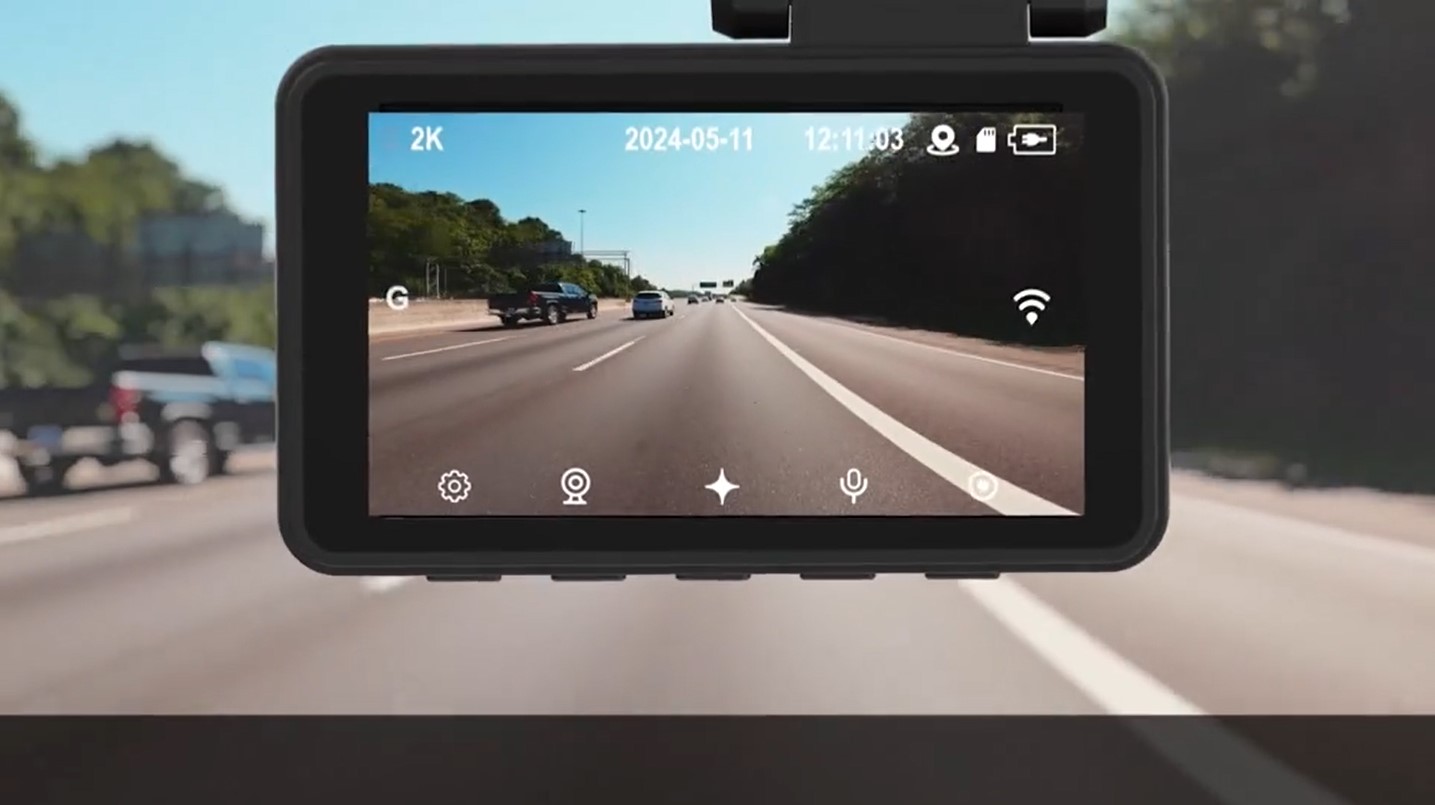
As a photography editor, I always tell people that resolution is about more than just a pretty picture—it is about usable data. The GekoGear Orbit D220 utilizes a dual-channel recording system that captures video at 2K resolution for the front camera and 1080P for the rear camera. In the context of a 2k dual channel dash cam for insurance claims, that jump from 1080p to 2K on the front sensor is the difference between seeing a car's color and being able to read its license plate from twenty feet away.
The front lens offers a 150° wide-angle field of view, which is wide enough to capture multi-lane highways without the "fish-eye" distortion that can ruin the perspective of a scene. The rear camera acts as a virtual bumper, monitoring the area behind you to capture tailgaters or rear-end collisions. Because the D220 uses high-quality CMOS sensors, the low-light video quality is surprisingly robust. It manages to balance the bright glare of oncoming headlights against the deep shadows of unlit backroads, ensuring that incident documentation remains clear regardless of the time of day.
Managing that data is equally important. The unit comes with an included 32GB microSD card, and it supports expansion up to 128GB. This is vital because 2K footage consumes more space than standard HD. The camera uses efficient loop recording cycles to manage storage, but having a larger card allows for more "protected" files to be stored before you need to manually clear the memory.
Pro Tip: Not all SD cards are created equal for dash cams. Always use a High Endurance microSD card. Constant writing and overwriting can wear out standard cards in a few months, whereas high-endurance versions are designed for the high-frequency cycles of a dual channel dash cam.
Installation Guide: From Box to Dashboard in 10 Minutes
One of the biggest hurdles for drivers looking for a dash cam with lane departure and forward collision warning is the perceived difficulty of setup. Many people assume they need to visit a mechanic or an audio specialist to wire the device into the car's fuse box. The D220 changes that narrative. This dash cam installation guide covers the standard plug-and-play setup that works for almost any vehicle on the road today.
- Mounting the Front Unit: Clean a spot on your windshield behind the rearview mirror. Use the adhesive mount to secure the front camera. The 3-inch IPS display should be visible but not obstructing your view of the road.
- Cable Routing: Tuck the power cable into the headliner and run it down the A-pillar. Most modern cars have enough gap in the trim to hide the wire completely without tools.
- Powering Up: Connect the cable to your vehicle’s USB port or 12V power outlet. The Orbit D220 will automatically power on and start recording as soon as the ignition is turned.
- Rear Camera Placement: Mount the 1080p rear camera to the back window. Run the connecting cable through the cabin along the floorboards or roofline to the front unit.
- Calibration: Use the on-screen menu to calibrate the OrbitVision AI. This ensures the lane departure and collision warnings are synced correctly with your car's height and position.
If you are wondering how to install orbit d220 dash cam without hardwiring, this method is the answer. It is non-invasive and perfect for leased vehicles or older cars where you don't want to mess with the electrical harness. However, if you want 24/7 parking mode surveillance, a separate hardwiring kit is available to provide continuous power even when the engine is off.
Built for Reliability: Supercapacitors and Wi-Fi 6
In the photography world, we worry about camera batteries dying in the cold. In the automotive world, the concern is the heat. Standard dash cams often use lithium-ion batteries, which are prone to swelling, leaking, or even failing in the extreme temperatures of a parked car. The Orbit D220 solves this by using supercapacitor technology. Supercapacitors are much more resilient to temperature fluctuations, allowing the device to operate reliably from freezing winters to scorching summer afternoons without the risk of battery-related failure.
Speed is the other pillar of the D220’s hardware suite. This is a wi-fi 6 dash cam for fast video transfer, which is a massive upgrade over the older Wi-Fi 4 or 5 standards found in budget cameras. When you need to show an officer or an insurance agent a clip on the side of the road, you don't want to wait five minutes for a 2K file to download to your phone. Wi-Fi 6 connectivity allows for near-instant smartphone app integration, letting you view, download, and share incident documentation in seconds.
The hardware build feels premium, but the real value is in the peace of mind. Knowing that the device won't fail due to heat and that you can access your files instantly makes the D220 a reliable partner for any driver. Whether it's for logging GPS metadata logging or simply having a witness for your daily commute, the reliability of a supercapacitor-powered system cannot be overstated.
FAQ
What is an AI dash cam and how does it work?
An AI dash cam uses an internal processor and specialized software algorithms to analyze the live video feed in real-time. Unlike a standard camera that simply records what it sees, an AI dash cam can identify objects like other vehicles or lane markings. It uses this data to provide active driver assistance alerts, such as warning you if you are drifting out of your lane or approaching another car too quickly.
Are AI dash cams worth the extra cost?
For many drivers, absolutely. The cost difference is often negligible when compared to the potential savings from avoiding a single accident. By providing real-time alerts like forward collision warning, an AI dash cam functions as a safety upgrade that can prevent collisions before they happen, making it a valuable aftermarket safety retrofit for older vehicles.
How does an AI dash cam detect potential accidents?
The system uses a combination of visual analysis and sensor data. The camera's AI identifies the distance and relative speed of objects in its field of view. Simultaneously, an internal G-sensor monitors for sudden changes in motion, such as hard braking or swerving. When the AI determines that the closing speed to an object is too high, it triggers a dash cam collision warning to alert the driver.
What is the difference between a standard dash cam and an AI dash cam?
A standard dash cam is a passive recording device that saves video to a memory card for later review. An AI dash cam is an active safety device. While it still records high-quality video, it also processes that video to provide real-time feedback to the driver. Features like lane departure alerts and pedestrian detection are exclusive to AI-enabled models.
Do AI dash cams require a monthly subscription?
The GekoGear Orbit D220 does not require a monthly subscription for its core AI features. Once you purchase the hardware, the OrbitVision AI safety suite, GPS logging, and Wi-Fi 6 transfers are all included at no additional cost. This makes it a great choice for budget-conscious drivers who want advanced technology without recurring fees.
Final Verdict
The GekoGear Orbit D220 stands out as a top-tier choice for any driver looking to enhance their vehicle's safety profile. By successfully bridging the gap between a high-end dual channel dash cam and a sophisticated ADAS system, it offers a level of protection that was once exclusive to new car buyers. Its 2K Quad HD resolution ensures that your insurance claim evidence is irrefutable, while the OrbitVision AI acts as a vigilant co-pilot during every mile.
For those interested in adding AI safety features to older cars with dash cams, the D220 is the most practical and high-performing solution on the market. Between the reliable supercapacitor technology and the blazing-fast Wi-Fi 6 transfers, it addresses the most common pain points of dash cam ownership. If you want the best budget AI dash cam with collision warning that is easy to install and built to last, the Orbit D220 is the upgrade your vehicle deserves.