Our Top Picks
- Photokive: The absolute gold standard for fragile, intact scrapbooks that shouldn't be touched.
- ScanMyPhotos: Best for large boxes of loose prints where cost-efficiency is the priority.
- Capture: Great for those needing quick long-term storage solutions for standard legacy media.
Professional services like Photokive and Capture utilize non-destructive scanning technology to digitize photo albums without removing individual pictures. This white-glove approach uses high-resolution cameras to capture images directly from the page, which preserves the structural integrity of fragile scrapbooks and maintains the original layout context of family memories.
The Problem with Traditional Scanning: Protecting Your Legacy
As a photography editor, I have seen countless families lose their history simply because their memories were trapped in deteriorating formats. There is a heartbreaking statistic suggesting that 96% of photos are forgotten because they are hidden away in dusty attics or heavy binders. When we talk about digitizing these collections, the primary hurdle isn't just the sheer volume; it is the physical state of the media itself.
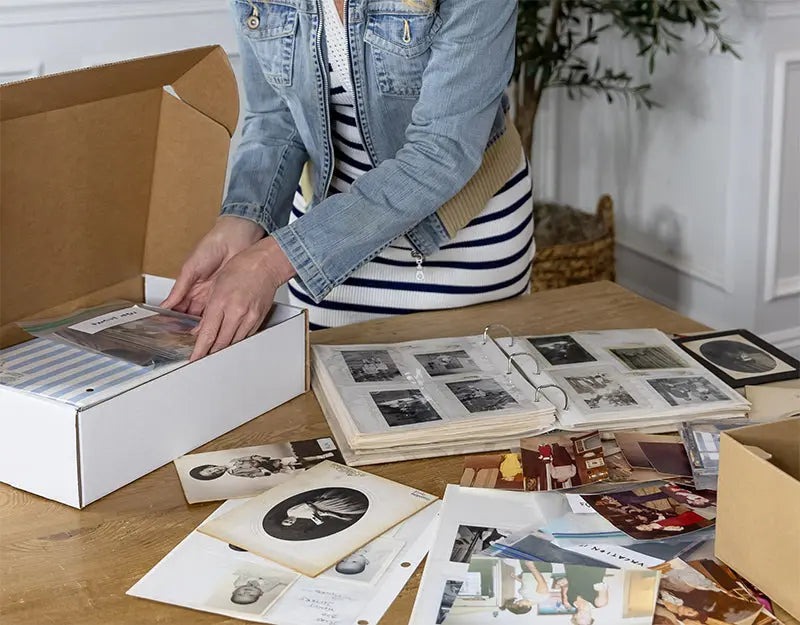
Many older collections are housed in what we call sticky magnetic photo albums. These were popular in the 1970s and 80s, but the adhesive used is often acidic and becomes permanent over time. If you try to peel a forty-year-old photo off that page, you risk tearing the original paper or leaving half the image behind. This is where visual storytelling faces a physical threat. For many, the scrapbook itself is the heirloom preservation project—the handwritten notes in the margins and the specific arrangement of photos tell a story that individual loose prints cannot replicate. Choosing the best ways to digitize old sticky magnetic photo albums requires moving away from the "rip and scan" mentality and toward a more sophisticated, non-destructive method.
Photokive Review: How Their Non-Destructive Method Works
Photokive has carved out a niche in the imaging world by focusing on high resolution scanning for preserving scrapbook page layouts. Unlike traditional bulk services that might use high-speed sheet-fed scanners—which require photos to be loose—Photokive treats each album as a unique piece of art. Their process is an extension of The Kive Company, which has processed and digitized memory collections for more than 500,000 families since 2012.
The technical core of their service relies on professional photography equipment rather than consumer-grade flatbeds. By using high-resolution cameras mounted on specialized copy stands, they achieve a resolution of 300 DPI or higher while the book remains open on a flat surface. This touchless approach is essential for white glove photo scanning for fragile scrapbooks because nothing ever touches the delicate surface of the photo.
One of the most impressive technical aspects of the Photokive workflow is their 8-layer glare removal technology. Anyone who has tried to take a picture of a glossy photo under a living room lamp knows the frustration of hot spots and reflections. Photokive’s lighting rigs are designed to neutralize these reflections, ensuring that the digital version looks as clean as the original, if not better. This process respects the optical resolution of the grain while applying subtle image restoration to correct for the yellowing of old adhesive or the fading of dye-based inks.
Professional Photo Digitizing Costs: Is Photokive Worth the Premium?
When evaluating any service, we have to look at the professional photo digitizing costs versus the "sweat equity" of doing it yourself. Photokive is undeniably a premium service. Their pricing starts with a base fee of fifty-nine dollars for the first one hundred images. Once you cross that threshold, additional photos are priced at approximately fifty-nine cents each.
In comparison, high-volume bulk services that require manual disassembly are generally more affordable, with prices ranging from twelve to twenty cents per photo. However, those lower costs do not include the labor of safely removing photos from an album or the risk of damaging them in the process. When you consider professional scrapbook scanning service cost comparison, you aren't just paying for the digital file; you are paying for the safety of the original.
Photokive adds value through their memory curation features. Their standard processing turnaround time of 6 to 8 weeks includes ninety days of free cloud storage with every order. They also provide a disaster recovery benefit—essentially a "disaster guarantee" that allows for free reprints if something happens to your home collection. For many families, especially those looking at professional photo digitizing for wedding scrapbooks, the peace of mind knowing the physical book never had to be disassembled is worth the extra investment.
Photokive vs. ScanMyPhotos: Which Service Should You Choose?
The decision between these two industry leaders comes down to the current state of your media and your ultimate goals for memory curation. If you have boxes of loose prints from the 1990s, ScanMyPhotos is the efficiency king. But if you have intact, fragile scrapbooks, Photokive is the clear winner for digitize photo albums.
| Feature | Photokive | ScanMyPhotos |
|---|---|---|
| Best For | Intact Albums & Scrapbooks | Bulk Loose Photos |
| Handling | Non-destructive (Photos stay in album) | Manual (Photos must be removed) |
| Base Price | $59 (first 100 photos) | ~$0.12 - $0.20 per photo |
| Turnaround | 6-8 Weeks | 1-2 Weeks (Express available) |
| Storage | 90 Days Free Cloud Storage | Add-on options available |
Comparing Photokive vs ScanMyPhotos for album digitizing highlights a fundamental choice: do you want a digital inventory of every photo, or do you want a digital archive of your family's creative legacy media? Photokive captures the layout, the stickers, the ticket stubs, and the handwritten dates. ScanMyPhotos captures the individual rectangles.
Archival Best Practices: The 3-2-1 Backup Strategy
Once you receive your digital files, your job isn't quite finished. Professional scanning is only the first step in long-term heirloom preservation. I always recommend that my readers follow the 3-2-1 backup strategy to ensure their digital legacy remains intact for the next generation.
- Three Copies: Keep three different versions of your photos.
- Two Formats: Store them on two different types of media (e.g., a physical hard drive and a cloud service).
- One Offsite: Ensure one copy is kept in a different physical location from your home.
While Photokive’s cloud storage is a great start, you should eventually download archival quality digital copies of old family albums to a high-quality external SSD. Ensure your metadata organization is consistent—label folders by decade or event—so that future generations can actually find what they are looking for. Digital files are just as susceptible to being "forgotten" as physical ones if they aren't properly organized.
FAQ
What is the best way to digitize old photo albums?
The best way to digitize photo albums, especially those that are fragile or hold sentimental value in their layout, is to use a professional scrapbook scanning service like Photokive. These services use high-resolution overhead cameras to capture the entire page without removing the photos, ensuring the physical integrity of the album is maintained while providing high-quality digital copies.
How much does it cost to have a photo album digitized professionally?
The cost depends on the level of care and labor involved. Premium services that scan intact albums typically start at a base fee of fifty-nine dollars for the first hundred images, with additional images costing about fifty-nine cents each. More traditional bulk services that scan loose prints are cheaper, often ranging between twelve and twenty cents per photo, but they require you to remove the photos from the album first.
How do you digitize photos without removing them from the album?
To digitize photo albums without removing photos, professional services use a non-destructive method involving professional-grade digital cameras and specialized lighting. This setup captures a top-down image of the page while it lies flat. This avoids the heat and physical pressure of traditional flatbed scanners and prevents the need to peel photos away from old, damaging adhesives.
Are there apps that can scan entire photo album pages?
Yes, there are several mobile apps designed for this purpose, but they often struggle with glare and perspective distortion. While apps are a convenient "quick fix" for sharing a single image on social media, they do not offer the same optical resolution, glare removal, or archival quality that a professional service provides. For long-term heirloom preservation, a professional service is the superior choice.
How long does it take to digitize a standard photo album?
When using a professional service, the standard processing turnaround time is typically six to eight weeks. This timeframe accounts for the white-glove handling, high-resolution capture, color correction, and digital upload of your files. During peak holiday seasons, these times may extend, so it is best to plan ahead if you are preparing a gift.
Conclusion: Preserving Memories for the Next Generation
In my years of reviewing imaging tech, I’ve learned that the best equipment is the one that actually gets the job done without causing harm. For those of us with piles of scrapbooks that represent years of visual storytelling, the anxiety of potentially damaging them often leads to procrastination.
Services like Photokive remove that barrier. By choosing a scrapbook scanning service that respects the original format, you aren't just getting JPEGs; you are ensuring that your family’s history is preserved exactly as it was meant to be seen. Whether it is a fragile wedding album or a child’s first scrapbook, the investment in professional photo digitizing pays dividends in the form of peace of mind and a legacy that will never be forgotten in an attic.