Quick Facts
- Top Pick for Most Users: Projectivy Launcher offers the most balanced experience without requiring root access.
- Lightest RAM Footprint: FLauncher consumes only about 96MB of idle memory, making it the fastest option for budget hardware.
- Best for Media Collectors: Dispatch Launcher features native Plex integration for a unified library interface.
- Performance Boost: Switching to a third-party launcher can reduce app launch latency by up to 50% on low-RAM devices.
- Ad-Free Mandate: These utilities focus on sponsored content removal and bloatware mitigation for a cleaner user experience.
- Privacy Focus: Most third-party launchers remove tracking and telemetry while providing OLED burn-in prevention.
| Launcher | APK Size | Idle RAM Usage | Ad-Free Status |
|---|---|---|---|
| Projectivy | 5.2 MB | ~110 MB | Yes |
| FLauncher | 4.7 MB | ~96 MB | Yes |
| Dispatch | 12.0 MB | ~180 MB | Yes |
Reclaim your living room. As smart TVs become increasingly cluttered with sponsored content and unskippable YouTube Shorts, users are turning to third-party Android TV launchers to regain control. The best smart tv launchers provide a custom Google TV home screen experience that is faster, cleaner, and completely ad-free. These third-party launchers for Android TV and Google TV allow users to replace the default home screen to eliminate sponsored content and advertisements. These utilities often reduce memory overhead and application launch latency, making them ideal for devices with limited RAM. They also provide deep customization options, such as creating custom app categories, changing icon layouts, and accessing sideloaded apps not visible on the stock interface.
The Breaking Point: Why You Need a Custom Google TV Home Screen
In the last two years, the Google TV and Android TV ecosystems have undergone a frustrating transformation. What used to be a tool for launching your favorite streaming apps has morphed into a billboard for services you don’t subscribe to. As of 2024, smart TVs are present in 83% of the approximately 122 million U.S. TV households, making them the primary gateway for digital content consumption. Unfortunately, that gateway is now crowded with auto-playing trailers and unremovable rows of recommendations.
Research from 2024 indicates that 26% of smart TV viewers select content based on home screen recommendations, while 38% are greeted by a default interface of pre-installed apps upon powering on their devices. For the enthusiast, this means the interface is actively fighting against your intent. This bloatware mitigation is not just about aesthetics; it is a performance issue. The stock Google TV launcher can consume upwards of 350MB of RAM just to sit idle, which is a massive burden on budget sticks with only 1.5GB or 2GB of total memory. If you want to know how to remove ads from android tv home screen, the solution isn't in the settings menu—it is in a complete interface replacement. By installing a custom Google TV home screen, you prioritize privacy and performance while reclaiming your visual space.
1. Projectivy Launcher: The Gold Standard for Customization
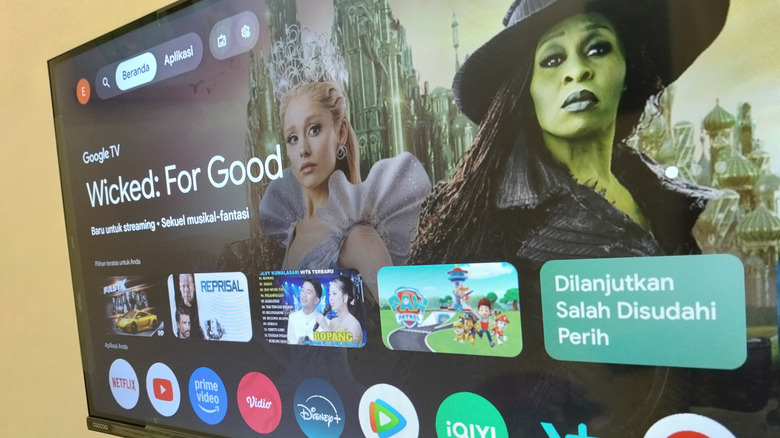
Projectivy Launcher is widely considered a top choice for removing ads and sponsored tiles from the Google TV home screen without requiring root access. For most of my readers, this is the first and only app they will need to install. It strikes a perfect balance between technical power and ease of use, and it is available directly on the Google Play Store, which simplifies the installation process.
What sets Projectivy apart is its ability to handle customizable app categories. You can group your cloud gaming apps, streaming services, and system utilities into distinct rows. It also supports the Watch Next feature, which pulls your current progress from apps like Netflix or Disney+ directly onto the new home screen. For those concerned with technical setup, Projectivy includes a built-in default launcher override setting that uses Android's Accessibility services to intercept the Home button press, making it the best smart tv launchers choice for users who want to avoid complex ADB commands.
Beyond just aesthetics, Projectivy is one of the few launchers that display sideloaded apps on android tv without needing a secondary app drawer. If you use utilities that aren't available on the official store, they appear right alongside your standard apps. The launcher also provides a variety of display calibrations and a handy OLED burn-in prevention mode, which shifts pixels slightly to protect your expensive hardware during long idle sessions.
2. FLauncher: The Lightweight Minimalist King
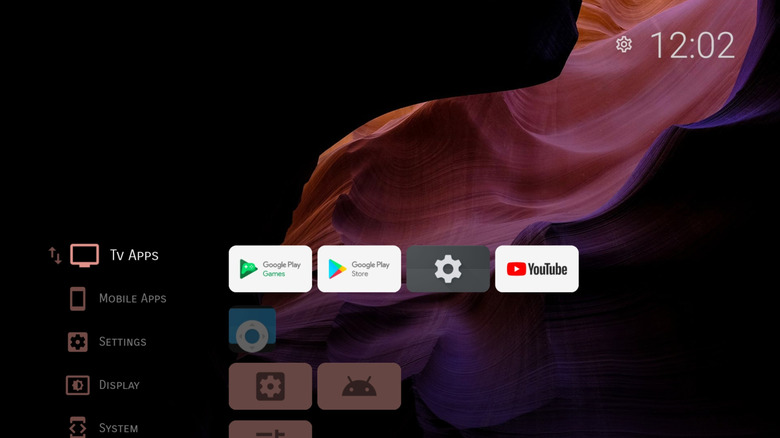
If you are using a budget device like the Onn 4K or an older Sony Bravia, every megabyte of RAM counts. This is where FLauncher shines. Built as a community-driven, open-source (FOSS) project using Flutter, FLauncher is designed with a minimalist android tv launchers for clean home screen philosophy. It doesn't try to be a media hub; it tries to be a fast, efficient app launcher.
The RAM footprint is remarkably small. While the stock Google UI might chug along, FLauncher feels snappy because it isn't constantly trying to ping servers for new advertisements or tracking telemetry. It is the quintessential lightweight android tv launchers for low ram devices, offering a grid-based layout that feels similar to a tvOS aesthetic. You can change the background, adjust the number of columns, and hide apps you never use.
FLauncher is also an excellent choice for those who value privacy. Because it is open-source, the community can verify that no data is being sent back to third-party advertisers. While it lacks some of the flashy "Watch Next" features of Projectivy, its speed is unmatched. It is a pure third-party Android TV launchers experience that gets out of your way and lets you get to your content.
3. Dispatch Launcher: The Media Collector’s Choice
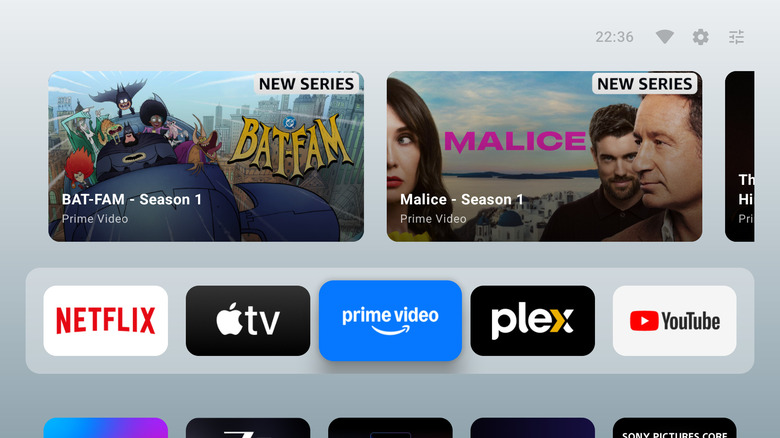
For the power users and those seeking the best launchers for nvidia shield tv pro 2026, Dispatch Launcher is the premium newcomer on the scene. Unlike the other two options, Dispatch is built specifically for users who have a large local media collection. It features native Plex integration, allowing your personal movie library to be integrated directly into the home screen layout.
Dispatch uses a modern, sleek design that feels more like a high-end streaming service than a utility app. It effectively creates a unified library interface where your local files and your streaming apps live in harmony. While it does require a small subscription or a one-time purchase after a 14-day trial, the level of polish is significantly higher than most free alternatives. It handles APK sideloading with ease and provides deep metadata for your movies and shows.
If you are running an NVIDIA Shield TV Pro, you likely have the overhead to run a more feature-rich launcher. Dispatch leverages that hardware to provide smooth transitions and high-resolution posters. Setting this up as your default usually involves the Launcher Manager utility, as high-end devices often have more aggressive "home protection" from the manufacturer. However, once configured, it turns your TV into a professional-grade media center.
Setup Guide: How to Set Third-Party Launcher as Default on Google TV
Changing your home screen isn't as simple as clicking an "Open" button. Google makes it purposefully difficult to leave their ad-supported ecosystem. However, knowing how to set third party launcher as default on google tv is a vital skill for any home theater enthusiast.
- Enable Developer Options: Go to Settings > Device Preferences > About. Click on "Build" seven times until it says you are a developer.
- Install the Launcher: Download your chosen app from the Play Store or sideload the APK.
- Use the Accessibility Shortcut: For apps like Projectivy, go into the launcher settings and find "Override current launcher." This will prompt you to enable the app in the Accessibility menu. Once enabled, pressing the Home button will automatically trigger the third-party interface.
- Launcher Manager Utility: For devices running Google TV 12 or higher (like the latest Chromecast), you may need an external app called Launcher Manager. This tool allows you to "Disable Stock Launcher" via a single toggle, forcing the system to recognize your new app as the primary interface.
- Remote Button Remapping: If the above methods fail, you can use a "Button Mapper" app from the Play Store to redirect the Home button's "Single Tap" action to open your preferred launcher.
If you ever feel overwhelmed or want to go back, reverting is simple. You can always re-enable the stock launcher through the same Launcher Manager utility or by uninstalling the third-party app. This ensures that you can experiment with different looks without the fear of "breaking" your TV.
Hardware Compatibility Checklist
Before you dive in, it is important to know if your hardware is up to the task. Most modern third-party launchers work across the entire spectrum of Android-based TV devices, but some handle certain features better than others.
- NVIDIA Shield TV Pro: Best for Dispatch or Projectivy; handles heavy metadata and high-res icons easily.
- Chromecast with Google TV (4K/HD): Requires Launcher Manager for a truly seamless default launcher override.
- Onn 4K Pro / Onn 4K: Excellent candidates for FLauncher to save on RAM footprint and reduce app launch latency.
- Sony/TCL/Hisense (Integrated Google TV): Generally works best with Projectivy via the Accessibility service method to avoid interfering with built-in TV hardware settings.
FAQ
What is the best custom launcher for a smart TV?
For the majority of users, Projectivy Launcher is the best smart tv launchers option. It provides the most features—including ad-blocking, app categorization, and Watch Next support—without requiring technical knowledge like ADB or root access. It is stable, frequently updated, and works well on both high-end and budget hardware.
How do I change the default launcher on my smart TV?
To change the default launcher, you can either use the built-in Accessibility override found in apps like Projectivy or use a dedicated tool like Launcher Manager. For most Google TV devices, you will need to enable Developer Options and allow the third-party launcher to act as the primary activity handler for the Home button.
Are third-party TV launchers safe to use?
Yes, third-party launchers from reputable sources like the Google Play Store or well-known open-source repositories are safe. They act as activity handlers, meaning they simply provide a different visual way to open your existing apps. They do not require root access or administrative control over your Google account.
Can a custom launcher make my smart TV faster?
Absolutely. Stock launchers are often bloated with background processes that track user behavior and load video advertisements. By switching to a minimalist launcher like FLauncher, you reduce the RAM footprint significantly, which frees up system resources for your actual apps and reduces the time it takes to return to the home screen.
How do I remove ads from my smart TV home screen?
The most effective way to remove ads is to replace the stock launcher with an ad-free alternative. Apps like Projectivy and FLauncher do not display any sponsored content or YouTube Shorts on the home screen. This provides a clean, distraction-free environment that focuses solely on the apps you have installed.