Quick Facts
- Top Productivity Pick: Apple Shortcuts (Native Automation)
- Best for Focus: Focus Timer (Pomodoro)
- Best Utility: Moovit (Real-time Transit)
- Best for Health: Water Tracker (Hydration)
- Best for Shopping: Grocery (Smart List Sorting)
- Selection Criteria: Apps must offer significant utility in the free version without notification fatigue.
- Hardware Requirement: Most apps perform best on Series 7+ due to screen real estate and processing power.
The best free Apple Watch apps for productivity in 2026 include Apple Shortcuts for custom automation, Grocery for smart shopping lists, and Water Tracker for hydration management. Built-in tools like Reminders and Timers offer robust free functionality for task and time management without requiring subscriptions. Third-party options like Moovit and CARROT Weather provide essential real-time transit and weather data through watchOS complications.
Using an Apple Watch for work productivity involves leveraging glanceable complications for schedule updates and haptic alerts for time-boxing techniques like Pomodoro. Siri voice commands allow for hands-free task capture, while standalone apps like Focus Timer help maintain deep work sessions directly from the wrist. By utilizing these wearable tools for quick interactions, users can minimize phone distractions and maintain focus on their professional workflows.
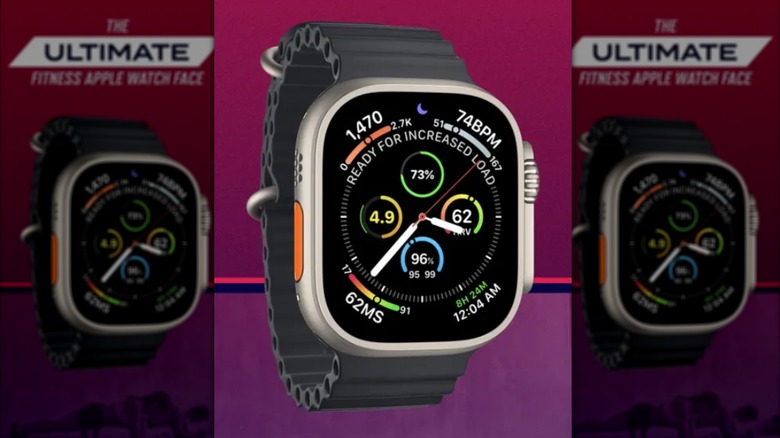
Essential Apple Watch utilities for 2026 prioritize energy management and seamless daily transitions. Athlytic offers AI-driven fitness coaching to track recovery and exertion, while Moovit provides precise synchronization for commuters using public transit. Integrating these utilities with custom watch faces ensures that critical metrics, such as heart rate variability or navigation alerts, are accessible at a glance for better daily organization.
| App Name | Primary Category | Best Feature | Pricing Tier |
|---|---|---|---|
| Apple Shortcuts | Automation | Siri Voice Commands | 100% Free |
| Moovit | Transit | Real-time Sync | Free (Ad-supported) |
| Focus Timer | Time Management | Haptic Time-Boxing | Free (Basic) |
| Grocery | Task Management | Smart Store Sorting | Free (Unlimited Lists) |
| Water Tracker | Wellness | Habit Formation | Free (Daily Goal) |
The Foundation: Setting Up Focus Modes
Productivity on the wrist is a double-edged sword. If every notification from your phone mirrors to your watch, the device becomes a source of distraction rather than a tool for efficiency. True work productivity begins with mastering notification management. It is no surprise that approximately 56% of Apple users have adopted the Focus feature to choose which apps and notifications can reach them, highlighting a massive shift toward digital wellbeing and intentional device usage.
When I talk about a wrist-first design, I am referring to apps that respect your attention. In 2026, the goal isn't to spend more time looking at your watch; it is to spend less. By configuring specific Focus Modes—such as Work, Deep Work, or Personal—you can ensure that only essential apple watch utilities appear on your watch face. This minimalist interface prevents the "scroll-hole" effect we often experience on iPhones. Using haptic alerts instead of audible pings allows for a more discreet and less jarring way to stay informed, fostering better habit formation over time.
1. Automation Mastery: Apple Shortcuts
If you are looking for the absolute best free apple watch apps for productivity, look no further than the one already installed on your device: Apple Shortcuts. While many users think of Shortcuts as an iPhone-only tool, its power on watchOS is unparalleled. It allows you to trigger complex sequences of actions with a single tap on a complication or a simple voice command.
Pricing
Free (Native Apple App)
Hardware Requirements
Works on all models, but the 64 GB storage on Series 11 allows for more complex, locally-stored scripts without lag.
Shortcuts is the ultimate tool for must have third party apple watch apps for productivity integration because it acts as the glue between your various services. For example, you can create a "Starting Work" shortcut that sets your Focus Mode, opens your Focus Timer, and logs your start time in a spreadsheet.
- Best For:
- Triggering complex morning routines.
- Hands-free task capture via Siri voice commands.
- Workflow automation that bridges the gap between different apps.
- Creating custom watchOS complications for actions that don't have native apps.
The beauty of Apple Shortcuts for productivity automation is that it removes the friction of navigating menus. Instead of opening an app, finding a button, and confirming an action, you simply speak to your wrist. This is essential for maintaining a deep work state where every second of diverted attention counts.
2. Transit & Navigation: Moovit
For the urban professional, commuting is often the most chaotic part of the day. While Apple Maps has improved significantly, Moovit remains one of the top third-party apple watch apps for those who rely heavily on public transportation. It excels where native apps often lag: real-time synchronization and granular transit alerts.
Pricing
Free with optional subscription for ad-removal.
Hardware Requirements
Requires GPS (Series 4 or later) for optimal accuracy.
Moovit provides essential real-time transit data through watchOS complications, meaning you don't have to pull your phone out at a crowded bus stop or train station. The watch app gives you a countdown to the next arrival and haptic alerts when your stop is approaching. This allows you to read a book or catch up on emails during your commute without the anxiety of missing your stop.
- Best For:
- Daily commuters using buses, trains, or subways.
- Real-time synchronization of arrival times.
- Getting "get off" haptic alerts to stay focused during transit.
- Essential apple watch utilities for daily workflows in metropolitan areas.
3. Deep Work & Focus: Focus Timer
In the era of constant connectivity, the time-boxing technique has become a gold standard for professional efficiency. Focus Timer is one of the best free productivity apps for apple watch 2026 because it brings the Pomodoro method directly to your wrist. By breaking your work into 25-minute intervals followed by short breaks, you can maintain a higher level of cognitive performance throughout the day.
Pricing
Free (Includes basic timer and haptic feedback).
Hardware Requirements
Optimized for all watchOS versions; uses minimal battery.
The specific advantage of using a watch-based timer over a phone-based one is the lack of visual distraction. When the timer is on your wrist, you can use haptic alerts to signal the end of a session. You don't need to look at a ticking clock or check your phone screen, which often leads to checking "just one notification." This app is frequently cited as one of the best apple watch complications for focus and organization because it keeps your current progress visible at all times.
- Best For:
- Implementing the Pomodoro or time-boxing technique.
- Minimizing phone-based distractions during deep work.
- Use of haptic alerts to signal transitions between work and rest.
- Maintaining a minimalist interface for time management.
4. Smart Organization: Grocery
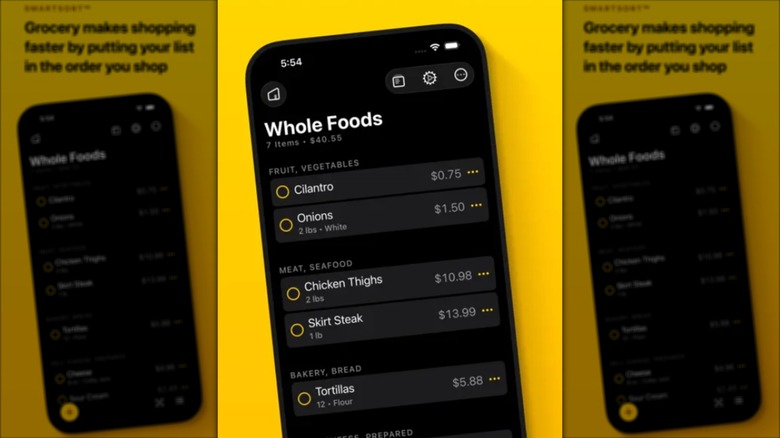
Task management on a watch usually feels cramped, but Grocery solves this by focusing on one specific, high-frequency task: the list. While designed for food, it has evolved into one of the most effective free apple watch apps for task management. Its killer feature is smart list organization, which reorders your items based on the layout of the store (or office) as you check them off.
Pricing
Free tier includes unlimited lists and smart sorting.
Hardware Requirements
Works best on Series 7 and later for the QWERTY keyboard if you need to add items on the fly.
For a professional, this isn't just about milk and eggs; it is about efficiency in daily errands. By saving ten minutes at the store, you gain ten minutes of recovery or work. The app also features excellent App Store ratings for its Apple Watch integration, allowing you to cross off items with a single tap, even when your hands are full.
- Best For:
- Streamlining daily errands and shopping.
- Smart list organization based on physical location.
- Quick-tap interactions that don't require the iPhone.
- Using apple watch for work productivity by managing office supply runs.
5. Health as Wealth: Water Tracker & Vitals
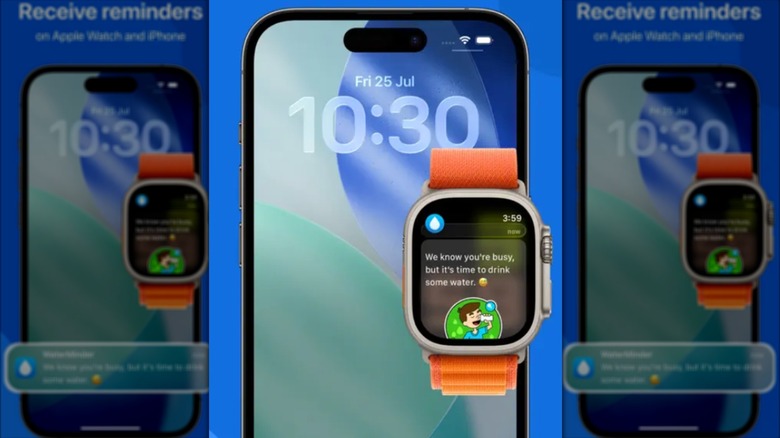
You cannot be productive if you are dehydrated or burnt out. In my testing, I’ve found that the link between wellness and productivity is the most overlooked aspect of wearable technology. Water Tracker and the native Vitals app (integrated with Athlytic for deeper insights) provide the necessary biometric tracking to ensure your body can keep up with your brain.
Pricing
Free (Basic tracking and reminders).
Hardware Requirements
Requires Series 8/9/10 or Ultra for advanced biometric sensors like skin temperature and improved heart rate variability monitoring.
Hydration reminders are a simple but effective habit formation tool. Low-level dehydration is a leading cause of afternoon brain fog. By using apple watch fitness apps for energy management, you receive subtle nudges to drink water throughout the day. When combined with monitoring your heart rate variability, you can actually see when your body is under stress and when it is primed for a deep work session.
- Best For:
- Maintaining cognitive performance through hydration reminders.
- Monitoring heart rate variability to prevent burnout.
- Tracking recovery and exertion to plan the workday.
- Seamless daily transitions from fitness to professional focus.
Hardware Compatibility: Series 10 vs. Ultra 2
Choosing the right apps is only half the battle; understanding your hardware is the other. As we move through 2026, the gap between the Apple Watch Series 10 and the Ultra 2 remains significant for power users. Apple continues to be the most popular smartwatch vendor globally, capturing a 21.6% market share in the first quarter of 2024, and much of that is driven by the diversity of their hardware lineup.
The Series 10 is the thin, elegant choice for the average professional. However, its battery life (roughly 18-24 hours) means you must be strategic with your app usage. If you are using heavy real-time synchronization for transit or frequent haptic alerts for time-blocking, expect a 15-20% battery drain over a standard 8-hour workday.
The Ultra 2, with up to 72 hours of battery life in low-power mode, is the better choice for those who want their apple watch productivity apps running in the background 24/7 without a midday charge. Furthermore, the larger screen on the Ultra makes using the QWERTY keyboard for free apple watch apps for task management much more viable.
FAQ
Are there any completely free apps for the Apple Watch?
Yes, many of the best tools are either entirely free or have a very generous free tier. Apple Shortcuts and the native Reminders app are 100% free with no hidden costs. Others, like Moovit and Grocery, offer their core productivity features for free, supported by optional subscriptions for advanced customization or ad removal.
What are the best free productivity apps for Apple Watch?
The top-rated free apps for boosting efficiency include Apple Shortcuts for automation, Moovit for transit management, Focus Timer for the Pomodoro technique, and Grocery for smart list organization. These apps prioritize glanceable information and quick interactions to keep you focused.
Which free Apple Watch apps work without an iPhone nearby?
Most native Apple apps like Shortcuts, Reminders, and Alarms work offline. Third-party apps like Focus Timer can also run independently. However, apps like Moovit require an active internet connection (via cellular or a known Wi-Fi network) to provide real-time transit updates if your iPhone isn't within Bluetooth range.
Do free apps drain the Apple Watch battery faster?
Not necessarily. Battery drain is usually a result of how an app functions rather than its price. Apps that use constant GPS (like transit trackers) or keep the screen active will drain the battery faster. Most productivity apps like Grocery or Shortcuts have a negligible impact on battery life.
Are there free sleep tracking apps available for Apple Watch?
Apple’s native Sleep app is free and provides excellent data on sleep stages and duration. For third-party options, Sleep Cycle and Pillow offer free versions that track basic sleep quality and provide haptic "smart alarms" to wake you up during your lightest sleep phase, which is a great way to start a productive day.
Summary: Your First Install Bundle
If you have just unboxed a new watch or are looking to reset your workflow for 2026, start with this "First Install" bundle. Begin by setting up your Focus Modes to reclaim your attention. Then, add a complication for Apple Shortcuts to automate your most frequent tasks. Install Moovit for your commute, Focus Timer for your deep work blocks, and Grocery for your daily tasks. Finally, use Water Tracker to maintain the physical energy required for high-level productivity.
By selecting the best free apple watch apps that focus on wrist-first utility rather than just mirroring your phone, you turn your wearable from a distraction machine into a professional powerhouse.