Quick Facts
- Top Fitness Pick: WorkOutDoors ($8.99) for vector maps and 800+ metrics.
- Top Productivity Pick: Todoist for seamless wrist-based task management.
- Top Health Pick: Bevel (formerly Cora) for advanced recovery and strain scores.
- Native Essential: WhatsApp for Watch, offering full standalone messaging.
- Best Utility: Pedometer++ for the most customizable activity complications.
- Market Insight: By 2026, Apple maintains a 23% share of the global smartwatch market.
- User Behavior: Approximately 59% specifically engage with multifunctional apps to enhance their daily routines.
In 2026, the best Apple Watch apps focus on bridging the native gap, with Nike Run Club and Strava leading fitness, Todoist managing productivity, and Bevel providing advanced health tracking via Heart Rate Variability (HRV) and biometric sensors. These third-party tools transform your wearable from a simple notification center into a standalone powerhouse that reduces your reliance on a paired iPhone.
As the global smartwatch ecosystem reaches approximately 640.15 million users by 2026, the way we use our wearables has shifted. We are no longer just looking at a mirror of our phones. We want devices that proactively manage our health and shave seconds off our professional workflows. Whether you are rocking a Series 10 or the rugged Ultra 2, the right software is what defines your experience.
The following guide explores nine essential apps that represent the pinnacle of efficiency in the watchOS 11 era.
Advanced Fitness & Health Recovery
While Apple’s native Activity Rings are iconic, they often lack the technical depth required by serious athletes or those focused on holistic longevity. In 2026, the best health tracking apps for Apple Watch recovery have moved beyond simple step counting to analyze how your body actually feels.
WorkOutDoors
- Category: Fitness/Navigation
- Price: $8.99 (One-time)
- Key Feature: Fully customizable vector maps with offline support.
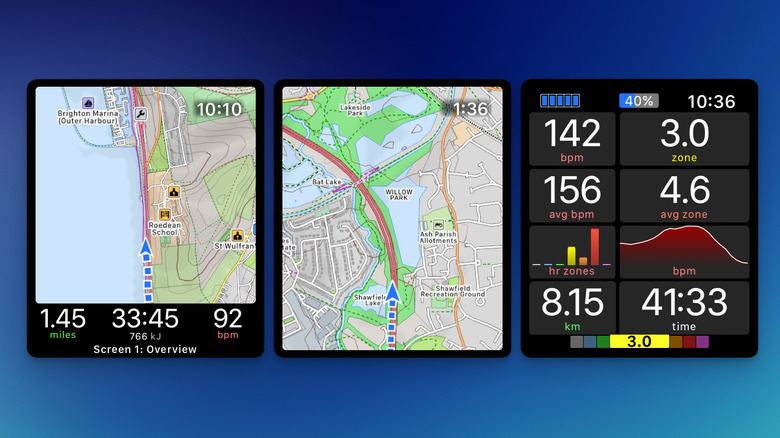
WorkOutDoors is often cited as the most powerful third-party fitness apps for Apple Watch for a reason. It offers over 800 customizable data fields, allowing you to create a workout screen that shows exactly what you need—be it your current elevation, heart rate zones, or interval progress. For essential apple watch apps for outdoor runners, the ability to follow a breadcrumb trail on a detailed map without a cellular connection is a game-changer.
Pros and Cons
- Pro: No subscription fee; one of the few high-end apps without a monthly cost.
- Pro: Maps are stored locally, saving battery and ensuring reliability in the wild.
- Con: The interface has a steep learning curve due to the sheer number of options.
Bevel (Cora)
- Category: Health & Recovery
- Price: Subscription-based
- Key Feature: Daily "Body Battery" and Strain scores based on HRV.
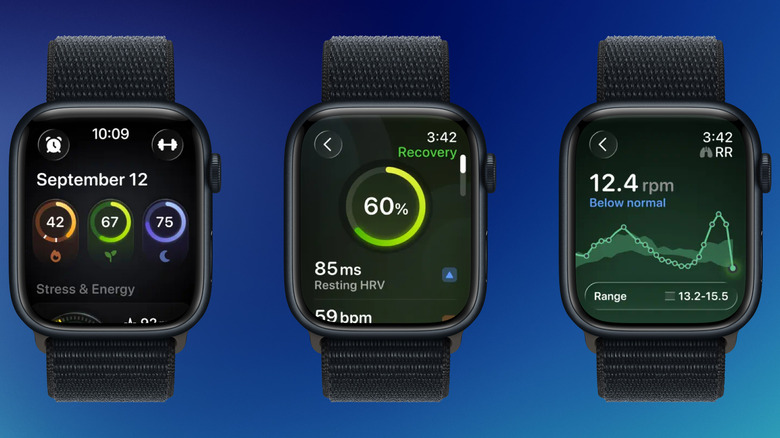
If you have ever wondered why you feel exhausted despite closing your rings, Bevel is the answer. It is widely considered one of the best health tracking apps for Apple Watch recovery because it interprets Heart Rate Variability (HRV) and sleep architecture to tell you how much effort you should exert today. It bridges the gap between raw data and actionable advice.
Pros and Cons
- Pro: Beautifully designed interface that feels like a native part of the system.
- Pro: Proactive alerts if your biometric sensors detect signs of overtraining or illness.
- Con: Requires a subscription for the most advanced recovery insights.
Fitness App Comparison for 2026
| Feature | WorkOutDoors | Nike Run Club | Strava |
|---|---|---|---|
| Primary Focus | Technical Metrics | Guided Coaching | Social/Community |
| Map Support | Advanced Vector Maps | Basic Path | Route Discovery |
| Offline Sync | Yes | Limited | No |
| Cost | One-time $8.99 | Free | Free / Subscription |
Productivity and Task Management
Efficiency on the wrist is all about glanceability. In 2026, useful Apple Watch apps for productivity prioritize getting you in and out of the app in under five seconds. The best Apple Watch apps for productivity 2026 are those that leverage the Action Button and the Digital Crown to make navigation effortless.
Todoist
- Category: Task Management
- Price: Free / Subscription
- Key Feature: Natural language input via voice dictation.
Managing a to-do list on a small screen sounds like a nightmare, but Todoist makes it work through excellent complications. You can see your next task directly on your watch face. With the improved Haptic feedback in newer models, checking off a task feels satisfyingly tactile. It is perfect for those "grocery store moments" where you need your hands free but your list accessible.
Pros and Cons
- Pro: Syncs instantly across iPhone, Mac, and Watch.
- Pro: Support for Smart Stacks allows tasks to appear only when you need them.
- Con: Complexity can be overwhelming if you have dozens of sub-tasks.
Cheatsheet
- Category: Utility/Notes
- Price: Free / One-time upgrade
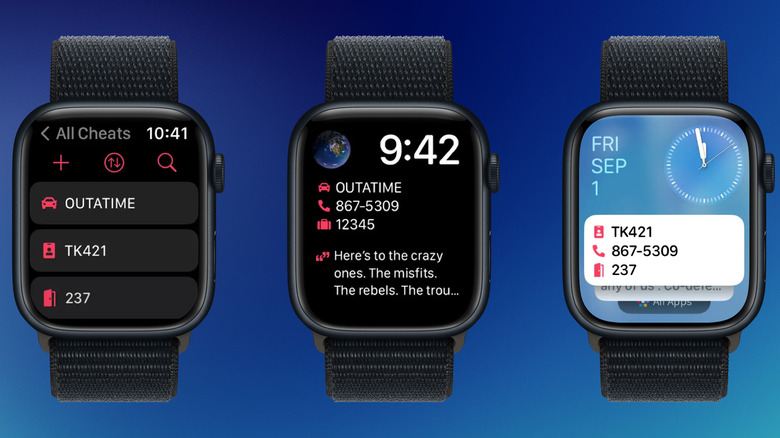
- Key Feature: Instant access to small snippets of text via complications.
Cheatsheet is the answer for those looking for the best apple watch apps for quick note taking. It isn't for writing a novel; it is for your gym locker code, your Wi-Fi password, or your parking spot number. By putting these "cheats" into a complication, you don't even have to open an app—the information is just there, glowing on your wrist.
Pros and Cons
- Pro: The fastest way to access static information.
- Pro: Includes a massive library of icons to make notes easily identifiable.
- Con: Very limited character count per "cheat."
Zenitizer
- Category: Mindfulness & Focus
- Price: Free / Subscription
- Key Feature: Minimalist Pomodoro and meditation timers.
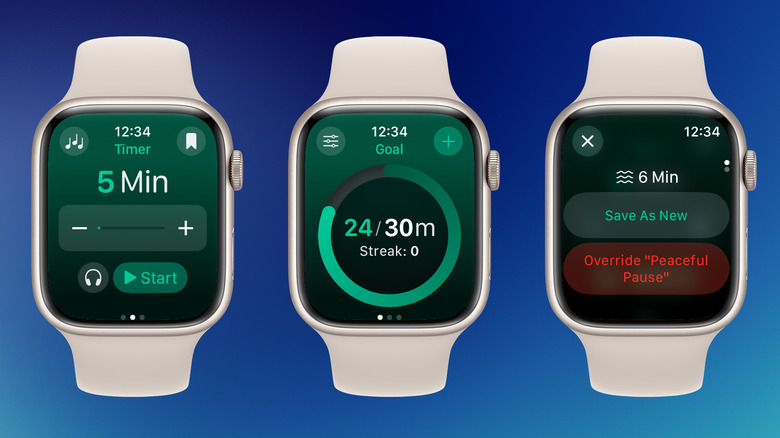
Productivity isn't just about doing more; it is about focusing better. Zenitizer facilitates Mindfulness sessions that help you break your day into focused sprints. The app uses the Digital Crown to quickly adjust timer lengths, and the gentle haptics signal the end of a session without the jarring noise of a standard alarm.
Pros and Cons
- Pro: Extremely clean, distraction-free design.
- Pro: Deep integration with Apple Health to track "Mindful Minutes."
- Con: The free version is somewhat limited in customization.
Standalone Utilities & Communication
A major trend in the Smartwatch ecosystem for 2026 is the "decoupling" of the watch from the phone. Users now expect their favorite services to work over Wi-Fi or cellular without the iPhone nearby.
WhatsApp (Standalone)
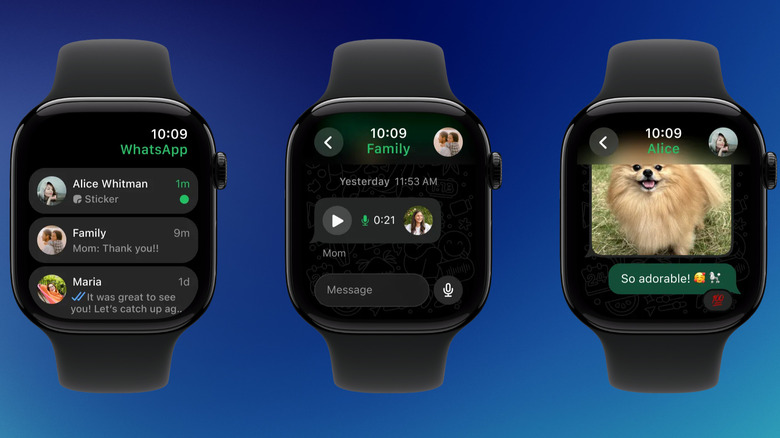
Following its full release for watchOS, WhatsApp has become an essential tool for wrist-based communication. You can now view entire chat histories, listen to and send voice notes, and even type out replies using the QWERTY keyboard on modern Apple Watch models. It turns your watch into a viable communication hub for when you are out for a run or a quick errand.
Pros and Cons
- Pro: Full standalone functionality—no phone needed for cellular models.
- Pro: High-quality voice note recording using the watch's beam-forming mics.
- Con: Group chats with heavy media can be slow to load.
Spotify
For music lovers, Spotify’s Apple Watch app has matured significantly. It supports Offline sync for up to 100 items per playlist, allowing you to leave your phone at home and still enjoy your podcasts and music via Bluetooth headphones. The integration with the watch's media controls is seamless, making it a top choice for anyone who finds the native Music app too restrictive.
WaterMinder
Maintaining peak cognitive and physical performance requires staying hydrated. WaterMinder is among the most useful Apple Watch apps for hydration reminders because it doesn't just nag you; it calculates your needs based on your weight and activity level. You can log a glass of water with a single tap on a watch face complication.
Maximizing Efficiency via Complications
To truly master the Apple Watch, you must master the watch face. In watchOS 11, the introduction of smarter widgets and better complication layouts has changed the game. Apps that live on your home screen are 10x more likely to be used than those buried in the app grid.
Pedometer++
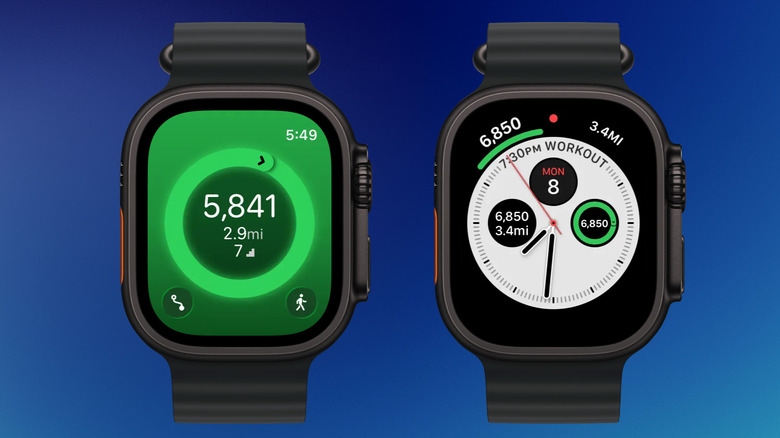
While Apple tracks steps, it doesn't always make it easy to see that number at a glance on every watch face. Pedometer++ solves this by offering a wide array of complications that show your progress toward your 10,000-step goal in real-time. It is a staple for 92% of smartwatch users who rely on their devices for health and fitness tracking.
Pros and Cons
- Pro: Low battery impact despite frequent updates.
- Pro: Integrates beautifully with the new Smart Stacks.
- Con: The aesthetic is very functional and lacks "flair."
Summary of the 2026 Wearable Landscape
The transition of the Apple Watch from a "peripheral" to a "primary" device is nearly complete. With Wearable technology continuing to evolve, the distinction between what your phone does and what your watch does is blurring. By selecting apps that utilize the unique hardware—like the Digital Crown for precise scrolling or the Biometric sensors for recovery data—you maximize the value of your investment.
When choosing the best Apple Watch apps for your lifestyle, prioritize those that offer standalone functionality and clean complications. In 2026, efficiency isn't about having more apps; it's about having the right ones that work even when your phone is in another room.
FAQ
Which Apple Watch apps are best for fitness tracking?
For high-level data and mapping, WorkOutDoors is the gold standard. If you prefer community and social competition, Strava is the top choice. For those who want professional coaching without a cost, Nike Run Club remains the best free option available in 2026.
What are the best sleep tracking apps for Apple Watch?
While the native Sleep app provides basic data, third-party apps like AutoSleep and Bevel offer much deeper analysis. They interpret heart rate and movement to provide a "readiness" score, helping you understand how your sleep quality affects your physical performance the next day.
Can I use Apple Watch apps without my iPhone nearby?
Yes, many modern apps now offer standalone functionality. Apps like Spotify, WhatsApp, and WorkOutDoors allow you to stream music, send messages, and track GPS workouts without your iPhone, provided you have a Wi-Fi connection or a cellular-enabled Apple Watch model.
Which productivity apps work best on a small watch screen?
Todoist and Cheatsheet are specifically designed for the small screen, focusing on short lists and quick voice entry. Apps that use complications to show information directly on the watch face are generally more efficient than those requiring you to navigate complex menus.
Are there any must-have apps for new Apple Watch users?
New users should start with Pedometer++ for better step tracking, WaterMinder for health habits, and Todoist for basic task management. These apps provide immediate utility and demonstrate the power of the Apple Watch complication system without being overly complex.