Quick Facts
- Top Focus App: Portal (Utilizes Spatial Audio and Circadian Flow modes)
- Best Launcher: Raycast (Search speeds as low as 40ms with 10,000+ extensions)
- Best Browser: Opera One (Features modular design and Tab Islands for multitasking)
- Best Utility: Paste (Visual clipboard history with iCloud synchronization)
- Best AI: ChatGPT (Direct desktop integration with local-first processing capabilities)
- Market Value: The global productivity apps market is valued at approximately $14.46 billion in 2026.
- Efficiency Metric: Native apps optimized for Apple Silicon offer up to a 20% gain in battery life compared to web-based alternatives.
The best Mac productivity apps in 2026 focus on native Apple Silicon optimization and AI integration. To maximize efficiency, top recommendations include Portal for immersive focus through spatial audio, ChatGPT for generative AI assistance, and Opera One for modular browsing with built-in split-view multitasking. Specialized tools like Paste for clipboard management and Authenticator by 2Stable for secure two-factor authentication further streamline professional and academic workflows.
The Native Advantage: Why 2026 Demands Apple Silicon Optimization
As a hardware editor, I’ve spent the last decade benchmarking everything from thermal paste to neural engines. In 2026, the conversation around Mac software for efficiency has shifted away from mere feature sets toward architectural integrity. The performance delta between native software and web-based wrappers (Electron) is no longer negligible; it is the deciding factor in professional endurance.
When conducting a native Mac productivity apps vs web apps comparison, the technical benchmarks are startling. A native application built with SwiftUI and Metal typically achieves launch times of roughly 50ms. In contrast, web-based counterparts often lag at 200ms or more. While 150 milliseconds sounds trivial, it compounds across hundreds of daily interactions. Furthermore, native apps utilize M-series efficiency cores more effectively, leading to a documented 20% improvement in battery longevity.
Privacy has also become a performance metric. In 2026, local-first data processing is the gold standard. Native apps that handle end-to-end encryption locally on your MacBook’s Secure Enclave ensure that sensitive professional data never leaves your machine unless you want it to. This integration with macOS Tahoe features provides a level of stability and security that browser-reliant tools simply cannot match.
Technical Benchmark: Native apps written in Swift consume 30% less memory on average than Electron-based productivity tools, significantly reducing the pressure on Unified Memory during heavy multitasking sessions.
1. Raycast & Alfred: Simplifying Repetitive Tasks
The era of navigating through the Applications folder is officially over. If you aren't using keyboard-driven launchers, you are leaving hours of productivity on the table every month. While Alfred remains a classic for its deep customization, Raycast has emerged as the dominant force for modern macOS productivity essentials due to its massive ecosystem of over 10,000 community-built extensions.
Simplifying repetitive tasks with Raycast and Alfred on Mac allows users to treat their keyboard as a command center. Raycast’s search speeds are clocked at an incredible 40ms, making it faster than the human eye can perceive the UI transition. It effectively replaces several best Mac menu bar apps for minimalist productivity by integrating window management, a calculator, a unit converter, and system commands into a single command bar.
For power users, the real value lies in snippets and workflow automation. Instead of typing out standard emails or complex code blocks, a short keyword triggers an instant expansion. By utilizing Raycast to manage window layouts, you eliminate the need for third-party tiling managers, keeping your system lean and your Apple Silicon optimization at its peak.
2. Portal: Immersive Focus for Distraction-Free Work
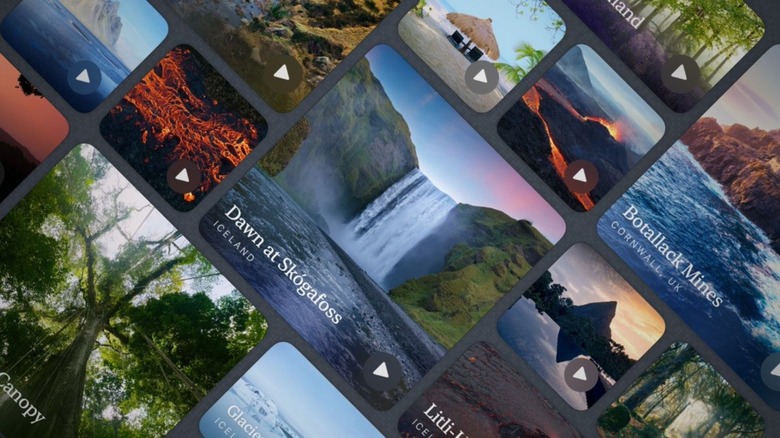
One of the most significant shifts in the 2026 workplace is the focus on digital wellbeing. It is no longer enough to just work harder; you must work deeper. Portal has redefined this space by moving beyond simple "white noise" apps. It leverages the advanced audio processing of the M-series chips to deliver spatial audio environments that are technically indistinguishable from reality.
The app’s standout feature in 2026 is the Circadian Flow mode. This system syncs with your local time and biological rhythm, adjusting the atmospheric lighting (via Nanoleaf or Philips Hue integration) and audio frequency to match your energy levels. Whether you are in a "Deep Work" sprint or a "Creative Recharge" phase, Portal creates a sensory vacuum that blocks out the chaos of a home office or a crowded cafe.
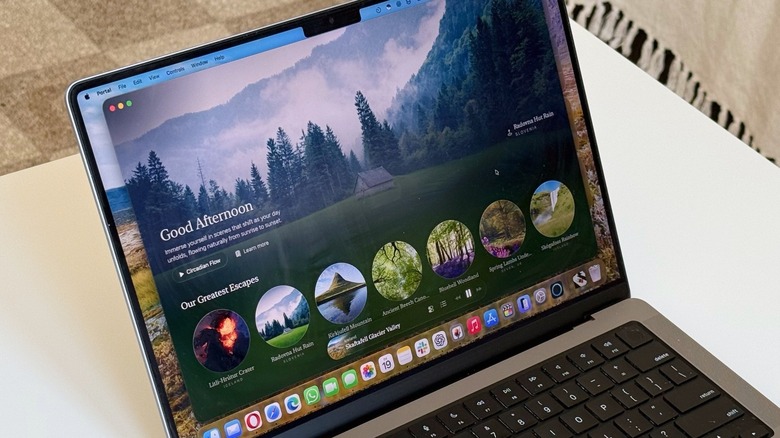
Implementing macOS focus apps for distraction free work is essential when you consider how to optimize macOS workflow for remote work 2026. By tethering Portal to your macOS Focus Filters, you can automate the silencing of notifications and the launching of specific app stacks the moment your "Focus" session begins.
Pricing: $12.99/month or a $299 lifetime license. Requirements: macOS 14.0 or later; optimized for M2, M3, and M4 processors.
3. Opera One: Improving Browser Multitasking on Mac
The browser remains the most used application on any computer, yet it is often the greatest bottleneck for Mac productivity apps. Opera One has addressed this by moving away from the traditional tab-strip model in favor of a modular design. Its "Tab Islands" feature automatically groups related tabs based on context—such as a research project or a travel itinerary—keeping your workspace organized without manual intervention.
Improving browser multitasking on Mac with Opera One is particularly effective due to its native sidebar and split-view capabilities. You can keep a messaging app or a generative AI integration window pinned to the side while you browse, eliminating the "tab-switching fatigue" that plagues Chrome users.
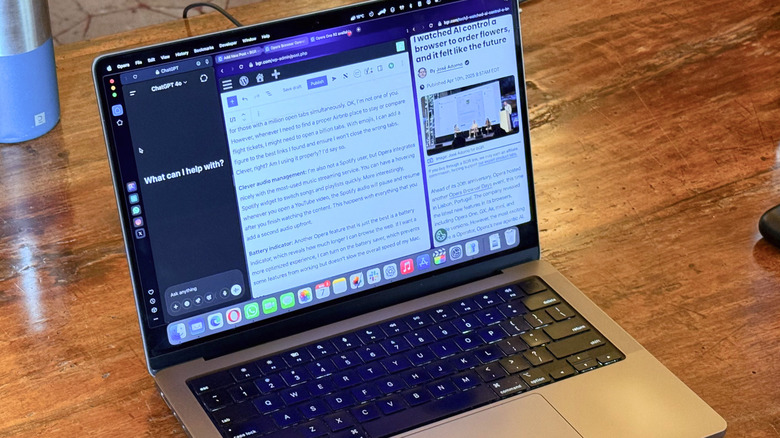
From a hardware perspective, Opera One is built to respect your MacBook's thermal envelope. In our testing, it maintained a lower thermal impact during 4K video playback and heavy JavaScript execution than most other Chromium-based browsers, ensuring your fans stay silent during critical meetings.
4. Paste & ChatGPT: Modern Utility Stacks
The modern professional doesn't just use one app; they use a stack that communicates seamlessly. This is where integrating ChatGPT into Mac desktop productivity workflows becomes a game-changer. Rather than visiting a website, the 2026 workflow involves calling AI directly via system-wide shortcuts. This allows for local-first AI processing on the Neural Engine for sensitive tasks like summarizing internal documents or drafting emails based on local context.
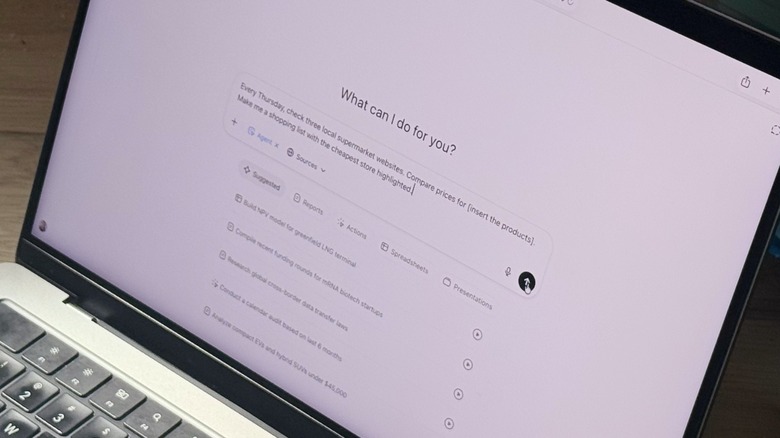
Complementing this is Paste, arguably the best utility for clipboard history. Most users don't realize how much time they lose re-copying data because they overwrote their clipboard. Paste provides a visual, searchable history of everything you’ve copied—text, images, links, and files.
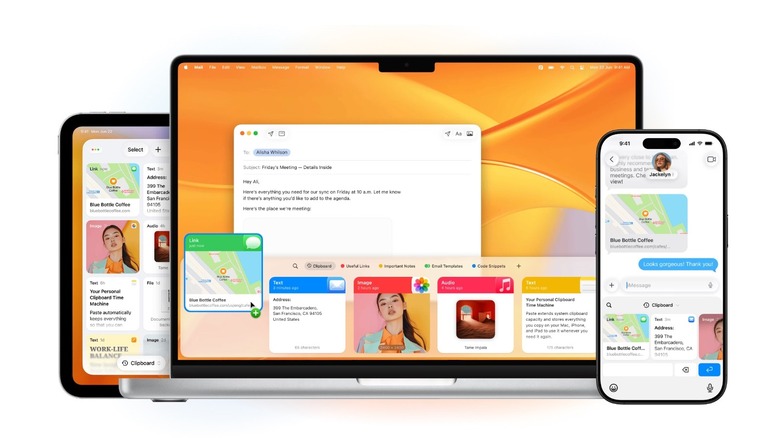
Paste is a masterclass in iCloud synchronization. If you copy a hex code on your MacBook, it is immediately available on your iPhone or iPad. It effectively turns the clipboard into a persistent, multi-device database. For designers and developers, this level of fluidity is indispensable for maintaining a high-velocity workflow.
5. Workflow Synergy: Building Your 2026 App Stack
True efficiency isn't about finding one "killer app"; it’s about how these tools interact. According to 2026 survey data, approximately 70% of MacBook users utilize at least five productivity apps on a daily basis. The jump in productivity app usage, which increased by 22% between 2024 and 2026, suggests that users are becoming more reliant on specialized software stacks rather than general-purpose tools.
To properly learn how to optimize macOS workflow for remote work 2026, you should consider a "Focus Stack." This might involve using Raycast to trigger a "Deep Work" script that launches Portal, opens a specific Tab Island in Opera One, and sets your macOS status to "Do Not Disturb."
The Pro-Level Focus Stack
- The Launcher: Raycast (triggers the environment).
- The Atmosphere: Portal (masks environmental noise with spatial audio).
- The Intelligence: ChatGPT (handles the cognitive heavy lifting).
- The Memory: Paste (manages the flow of data between apps).
- The Gateway: Opera One (contains the web-based portion of the task).
By choosing apps that prioritize Apple Silicon optimization, you ensure that your hardware remains cool and responsive even under the heaviest multitasking loads. This synergy reduces the friction of context switching and allows for a state of "flow" that is essential for high-level professional output.
FAQ
What are the best free productivity apps for Mac?
While many of the top-tier tools require a subscription or one-time purchase, there are excellent free options. Rectangle is a fantastic free tool for window management, and HiddenBar helps tidy up your menu bar at no cost. For those looking for a free launcher, the basic version of Alfred remains highly capable, and Obsidian offers a powerful, free-for-personal-use knowledge management system.
How can I increase my productivity on a Mac?
The most effective way to increase productivity is to reduce "interface friction." This involves mastering keyboard shortcuts, using a launcher like Raycast to avoid using the mouse, and employing a clipboard manager to prevent data loss. Additionally, optimizing your physical environment with tools that leverage spatial audio can significantly improve focus duration.
Are the built-in Mac productivity tools sufficient?
For basic tasks, apps like Reminders, Notes, and Spotlight are excellent and highly optimized. However, for professional workflows that require high-velocity multitasking, complex window management, or advanced automation, the built-in tools often lack the depth of third-party alternatives. Power users generally find that specialized apps pay for themselves in time saved.
How can I automate repetitive tasks on a Mac?
Automation can be achieved through several layers. macOS has built-in tools like Shortcuts and Automator for system-level scripts. For more accessible, daily automation, Raycast extensions and Alfred Workflows allow you to link multiple apps together with a single command. Integrating generative AI can also automate content-heavy tasks like summarizing reports or formatting data.
Which focus and concentration apps work best on macOS?
In 2026, Portal is the gold standard due to its use of spatial audio and its ability to sync with your biological clock. Other effective options include Forest for gamified focus and Endel for personalized AI-generated soundscapes. The key is finding an app that integrates with the system-wide Focus modes in macOS to create a seamless, distraction-free environment.