Quick Facts
- Total Ecosystem: Google TV and Android TV OS now power more than 270 million monthly active devices worldwide as of 2026.
- App Availability: The platform offers users access to more than 10,000 apps specifically designed for the television experience.
- Free Content: Users can access over 800 free live channels through the integrated Freeplay guide.
- Core Utilities: The most essential google tv apps for 2026 include LocalSend for file transfers, Plex for media management, and Gemini for AI discovery.
- Connectivity Needs: To ensure smooth 4K streaming and high-bitrate local playback, a stable connection of at least 25 Mbps is recommended.
As Google TV powers over 270 million devices in 2026, the platform has evolved beyond simple streaming. To unlock the full potential of your Google TV Streamer or smart TV, you need the right tools. We have curated the most essential google tv apps for this year, focusing on file management, AI discovery, and seamless playback. These tools expand the platform's functionality beyond standard streaming services, providing a more integrated and professional home theater setup.
LocalSend: Wireless File Transfers Without the Cloud
One of the biggest hurdles for any smart TV user is getting local files from a phone or laptop onto the big screen. Whether you are trying to install a specific APK or move a family video to your TV storage, the process used to involve clunky USB drives or slow cloud uploads. In 2026, the gold standard for this task is LocalSend. This utility has become a favorite among enthusiasts because it solves the file-sharing problem without requiring an internet account or a third-party server.
LocalSend operates entirely over your Local Area Network (LAN), meaning your data stays within your home. It uses an open-source protocol that is both secure and incredibly fast. For those who frequently experiment with APK Sideloading, this is an indispensable tool. You simply open the app on both your sending device and your Google TV, select the file, and hit send. The app is fully optimized for the D-pad, ensuring you can navigate the interface with a standard remote without needing a mouse toggle.
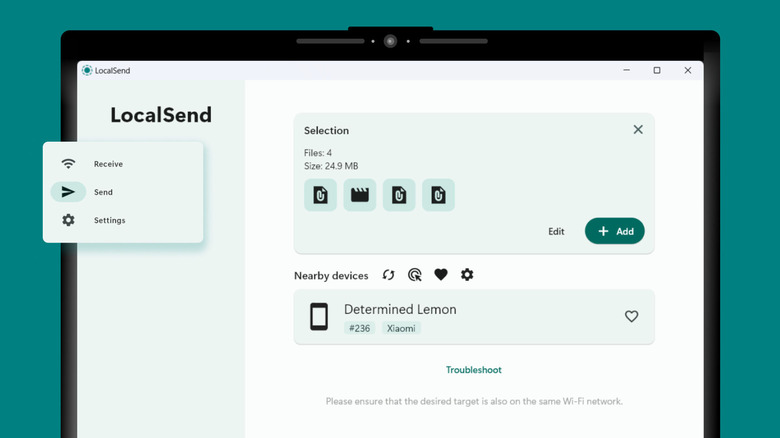
To transfer files to Google TV wirelessly, use an open-source utility like LocalSend. Once installed on both your sender device and your TV, you can move movies, music, and documents over a shared Wi-Fi network without using cloud services or cables. This method ensures secure, encrypted transfers and allows users to access local media through specialized players like VLC or Plex for a seamless home theater experience. It is easily one of the best utility apps for google tv for anyone tired of hunting for cables.
Compatibility Checklist: LocalSend
| Device | Compatibility | Optimization |
|---|---|---|
| Google TV Streamer (2024+) | Full Support | High-speed Wi-Fi 6E optimized |
| Chromecast with Google TV (4K) | Full Support | Standard LAN speeds |
| Smart TVs (Sony, Hisense, TCL) | Full Support | Varies by hardware |
Google Gemini: The Next-Gen Content Discovery & Smart Home Hub
In 2026, the traditional Google Assistant has been fully integrated into Google Gemini. This change represents more than just a rebrand; it is a fundamental shift in how we interact with our televisions. Gemini provides a conversational AI experience that understands context much better than previous voice remotes. Instead of just searching for a title, you can ask Gemini to find movies that match a specific mood or summarize the plot of a series before you hit play.
The integration with Smart Home Automation makes Gemini one of the best google tv apps for smart home integration available today. From your TV screen, you can use voice commands to check your front door camera or dim the living room lights for a movie night. The AI interface is designed to be non-intrusive, appearing as an overlay that does not interrupt your current viewing session.
Google Gemini on Google TV enhances content discovery through natural, conversational queries. By replacing Google Assistant, Gemini allows users to describe specific moods or ask detailed questions about shows and movies to receive highly personalized recommendations. In 2026, the AI also integrates with Google Home, enabling users to manage smart devices like doorbell cameras and lighting directly from their television interface. It effectively turns your TV into the central brain of your connected home.
Plex & VLC: Managing Your Personal Media Library
While streaming services like Netflix and Disney+ are the primary focus for many, local media remains vital for enthusiasts who want the highest possible quality. This is where the combination of Plex and VLC comes in. These are essential google tv apps for personal media libraries because they handle the heavy lifting of organization and playback.
Plex is more than just a media player; it is a full-scale server-client ecosystem. If you have a large collection of 4K movies or lossless music stored on Network Attached Storage (NAS), Plex organizes that data into a beautiful, Netflix-style interface. It automatically pulls in posters, cast information, and even trailers. For the 2026 Google TV Streamer, which features upgraded RAM and processing power, Plex can handle high-bitrate streams without stuttering, provided your network is up to the task.
If you prefer a more "no-frills" approach, VLC is the ultimate utility. It is famous for its universal Codec Support, meaning it can play virtually any file format you throw at it. Whether it is an old AVI file or a modern 8K MKV file, VLC handles Multimedia Playback with ease. It is particularly useful when you have files on a thumb drive or a network share that other players refuse to open.
Why You Need Both
- Plex: Best for organization, remote access, and a polished user interface.
- VLC: Best for quick playback of unusual file formats and direct network folder browsing.
- Storage: Both apps help you manage your local library without taking up precious internal storage on your Google TV device.
Downloader & The Sideloading Bridge
Even with over 10,000 apps in the store, there are times when the specific tool you need isn't available in the official Play Store. This is common for specialized utilities or regional apps. To bridge this gap, Downloader is a must have apps for google tv streamer setup. It acts as a basic web browser and file manager designed specifically for the big screen, allowing you to navigate to official websites and download APK files directly.
Using third-party apps for google tv allows power users to customize their experience far beyond the factory settings. However, it requires a bit of technical know-how. You will need to enable Developer Options on your Android TV OS to allow the installation of apps from unknown sources. Once this is set up, Downloader makes the process of sideloading third party apps on google tv as simple as typing in a URL.
Security Warning: Avoid using deprecated file managers like ES File Explorer, which have been flagged for security issues and intrusive ads in the past. Stick to modern, reputable tools like Downloader or LocalSend for managing your files.
For those setting up a new device, Downloader is often the first app installed because it facilitates the installation of everything else. It is the Swiss Army knife of the Google TV ecosystem, ensuring you are never restricted by the limitations of the official store.
Spotify: The Hub for Lossless Home Audio
In 2026, the television has become the primary speaker system for many living rooms, especially with the rise of high-quality soundbars and home theater receivers. Spotify on Google TV has evolved to support high-fidelity audio, making it a central part of the smart home experience. The app’s interface is specifically tailored for large screens, showing beautiful album art and synchronized lyrics that turn your TV into a digital jukebox during parties.
The integration between Spotify and Google TV is seamless. You can start a playlist on your phone and instantly hand it off to the TV. Because it works with Gemini, you can simply say, "Play some jazz in the living room," and the music starts immediately. This makes it one of the best free utility apps for google tv 2026 for those who want their hardware to serve double duty as a high-end audio streamer.
Quick Feature Highlights:
- Connect Support: Use your phone or tablet as a remote control.
- Visuals: Full-screen lyrics and background art.
- Integration: Works with Google Home groups for multi-room audio.
FAQ
What are the best free apps for Google TV?
The best free utility apps include LocalSend for file sharing, VLC for media playback, and the built-in Gemini for AI assistance. For content, the Freeplay app provides over 800 free live channels without a subscription.
How do I install new apps on Google TV?
You can install apps directly from the Apps tab on your Google TV home screen by searching for them. Alternatively, you can use the Google Play Store on a web browser or mobile device to remotely install apps onto your linked TV.
Can you sideload apps onto Google TV?
Yes, you can sideload apps by using a utility like Downloader. You must first enable Developer Options in the system settings and allow the installation of apps from unknown sources to facilitate this process.
How do I manage storage for apps on Google TV?
Navigate to Settings, then select System and Storage. From there, you can see which apps are taking up the most space and clear their cache or uninstall them to free up room for new utilities.
Can I use a VPN app on Google TV?
Most major VPN providers offer dedicated apps for Android TV OS. You can download these directly from the Play Store to encrypt your traffic and access content from different regions securely.
What are the best utility apps for a Google TV device?
Beyond streaming, the best utility apps for google tv are LocalSend (file transfer), Plex (media server), VLC (codec support), Downloader (sideloading), and Gemini (AI and smart home control). These tools ensure your TV functions as a versatile computing and entertainment hub.