Quick Facts
- Compatibility: AirPods function as standard Bluetooth earbuds, allowing for music and calls on all Android hardware.
- Working Features: Hardware-based features like Active Noise Cancellation and Transparency mode operate normally via the H2 chip.
- Missing Features: You lose Apple-exclusive software like automatic device switching, spatial audio head-tracking, and native Hey Siri.
- The Firmware Catch: Firmware updates cannot be performed on Android; you will periodically need an iPhone, iPad, or Mac.
- 2026 Progress: Android 17 now provides native battery reporting for AirPods, significantly narrowing the feature gap.
- Pro Recommendation: The AirPods Pro 3 is the best choice for Android users due to its new support for flexible high-bitrate codecs.
AirPods on Android function as high-quality Bluetooth earbuds, supporting ANC and touch controls natively across the entire lineup, including the latest AirPods Pro 3 and AirPods 4 models. While you lose Apple-exclusive features like automatic switching and the ear tip fit test, third-party apps and recent Android 17 updates have bridged the gap significantly, making them a viable choice for the 71% of global smartphone users currently on the Android platform.
For years, the recommendation for Android users was simple: "Just don't do it." But as we move through 2026, the audio landscape has shifted. Apple has moved toward USB-C across its entire lineup, and Google has made its Bluetooth stack more accommodating. If you love the industrial design of the AirPods or the class-leading transparency mode of the Pro series, you no longer have to carry an iPhone just to enjoy them. However, as an audio editor who spends his days jumping between Snapdragon-powered flagships and the latest iOS devices, I can tell you there are still some technical hurdles you need to know about.
1. Pairing Has Changed (Especially for AirPods 4)
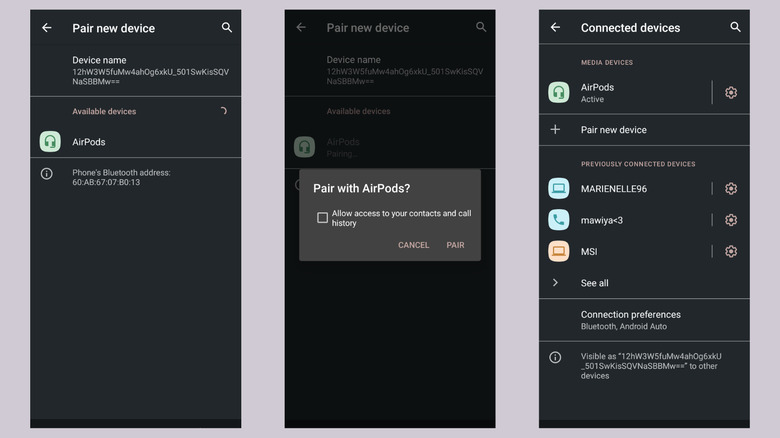
If you are coming from an older pair of earbuds, you probably expect a physical button on the back of the case. For the AirPods Pro and older AirPods models, that is exactly what you get. You put the buds in the case, open the lid, and hold that circular button until the status light pulses white. From there, your Android phone will see them as a standard Bluetooth device in your settings menu.
However, if you have picked up the newer AirPods 4, you might notice the back of the case is completely smooth. Apple has moved to a hidden capacitive sensor on the front of the case. To trigger the pairing mode, you now need to double-tap the front area of the charging case while the lid is open. It is a sleek design choice, but it has tripped up many longtime users.
If you encounter connection issues, the troubleshooting remains the same: a 15-second reset. Hold the pairing button (or the front-tap sensor) until the light flashes amber and then white again. This clears any previous pairings and allows the Android Bluetooth menu to pick up the signal without interference.
2. What Actually Works: Hardware vs. Software
The biggest misconception about AirPods on Android is that you lose the noise cancellation. Thankfully, that isn't true. Features like Active Noise Cancellation (ANC) and Transparency mode are processed locally on the Apple H2 chip inside the earbuds themselves. They do not require a handshake with an iOS operating system to function.
When you squeeze the stem of your AirPods Pro 2 or Pro 3, the chip toggles the ANC mode immediately. The same applies to the physical touch controls. If you want to skip a track or pause your podcast, the capacitive force sensors on the stems work perfectly. They are programmed at the hardware level, so your Android phone simply receives the "pause" or "skip" command like it would from any other Bluetooth headset.
Spatial audio is a bit more complicated. If you use the Apple Music app on Android, you can actually listen to Atmos-mastered tracks with spatial effects. However, what you lose is the dynamic head-tracking. The earbuds won't "know" where your phone is in 3D space because that requires the specialized API found in iOS. You get a wide soundstage, but it stays fixed relative to your head.
| Feature | Android Status | Why? |
|---|---|---|
| Audio Playback | Works | Standard Bluetooth A2DP profile. |
| Noise Cancellation | Works | On-chip H2 hardware processing. |
| Stem Gestures | Works | Local capacitive force sensors. |
| Automatic Pairing | Fails | Requires Apple iCloud/Handoff. |
| Ear Tip Fit Test | Fails | Requires iOS-only acoustic analysis. |
| Automatic Switching | Fails | Locked to the Apple ecosystem. |

3. The 'Walled Garden' Gaps: What You Lose
Despite the hardware working well, the loss of native Apple ecosystem features remains the primary trade-off. When you use AirPods on Android, you are essentially stepping outside the "walled garden."
The most annoying omission is the lack of automatic device switching. On an iPhone, Mac, and iPad, your AirPods follow you as you change devices. On Android, you have to manually disconnect from your tablet and connect to your phone every time. Similarly, "Hey Siri" is non-existent. There is no native way to remap that long-press to Google Assistant without using third-party software.
Then there is the firmware issue. Apple does not provide an "AirPods App" for the Google Play Store. This means your earbuds can never update their internal software while connected to an Android device. If a new update improves the ANC or fixes a Bluetooth bug, you will have to borrow a friend’s iPhone for 20 minutes to let the update push through. In a world where iOS only holds 29% of the market, it is a frustrating limitation for the majority of smartphone users.
4. The 2026 Software Bridge: Android 17 & Apps
For a long time, the only way to see your battery percentage was to guess based on the "low battery" chime. But as we move into the era of Android 17, Google has finally implemented better battery reporting for generic Bluetooth LE devices. This includes the AirPods lineup. You can now see the battery levels of each individual bud and the case right in the notification shade.
If you are on an older version of Android, or if you want more advanced features, there are several third-party software utilities that act as a bridge. My top recommendations for 2026 are:
- MaterialPods: This app mimics the classic Apple "popup" animation when you open the case. It provides accurate battery levels and can even trigger Google Assistant with a double-tap.
- LibrePods: An open-source alternative that focuses on privacy and low battery impact while still giving you the essential data.
- AndroPods: Useful for those who want to restore the "ear detection" feature (pausing music when you take a bud out), though it can be hit-or-miss depending on your phone's power management settings.
Some manufacturers, like OnePlus and Oppo, have even started integrating these features directly into their version of Android, recognizing that many of their users prefer Apple’s hardware for audio.
5. Pro Tip: Optimize Your Audio Quality
By default, some Android phones might struggle with the Bluetooth bitrate when connected to AirPods. Apple optimizes its buds for the AAC codec, which is fantastic on iOS but can sometimes be poorly implemented on certain Android chipsets, leading to higher audio latency or compression artifacts.
To fix this, you should dive into the Android Developer Options. If you haven't enabled them, go to Settings > About Phone and tap "Build Number" seven times. Once inside Developer Options, scroll down to the Networking section and find the Bluetooth Audio Codec setting. Ensure it is set to AAC.
Interestingly, the new AirPods Pro 3 have introduced a level of support for more flexible bitrates. While they aren't officially marketed as "aptX buds," they use a version of the H3 chip that manages higher-bandwidth data more efficiently on modern Android devices. This reduces the lag you might notice when gaming or watching movies.
Expert Insight: If you find the volume is too low when you first pair your AirPods, go to your phone's Bluetooth settings and look for a toggle called "Sync Volume with Phone" or "Absolute Volume." Turning this on (or sometimes off) fixes the gain mismatch between the earbuds and the Android system.

FAQ
Do AirPods work with Android?
Yes, AirPods work as standard Bluetooth earbuds on Android devices. You can use them for listening to music, watching videos, and taking phone calls. While you lose some Apple-specific software features, the core functionality remains intact across all models, including the Pro and Max versions.
What features do you lose using AirPods on Android?
The main features you lose are automatic device switching, "Hey Siri" voice activation, and the ear tip fit test. You also lose native spatial audio with head-tracking and the ability to update the firmware directly from your phone. Automatic ear detection (pausing when you remove a bud) also requires a third-party app to function on Android.
How do I pair AirPods to an Android phone?
To pair them, place the AirPods in their case and open the lid. For older models, hold the setup button on the back until the light flashes white. For AirPods 4, double-tap the front of the case. Then, open your Android phone's Bluetooth settings, search for new devices, and select your AirPods from the list.
Can you use active noise cancellation on Android?
Yes, you can use active noise cancellation on Android. Because the ANC is handled by the H2 or H3 chip inside the AirPods themselves, it works independently of the operating system. You can toggle between ANC and Transparency mode by long-pressing the stems of the earbuds.
How do I check AirPods battery on Android?
Starting with Android 17, battery levels can often be seen natively in the Bluetooth settings or notification shade. For older versions of Android, you will need to download a third-party app like MaterialPods or AirBattery, which will show the battery percentage for both the earbuds and the charging case.
How do you update AirPods firmware on Android?
You cannot update AirPods firmware using an Android device. To get the latest software updates, you must connect the AirPods to an iPhone, iPad, or Mac. The update happens automatically in the background while the buds are charging and near the Apple device. It is recommended to do this at least once every few months to ensure optimal performance.